
I clicked on a new anime wallpaper at midnight and my PC stayed silent, obedient. An alert blinked an hour later and Steam forced a logout — nothing about that waifu felt innocent anymore. By dawn I realized the desktop girl had been working for someone else.
I’ve chased malware stories for years, and you should treat this one like a small, fast-burning fire: it spreads while you sleep. You know Wallpaper Engine: millions of users, tens of thousands of community uploads on the Steam Workshop, and easy downloads that feel harmless. But “harmless” is where the danger lives.
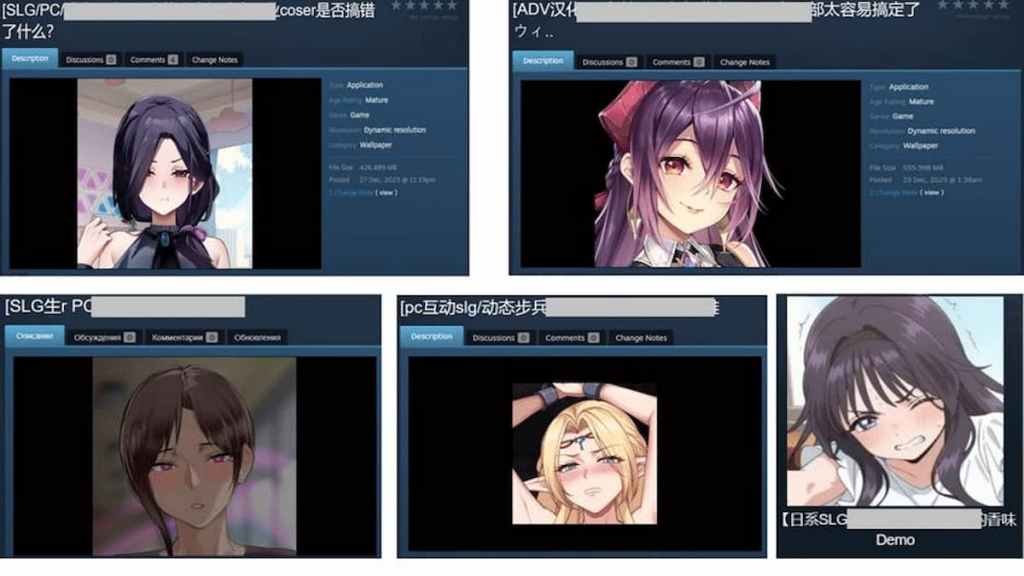
Observation: The Steam Workshop is full of cute, moving wallpapers with thousands of downloads.
I trawled the Workshop and found dozens of anime-style uploads with thousands of installs each. Kaspersky’s report names a trend: many of these packs bundled a DarkKomet backdoor that can harvest Steam credentials and hijack sessions.
That matters because Wallpaper Engine is a distribution platform, not a walled garden. When a creator packages a wallpaper, that bundle can include executable scripts and files, and players often click “download” without second thoughts. On a platform that feels as friendly as a fandom gallery, malware can arrive like a Trojan horse, slipping past casual trust and community ratings.
How can Wallpaper Engine spread malware?
Attackers wrap malicious binaries or scripts inside an otherwise ordinary wallpaper pack. Once executed, they can install backdoors, scrape local Steam data, or inject into running sessions. Kaspersky and PC Gamer flagged anime-heavy uploads that did exactly that.
Observation: The victims aren’t just power users — they’re regular folks who love anime desktops.
I talked to users who simply wanted animated backgrounds of Marika from Elden Ring; none expected credential theft. That’s the psychological lever here: familiarity and desire lower suspicion.
Threat actors exploit fandoms because engagement equals downloads. DarkKomet and similar tools are designed to quietly collect tokens and cookies while you admire your wallpaper. Once they have Steam tokens, attackers can move on account trades, trade scams, or accessing linked payment methods — a fast route to real-world loss.
Is Wallpaper Engine safe to use?
Safe isn’t binary. Wallpaper Engine itself is a legitimate app on Steam (it sells for $3.99 (≈€4)), but the community uploads are the risk vector. Trusted creators and verified uploads reduce risk, but nothing replaces caution and basic hygiene.
Observation: Antivirus vendors and researchers are already naming specific threats and samples.
Kaspersky published examples and technical analysis; PC Gamer republished the alert to reach gamers. Those referrals matter because they create pressure on moderators and platform owners to remove bad uploads.
If you run antivirus like Windows Defender, Malwarebytes, or a commercial suite, you can catch many payloads — but not all. You should manually vet creators, check comments and recent updates on Workshop pages, and scan downloads with VirusTotal before running unknown files.
How do I remove malware from a Steam wallpaper?
First, uninstall the wallpaper and stop Wallpaper Engine. Run a full system scan with your AV and a second-opinion scanner. Change your Steam password, enable Steam Guard, and review recent trade/login activity. If you suspect DarkKomet or other backdoors, consider restoring from a known-good backup or doing a clean OS reinstall.
Observation: Some fixes are simple and fast; others require a hard reset.
I’ve seen accounts recovered with a password change and two-factor authentication, and I’ve seen machines that needed full wipes after persistent backdoors. Prevention is far easier than cure.
Practical moves you can make today: avoid downloads from unknown creators, favor curated or workshop-endorsed items, and keep Steam Guard and two-factor authentication on. If you run an OLED and prefer a clean slate, a black background is the ultimate minimal surface — boring but safe.
Tools and names to watch: Kaspersky (research and indicators), DarkKomet (malware family), Steam Workshop (distribution), Wallpaper Engine (app), PC Gamer (reporting). Use VirusTotal or your AV vendor’s cloud scanning for suspicious packages.
I’m not here to scare you off customization; I’m telling you how quick attention and a few habits protect you. Treat downloads like attachments from strangers: check the source, scan the file, and ask whether the extra animation is worth the risk. A pretty wallpaper can be as harmless as a postcard or as sharp as a razor in a bouquet, depending on who put it there.
Which desktop guest will you trust next?