
I grabbed the Chain Spear and tried to swing across a gap—nothing happened. The HUD taunted me with a cold ?? where the use key should be. Momentum stalled in midair, and that little glitch turned a slick combat tool into a paperweight.
I’ve waded through enough release-day bugs to know when a problem is user-facing and when it’s just sloppy defaults. You and I can fix this in a minute by editing your keyboard bindings on Steam, Xbox PC configs, or whatever platform you’re playing on. Think of the spear as both a weapon and a travel tool; when its controls vanish, the DLC either asks you to fiddle or it leaves you stuck.
How to use the Chain Spear in Doom: The Dark Ages Revelations
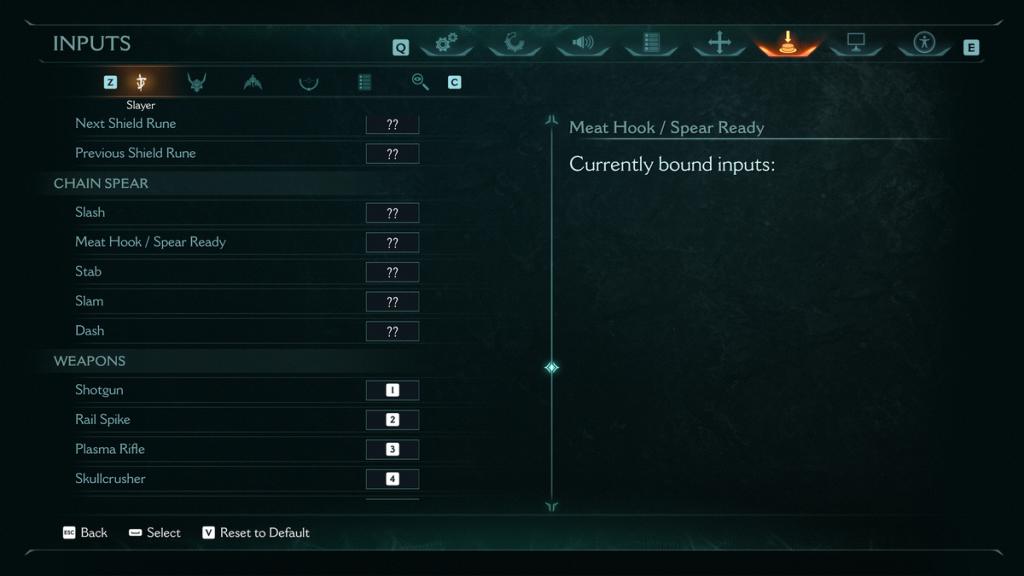
On my second run through Purgatory I picked it up immediately and replaced the broken Shield; the game still showed ?? for the key. The Chain Spear drops early in Chapter Two: Purgatory and is meant to replace your Shield—both as offense and as a movement aid. The problem is not your keyboard or controller: the game shipped with no default binding for the spear, so the HUD shows ?? instead of a key. Fixing it is a simple remap in the settings.
Why does the Chain Spear show “??” as the control?
The short answer: no default bind was assigned. This looks like an oversight from the developers—id Software and publisher Bethesda have released fixes for similar issues via Steam and platform patches before, but this one made it into the Revelations DLC. The game thinks you’ll bind it yourself, so the HUD shows placeholders.
How do I bind the Chain Spear controls so the “??” goes away?
Open the Options menu and go to Keyboard or Controller settings—on Steam you can also access Input settings from the game overlay. Find the Chain Spear entry (it will be blank) and assign the attack/use keys you prefer. Don’t reassign keys that clash with movement or map opens; pick an unused button or a secondary fire key. Once you assign Left / Right / Hold (if present) the ?? vanishes and the spear works as advertised.
Practical steps, fast:
- Pause the game and open Settings > Controls.
- Locate the Chain Spear binding—it will be empty or show ??.
- Click the binding and press the key or button you want on your keyboard/controller.
- Save and test the spear on the next platform gap in Purgatory.
If you’re on Steam and still see problems, check for a game update or the community discussion page—players often post exact binding names that match the config file. On consoles (Xbox/PlayStation) you may need to rebind a controller button through the in-game options or system accessibility settings. Moyens I/O’s screenshot tags and community posts helped me confirm the behavior across platforms.
One last note: don’t assign a key you use for an existing, important action unless you want surprises. Treat the binding like a safety leash; change it deliberately and test quickly. The spear can behave like a grappling hook when timed correctly, and using the wrong button mid-fight feels like pulling the wrong zipper on a parachute—messy and memorable.
I can’t say whether id Software will push a patch that auto-assigns the Chain Spear or leave the choice to the player, but the fix is in your hands right now via the controls menu. If you want automation, watch the Steam patch notes or official Bethesda channels for an update; otherwise, manual binding is the clean workaround. Do you trust the game to keep your bindings between sessions, or will you keep a sticky note with your new keybinds until a patch arrives?