
I watched the spinner slow, fingers hovering over the Enter key while the crate light trembled—my pulse louder than the game music. You know that moment when a code either hands you a rare anime crate or disappears into the void. I learned the hard way that timing and the right place matter more than luck, like holding a winning lottery stub.
Update: added new Excuse Me Sir codes on July 22, 2026
I’m a gamer who chases codes for a living; I’ll tell you what works and what wastes your time. Read this quick guide and you’ll stop guessing and start collecting rewards on Roblox’s Excuse Me Sir.
All New Excuse Me Sir Codes
Discord and server milestones still spark the biggest drops, and today’s list reflects that reality.
Redeem these before they vanish—developers push codes for traffic spikes and events, so they don’t last long.
- 3MVISITS: 10 Lucky Rolls NEW
- TRADING: 10 Lucky Rolls NEW
- 140KMEMBERS: 5 Lucky Rolls NEW
- 2MVISITS: 2 Anime Crates NEW
How do I redeem codes in Excuse Me Sir?
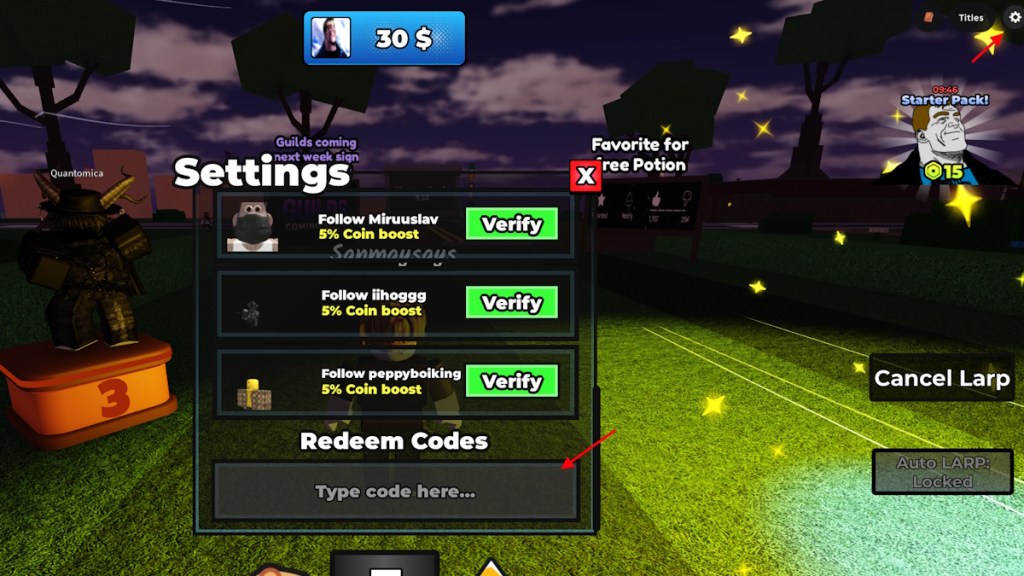
Open the game on Roblox, go to Settings, paste the code into the “Type code here…” box, and hit Enter. If the reward doesn’t pop, try restarting Roblox or re-pasting exactly as shown—codes are case-sensitive.
Expired Excuse Me Sir Codes
Community feeds move fast—old codes get thrown out as soon as a new patch or celebration arrives.
If a code below fails, it’s almost certainly expired:
- PATCHES
- DELAY
- CODERUBYCRATE
- BOSSUPDATE
- SORRYFORBUG
- PURPLE
- LIGHT
- revamp
- CRAFTUPD
- 4THJULY
- 1MVISITS
- 5KLIKES
- WEATHER
How to Redeem Excuse Me Sir Codes
Most players open the settings panel first—it’s always in the top-right corner of the screen.
Follow these quick steps and you’ll save time:
- Launch Excuse Me Sir on Roblox.
- Click the Settings icon in the top-right.
- Scroll to the Redeem Codes field and paste the code.
- Press Enter to claim your reward.
How to Get More Excuse Me Sir Codes
Announcements on Discord and dev Twitter are where I’ve found the biggest drops—follow those accounts and check early.
Here’s a practical routine that works for me and other players:
- Bookmark this guide and refresh it when you play—new codes appear frequently.
- Join the official Excuse Me Sir Discord and enable announcements. Developers and moderators post codes there first.
- Follow the game’s Roblox page and the developer’s Twitter/X for milestone gifts and emergency fixes.
- Watch community hubs and content creators on YouTube or TikTok; creators sometimes share exclusive codes.
Hunting codes can feel random, but good sources make it systematic—like sifting a coin jar until the rare piece shows up.
Where can I find new codes for Excuse Me Sir?
Primary sources: the game’s Discord server, the Roblox game page, and the developer’s social accounts. Secondary sources: community videos, Reddit threads, and this guide.
Why Are My Excuse Me Sir Codes Not Working?
Servers and timed promotions are the usual reasons; codes are distributed for short windows to drive activity.
Before you panic, run through this checklist:
- Expired code: most likely—redeem quickly when you see a drop.
- Case sensitivity: copy and paste the exact code, including capitalization.
- Typos: spaces or hidden characters can break a code; paste into a plain text editor to verify.
- Client glitch: close Roblox and re-open the game, or try redeeming on a different device.
- Server-side limits: some codes have per-account or per-server caps; if many players claim at once, you might miss out.
Why are my codes failing even when they look correct?
If the code is correct and recent, check announcements: developers sometimes disable codes during hotfixes. If nothing shows, reach out on Discord or through the game’s Roblox page for confirmation.
Enjoy the grind and trade carefully—people swap rare crates, anime skins, and Lucky Rolls in Discord and on Roblox groups, and those trades shape your progress more than one-off freebies. What’s your boldest trade or luckiest drop so far?