
You’re staring at the Party button while your friend pings: “Ready?” The screen won’t cooperate and the lobby feels intentionally stubborn. I’ve been there—when a tiny server setting stands between a great night and a solo grind.
I’ll walk you through the exact steps I use when I want to turn a solo Aniimo session into a shared one with friends. No fluff — just the menu clicks, the rules, and a few tips that save time and frustration.
Late-night grind reveals one truth: co-op only works when both players have reached the right point. How to play with your friends in Aniimo
You need to reach Level 14 on your character before Aniimo lets you add friends and create parties. That’s the gate; pass it and the social tools appear. I always tell friends to hit that milestone first — it’s the fastest way to stop pinging “can you join?” and actually start playing.
How do I add friends in Aniimo?
Find the user ID on your character screen — it’s in the bottom-left corner. Share that ID with your friend or have them send theirs to you, then add them through the friend interface. I prefer copying the ID into Discord instead of fumbling with in-game chat; it’s faster and reduces typos.
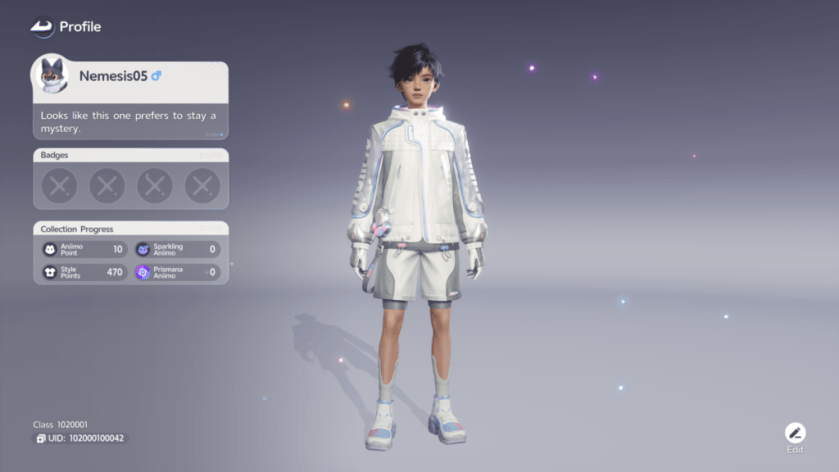
Once someone is on your friend list you can invite them into a party. Friends make Aniimo feel different — more strategic and a lot less lonely. Your friend list is a thread connecting separate islands.
Hosting often feels like setting the table for dinner: you arrange it, then hope everyone sits. How to host a co-op session in Aniimo
Open the menu and choose Party. From there, pick the challenge you want to run and send an invite to your friend. When they accept, both of you will load into the same session and share the same story beat.
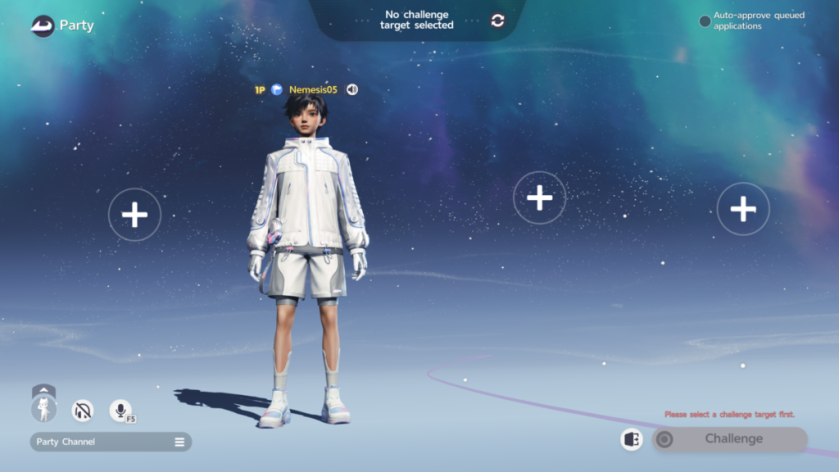
How do I host a co-op session in Aniimo?
Simple menu path: Menu → Party → Select challenge → Invite friend. If your friend doesn’t show up, check that both of you are online and visible in each other’s friend lists. I keep Discord open as a backup for invites — it’s faster than waiting for the in-game notification.
Why can’t I join my friend’s co-op in Aniimo?
The most common culprit is server mismatch. You can only co-op if both players are on the same server. If you’re not, one of you will need to migrate to the other’s server via the server selection option in the account or settings menu. It’s the little migration step that saves an evening of frustration.
Pro tip: if you play on PC via Steam or use Discord for coordination, name the session or keep a pinned message with the host’s user ID and server — small habits that stop the same problems from repeating. Moyens I/O’s screenshots are a good quick reference if you want visual confirmation of where the user ID sits on the screen.
So — will you migrate servers now and claim that shared story?