
I missed an open-net tap-in because my camera swung too late. The loss stung more than the scoreline—I realized settings were the invisible opponent. You can fix that in ten minutes and stop giving away matches for free.
Best Camera settings in FC 27
Half my matches were decided by one bad angle. If you want the pitch to read like a map, start here.
I play on PC and console (Steam, PlayStation, Xbox) and I keep the same rule: visibility first. Set the camera to Co-op across 11v11 modes so you see both build-up and the run into space—Co-op is like a stadium photographer’s vantage, giving you the whole story instead of a single snapshot.
What is the best camera setting for FC 27?
- Online 11v11 Camera: Co-op
- Offline 11v11 Camera: Co-op
- Player Career 11v11 Camera: Co-op
- Clubs 11v11 Camera: Co-op
- Rush Camera: Rush Tactical
- The Grounds Rush Camera: Rush Tactical
- The Grounds Street Football Camera: The Grounds Pro Club
- Be-A-Goalkeeper Camera: Co-op
- Be-A-Goalkeeper Save UI: On
- Power Shoot Zoom: On
- Horizontal Camera Sensitivity: 20
- Vertical Camera Sensitivity: 20
- Inverse Horizontal Camera Control: Off
- Inverse Vertical Camera Control: Off
- Custom Camera Settings: Custom
- Height: 20
- Zoom: 0 if your monitor is 21″ or less (otherwise set it to 4)
- Pro Camera Zoom: 10
- Pro Camera Speed: 10
- Pro Camera Swing: 10
- Camera Shake Visuals: Off
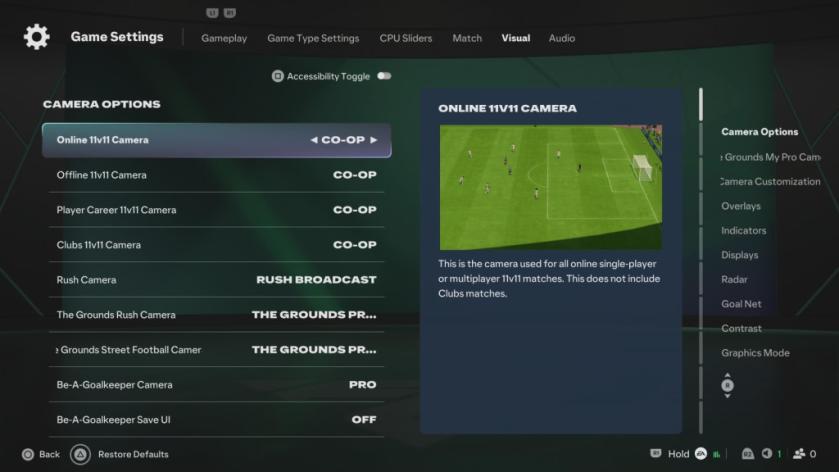
Co-op gives you leads and through-ball angles earlier. If you’ve played FC 26 on the same platform your settings might carry over, but small tweaks—height, zoom, and pro camera swing—make the difference between a tidy pass and an intercepted hopeful.
Best Controller settings in FC 27
My saves and finishes improved the moment I stopped trusting default mappings. If you want to feel in control, tune the controller next.
Whether you’re on a DualSense, Xbox Series controller, or a PC pad via Steam, these settings give you the feel used by competitive players. Shot Assistance set to Precision changes how the game responds to touch and timing—Precision is a scalpel, not a hammer, so practice shots until muscle memory matches the tool.
How should I set my controller for FC 27?
- Preset: Competitive
- Shot Assistance: Precision
- Through Pass Assistance: Semi
- Lobbed Through Pass: Semi
- Ground Pass Assistance: Assisted
- Cross Assistance: Assisted
- Lob Pass Assistance: Assisted
- Pass Receiver Lock: Late
- Precision Pass Sensitivity: Normal
- Clearance Assistance: Classic
- Defending: Advanced Defending
- Professional Fouls: On
- Pass Block Assistance: On
- Auto Switching: Air Balls and Loose Balls (test Manual for Air Balls if you want full control)
- Auto Switching Move Assistance: Low for beginners, None if you prefer full manual
- Right Stick Switching: Classic
- Right Stick Switching Reference: Player Relative
- Right Stick Switching Sensitivity: 4
- Next Player Switching: Classic
- Reaction Time Calibration: Off
- Reaction Time Calibration Sensitivity: 0
- Player Lock: On
- Simplified Skill Moves: Off
- Save Assistance: Assisted
- Camera Pan Speed: Default
- Right Stick Remap: Off
- L1/R1 and L2/R2 Remap: Off
- Analog Sprint: Off
- Trigger Effect: Off
- User Vibration: Personal preference
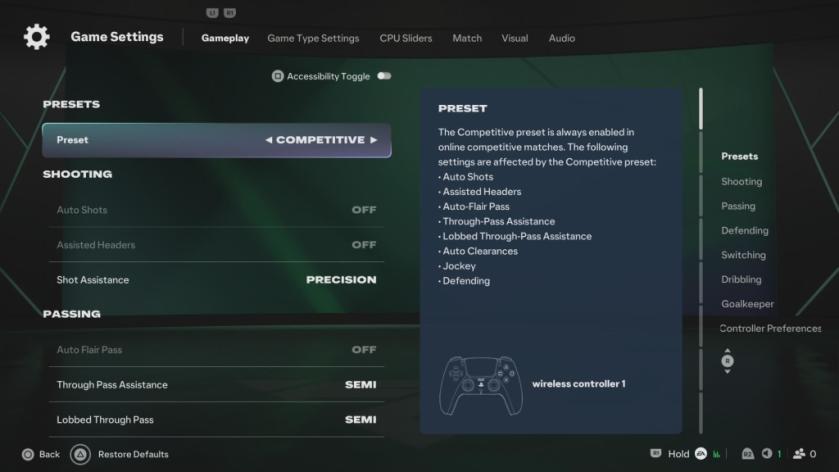
If you bought FC 27 for $59.99 (€56) on Steam or via PlayStation/Xbox stores, spending ten minutes here will repay that cost in fewer rage quits and more wins. I recommend testing these settings in a few single matches, then in Clubs or Online 11v11—each mode reveals different small adjustments that matter.
Want to argue that a different setup is faster for you—DualSense haptics on or off, or manual switching always on—what would your counter-setup be and why?