
I fired up Transport Fever 3 and froze at the HUD — dollars staring back while my little network felt out of place. You know that tiny itch when a single symbol breaks immersion. I changed the currency myself so the game’s money read like mine.
A single click in Settings opens the folder that holds the game’s configuration files — and that’s where the fix lives
I’ll walk you through the exact steps I used. You won’t need any third-party software: Steam, Windows File Explorer, and Notepad are all it takes. This is as simple as swapping a shirt.
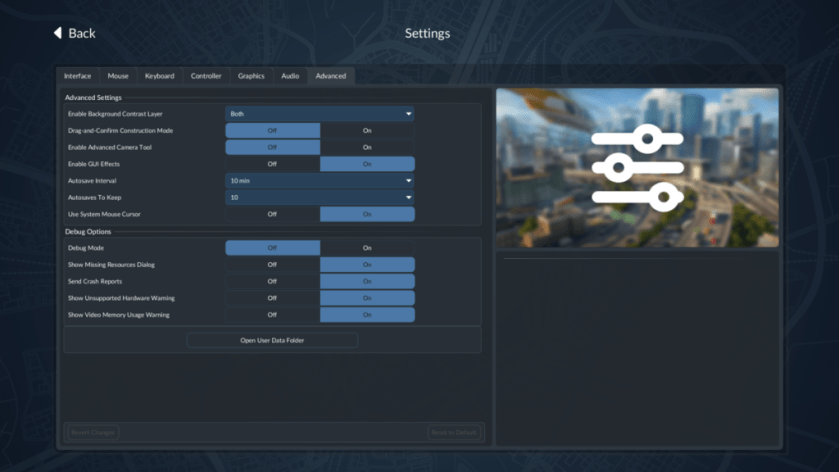
The Advanced tab contains a direct link to your user data folder — that folder is the one you want
Open Transport Fever 3, hit Settings, then the Advanced tab, and click Open User Data Folder. Windows File Explorer will pop open the directory where the game’s .lua files live. Before you edit anything, copy the Settings.lua file to a safe place. If you make a mistake, Steam’s Verify Integrity of Game Files can restore the original without reinstalling.
Finding and editing Settings.lua is straightforward — and it only takes a couple of keystrokes
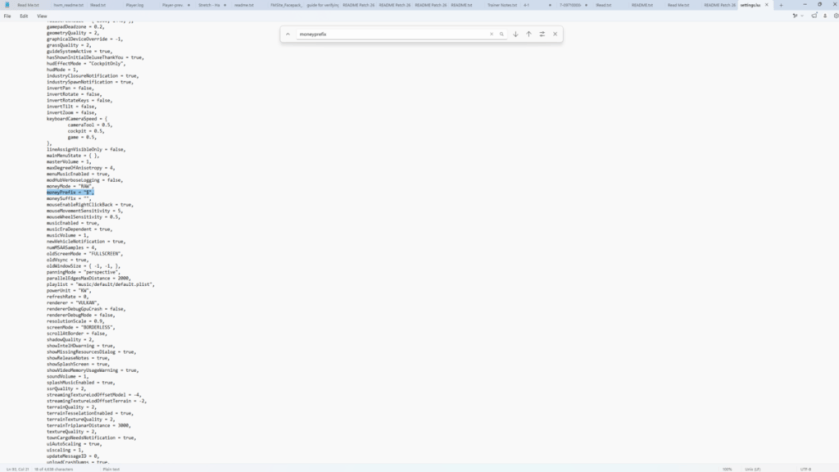
In the folder, right-click Settings.lua and open it with Notepad (or any plain-text editor). Press Ctrl+F and search for moneyPrefix. You’ll see the default set to the dollar sign. Change that character to one of the symbols below, save the file, and relaunch the game.
- $ (USD, ≈€0.92)
- € (EUR)
- £ (GBP ≈€1.20)
- ¥ (JPY ≈€0.006)
Can I change currency in Transport Fever 3?
Yes. You modify the symbol by editing Settings.lua in the game’s user data folder. This approach is supported by Windows standard tools and doesn’t require mods, special editors, or external apps. Urban Games designed the UI to read that file at launch, so the symbol switches as soon as you relaunch.
Does changing the currency affect gameplay or prices?
Short answer: no. The change is cosmetic only — it switches the symbol the UI displays. Revenue, costs, and pricing calculations still run on the same internal numbers. Think of it like changing the flag on a ship: the vessel behaves the same, it only looks different.
If something goes wrong, a backup and Steam’s repair tool will save you — practical failsafes matter
Before editing, copy Settings.lua to a different folder or give it a .bak extension. If the game behaves oddly after saving, close Transport Fever 3 and replace the edited file with your backup. If that fails, in Steam right-click the game, Properties > Local Files > Verify integrity of game files — Steam will redownload any missing or corrupted files.
Why bother at all? A small cosmetic fix improves immersion — and it’s effortless
Changing the currency is a tiny tweak that can make your world feel native. You won’t change profits or balance, but you’ll stop getting that itch every time you glance at the HUD. I used Notepad and Steam; you can do the same in five minutes.
Ready to price your fleet in pounds, euros, yen, or dollars — which do you prefer and why?