
You hit Block during a heated exchange, then the lobby opens and your friend isn’t there. You stare at the screen, wondering if you just locked yourself out of a game night. I’ve done that; here’s the fast way back.
Your friends list looks smaller than it should — How to Unblock Someone on Roblox
I’ll walk you through the two places you can reverse a block: the mobile app and the desktop/site. The process is short, predictable, and won’t send a notification to the other player, so you can repair things quietly — sometimes like finding a lost key under the sofa.
You have your phone in hand and the Roblox app open — How to Unblock Someone on Roblox Mobile
If you blocked someone by accident or want to re-add a friend for a match, do this on iOS or Android:
- Open the Roblox app on your phone or tablet.
- Tap the three lines (hamburger menu) in the top-left corner.
- Scroll down and select Settings.
- Tap Privacy & content restrictions.
- Select Blocked users.
- Find the username and tap Unblock next to it.
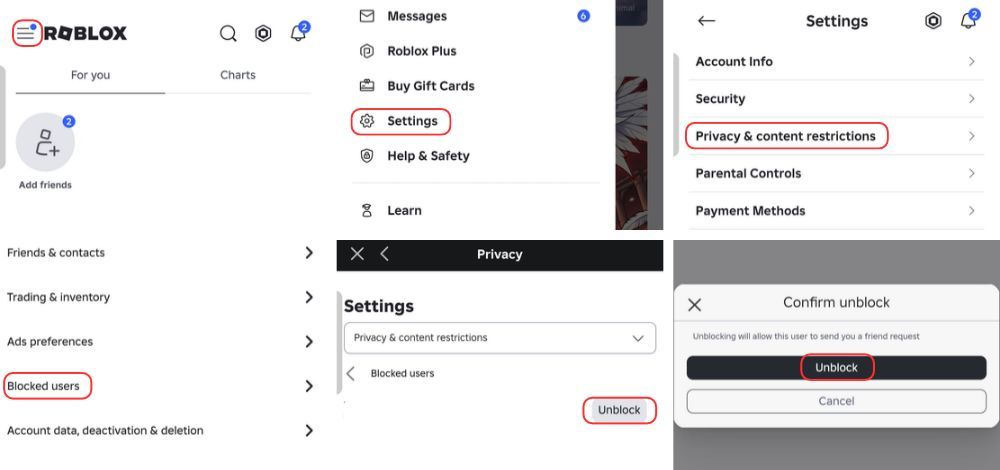
After you tap Unblock, that username drops off your blocked list immediately. If you want them back as a friend, send a request and join a server together — it can be as simple as hitting Play on a favorite game.
Can you unblock someone on Roblox?
Yes. Roblox stores blocked accounts under Blocked users in your privacy settings on both the mobile app and the website or desktop app. I use the same steps on Android and Safari; they work the same way in Roblox’s native Windows client.
Your browser tab is open and the site is loaded — How to Unblock Someone on Roblox PC
On desktop or in the Roblox app for Windows, the route mirrors mobile. Follow these quick steps:
- Open Roblox and click the three lines (hamburger menu) in the top-left corner.
- Select Settings.
- Open Privacy & content restrictions.
- Choose the Blocked users option.
- Find the player you want to unblock.
- Click Unblock next to their name.
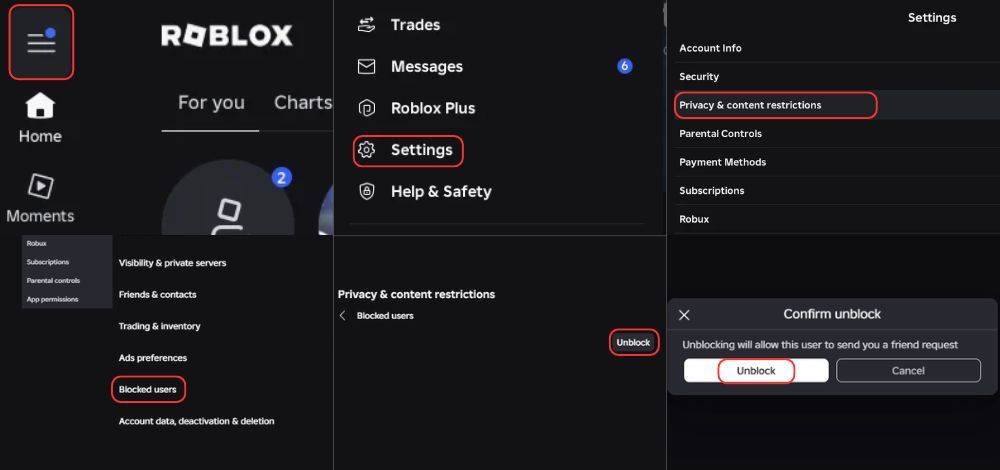
Note: if you’re in the same Roblox group as the person you blocked, their public wall posts may still appear. That can make it look like the block did nothing — try a friend request or a quick chat to confirm the status.
Will someone know if I unblock them on Roblox?
No. Roblox does not send an automated notification when you remove someone from your blocked list. They’ll notice only if you re-friend them, message, or join the same game server together.
If you want to play with someone again but prefer a soft approach, unblock them and wait before sending a friend request; let the game reconnect you. Want to test whether unblocking fixed the issue without committing to a friend request — what would you try first?