
Update: added new K2 Climbing Simulation codes on May 28, 2026
I froze on the final ridge, fingers numb, watching a tiny flag ripple in the wind — and it hit me that a Roblox screen could feel as fragile and real as that moment. I’ve chased developer posts across Discord servers until my eyes stung. Now I’ll show you the exact codes and tricks that get you free points and the gear that actually matters.
I’ve been parsing 14Peaks Studios threads and testing every code so you don’t waste time. Read this once, copy the codes, and you’ll skip the scavenger hunt and get straight to the climb.
At peak hours the player count spikes whenever a new code drops — All New K2 Climbing Simulation Codes (May 2026)
- 10KLIKES: Free rewards NEW
- BETA: Free rewards NEW
I watched a thread die overnight — Expired K2 Climbing Simulation Codes
- 500K
When I clicked play, the code box was staring back at me — How to Redeem K2 Climbing Simulation Codes
You only need a minute. I’ll walk you through the exact steps so there’s no fumbling on the screen when that rare code appears.
- Launch K2 Climbing Simulation on Roblox.
- Select the Redeem Code option in the bottom-left corner of the screen.
- Paste the code from this page into the box.
- Click the Search icon to claim your rewards.
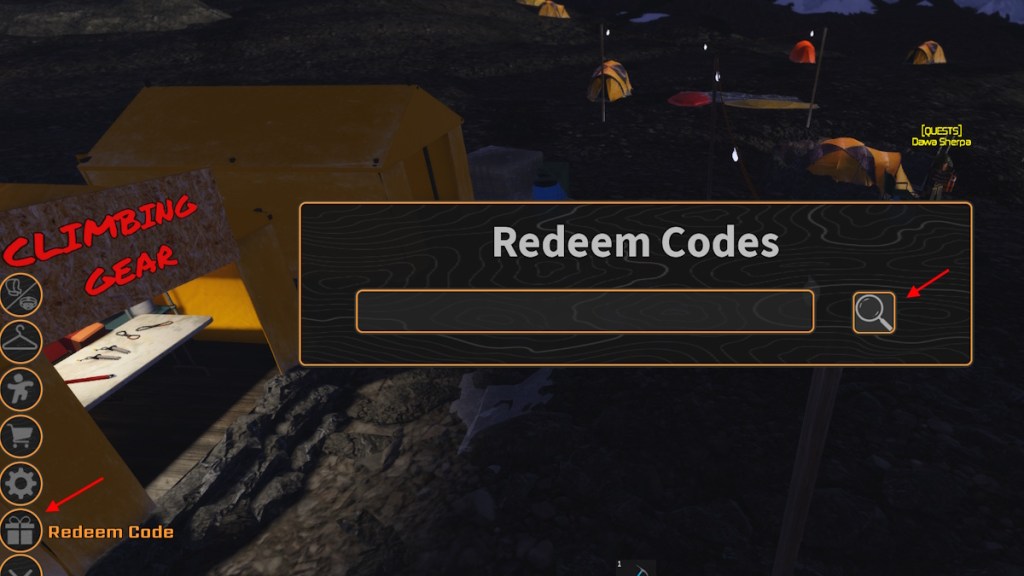
How do I redeem K2 Climbing Simulation codes?
Open the game on Roblox, hit the Redeem Code button at the lower-left, paste the code, then confirm with the search/enter icon. If a code is valid you’ll see the reward pop immediately; if not, the game will return an error message.
On Discord the announcements scroll like a news ticker — How to Get More K2 Climbing Simulation Codes
The developers at 14Peaks Studios post codes on their Discord server, and sometimes on their Roblox group. The Discord feed is a crowded basecamp: codes are often buried in celebration posts, patch notes, or pinned messages.
Here’s a short checklist to stay ahead:
- Join the 14Peaks Studios Discord and enable notifications for announcements.
- Follow the game page on Roblox — creators sometimes drop codes in group shouts.
- Bookmark this page and refresh after large milestone posts (like follower counts).
Where do developers usually post new codes?
Primarily on Discord announcement channels and the Roblox game page. Occasionally the devs will tweet or post on community forums; the fastest route is Discord + Roblox group messages.
When a code returns “invalid” two minutes after release — Why Are My K2 Climbing Simulation Codes Not Working?
Codes can expire fast. I’ve seen them go cold within hours of release because the devs only intend short windows for giveaways.
Checklist to troubleshoot:
- Confirm you copied the code exactly — spacing and case matter.
- If a code looks valid but won’t redeem, close and restart the Roblox client and try again.
- Check whether the code has an expiry — expired codes won’t work no matter what you do.
Why did a code that worked for others fail for me?
Possible reasons: the code expired, you made a typing error, or the server didn’t register your request. Restarting Roblox and retrying usually fixes client-side hiccups.
In my own vault of tiny wins — Extra tips and context
Think of codes as a rope ladder to the summit; they don’t replace strategy, but they get you cosmetic gear and points faster.
If you spend Robux on cosmetics, remember prices vary — Robux packs are purchased through Roblox, and community conversion rates typically put small purchases under a few euros. For tracking and announcements, use Discord and the Roblox group; for testing codes, try them ASAP after release.
If you play climbing sims, try Hell to Heaven Climb, Climb and Plunge, and Climb to Infinity. If none fit, check Roblox’s broader codes lists or follow creators directly on Discord. Which code do you think will vanish first, and why will people argue about it?