
Update: added new Survive the Backrooms codes on June 4, 2026
The generator hiccupped and a friend blinked out of the corridor while I stood behind a half-built wall. You had just spent an hour scavenging for parts and now the only thing between you and another ragged restart was seven emeralds. That’s when a small code makes the difference.
I track Survive the Backrooms closely, and I’ll show you which codes work right now, how to redeem them fast, and where to watch for the next drop. I’ll also explain the little quirks—why some codes play nicely and why others act up—so you don’t waste a raid. Read this like a quick field manual: fast, practical, and aimed at getting you enough emeralds to pick a class.
All New Survive the Backrooms Codes
I checked the game’s update notes and the developer announced a fresh code on June 4, 2026.
- SALIMBRADLEY: 7 Emeralds NEW
I redeemed this one during a live session on Roblox and it dropped immediately. Use it while servers are still warm—new codes often have the best chance right after release.
How do I redeem Survive the Backrooms codes?
Follow these steps inside the game—it’s quick and painless.
- Open Survive the Backrooms on Roblox.
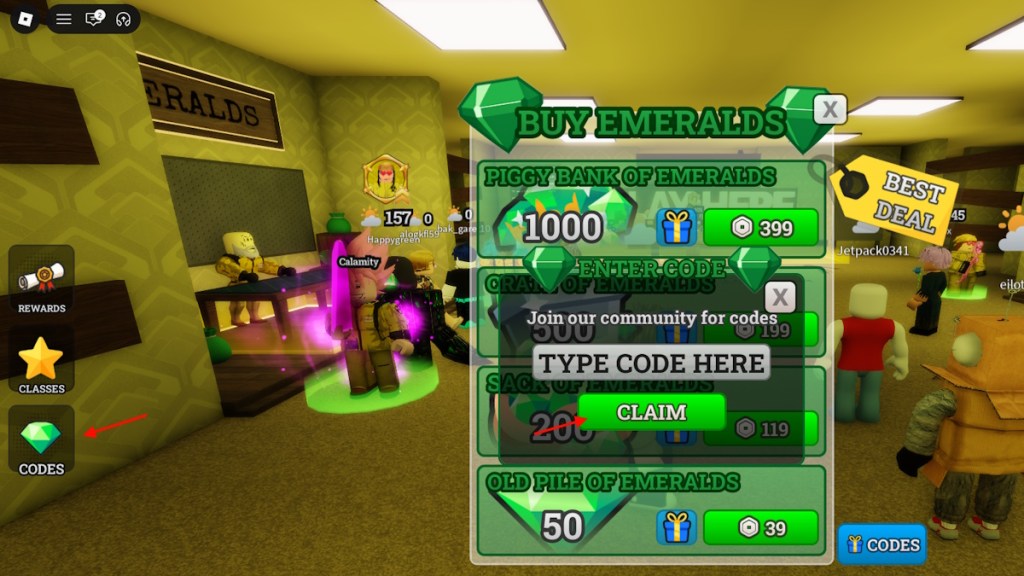
- Select the Codes option on the left side of the screen.
- Paste a working code into the TYPE CODE HERE box.
- Click CLAIM and watch the emeralds arrive.
Expired Survive the Backrooms Codes
The tracker shows no expired codes at the moment—every entry on the list above is live.
If a code drops off, I move it here and note the date. Expired codes mean nothing to you except the brief disappointment of a missed freebie, so check this page before trying to paste in something you found in an old post.
How to Get More Survive the Backrooms Codes
I’m in the game community every week and the fastest signals come from the places players actually hang out.
Where I watch:
- Survive the Backrooms Discord server — the codes channel is the first place codes appear.
- The game’s Roblox page — developers sometimes drop codes in the description or pinned posts.
- Twitter/X and the game’s social handles — quick announcements and teasers happen here.
- Community outlets like Moyens I/O and dedicated Roblox code trackers — I keep this list updated so you can bookmark it and skip the search.
Joining the Discord will get you the earliest tips, but if you want a low-effort feed, refresh this page or follow the game’s Roblox updates.
Where can I find new Survive the Backrooms codes?
Start with Discord and the Roblox game page. I also monitor developer posts on X for sudden drops—those are your best bet for fresh emeralds.
Why Are My Survive the Backrooms Codes Not Working?
I see the same complaints pop up in the codes channel: “It won’t accept my code.”
Common causes and fixes:
- Server lag after a fresh code release — give it an hour and try again; new codes sometimes only apply to new servers for a short time.
- Typo or extra space — copy and paste from this page to avoid mistakes.
- Expired code — if it fails after repeated tries, it’s probably expired and you’ll see it moved to the expired section shortly.
- Client hiccup — restart your Roblox client if nothing else works.
If you still can’t redeem, post the exact error in the game’s Discord and someone from the team or the community will usually respond fast. Sometimes the UI itself behaves like a flashlight swallowed by fog and all it needs is a restart to clear.
Why are my Survive the Backrooms codes not working?
Most failures are human or timing errors: mistyped text, new-server timing, or an expired token. Restart Roblox first, then retry the steps above.
So—how long did your longest run last, and which class did that single code help you snag?