
I was three floors up, gunfire thundering below, when my HUD blinked—Sprite extraction available. Heart racing, I held my pickaxe and watched the wheel spin. You get two breaths to pick the right Gizmo; choose wrong and the round ends for a good reason.
What Are Gizmos in Fortnite?
On the drop you notice small icons next to your Sprite meter — simple items with outsized impact. Gizmos are small, pickaxe-slot tools that affect how you interact with Sprites and Sprite chests without occupying a standard inventory slot. That means you can run a full weapon loadout and still carry utility that influences extraction.
There are three Extraction Gizmo types you’ll see in Chapter 7 Season 3:
- Portable Extractor: Lets you extract Sprites from anywhere on the island, no crate required.
- Sprite Locator: Acts as a short-range detector to reveal buried Sprite Chests.
- Extraction Site Booster: Increases Sprite Dust when you use a Boosted Extraction Crate.

Some of these arrive as rewards for Sprite Mastery; others appear in the Item Shop or through limited-time events run by Epic Games. Think of a Gizmo as a compact tool that bends extraction mechanics to your will, like a Swiss army knife for your sprite work.
How to Use Gizmos from Your Pickaxe Slot in Fortnite
At a crate you hesitate for a second — the wrong choice will cost you the Sprite. To activate a Gizmo, press and hold your Pickaxe button. On PC the default is F, on Xbox it’s Y, and on PlayStation it’s Triangle.
Hold the key until the wheel appears. The selection screen behaves the same way as the Emote Wheel: move your mouse or thumbstick to highlight the Gizmo you want, then release to confirm. That Gizmo becomes active until you switch it out.
You can cancel while a Portable Extractor is mid-use by switching to another inventory slot, which is handy when a third-party rushes the extraction. The Sprite you’re extracting can still be lost if you get knocked out while the animation plays, so don’t treat the wheel like a pause button.
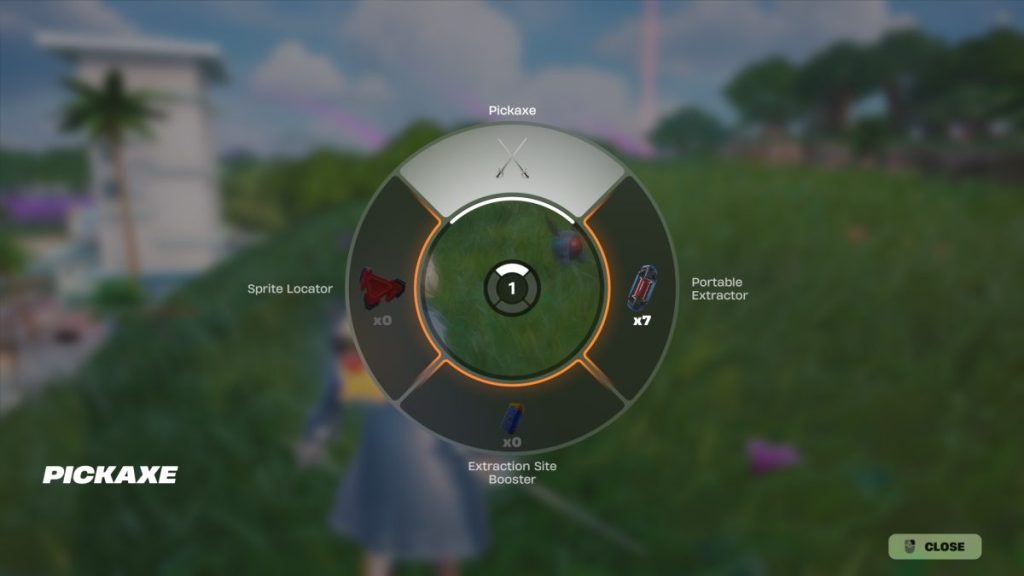
Quick checklist while you’re in a match:
- Hold the Pickaxe bind, choose the Gizmo, and keep moving unless the extraction animation demands stillness.
- If you spot a buried Sprite chest, swap to a Sprite Locator before you dig.
- Use Extraction Site Booster when you’re looting a Boosted Extraction Crate for maximum Sprite Dust.
Remember: timing is everything. Treat the selection like a gamble and don’t sit in the wheel longer than you would in the open on a hot drop.
Mid-match habits that actually matter
When I play on Xbox or PS5 I set muscle memory around the pickaxe wheel so I don’t freeze under fire. Small habits win fights.
Practice picking a Gizmo one-handed while strafing; that split-second saves lives. Also watch how Fortnite patches affect Gizmo behavior—Epic Games adjusts Sprite mechanics regularly, so what works this week may need one tweak next patch. Use Holofoil Sprites to reveal rarer targets and pair them with a Portable Extractor to farm efficiently. A well-timed Gizmo can act as a homing beacon in your pocket when you’re hunting for that last elusive Sprite.
Can you use all Gizmos at once in Fortnite?
No. You can only have one Gizmo active at a time from your Pickaxe slot. That restriction forces choices: carry detection, extraction range, or a dust booster—pick the one that fits the moment.
Can you buy Gizmos in Fortnite?
Yes, certain Gizmos appear in the Item Shop or as part of event bundles offered by Epic Games across PC, Xbox, and PlayStation. You’ll also earn some through Sprite Mastery rewards—so both playtime and the shop can put Gizmos in your hands.
Will Gizmos carry over to Fortnite Chapter 7 Season 4?
Not always. Seasonal cycles and balance changes mean Gizmos don’t automatically persist. Epic Games tends to rotate mechanics between seasons, so treat Gizmos as powerful but potentially temporary tools.
You’ve learned the wheel, the keys, and the trade-offs. Now, which Gizmo will you bank on the next time you hear extraction start? ?