
I logged in for a quick match and froze: a notification blinked, and The Dane was waiting in my locker—an unexpected golden ticket tucked behind the usual chaos. My heart sped up because free pets in Fortnite don’t come every day. I grabbed a screenshot before the panic set in.
I’ve chased Riot-style drops and Epic surprises before, so let me walk you through the exact, no-fluff steps to claim The Dane Sidekick for free and handle the few hiccups that sometimes follow.
You open Fortnite and expect your usual loadout — here’s how to claim The Dane without stress
Epic Games released The Dane as a free sidekick in v41.20 to push pets into UEFN and the main map. You don’t need the Chapter 7 Season 3 Battle Pass or any weekly quests; this is a blanket give-away.
How to get The Dane Sidekick in Fortnite for free
- Update Fortnite to version v41.20.
- Launch the game and log in; a pop-up or notification should appear granting the sidekick.
- If you don’t see a notification, go to your Locker and filter the collection by Sidekicks.
- Find The Dane icon, click it, and customize name and style in the sidekick menu.
- Confirm your choices — the sidekick will be added to your roster immediately.
You check the Locker and there’s no sign of him — what to do next
Sometimes the backend takes a breath. Servers, regional sync, and cached profiles can delay cosmetic grants by a day or two.
If The Dane isn’t present after an update and a short wait:
- Restart the client and confirm your game version is v41.20.
- Clear cache or relaunch your console/PC; that often forces the inventory to refresh.
- If 48 hours pass with no sign, file a ticket with Epic Support. Mention v41.20, your platform, and include a screenshot of your Locker view.
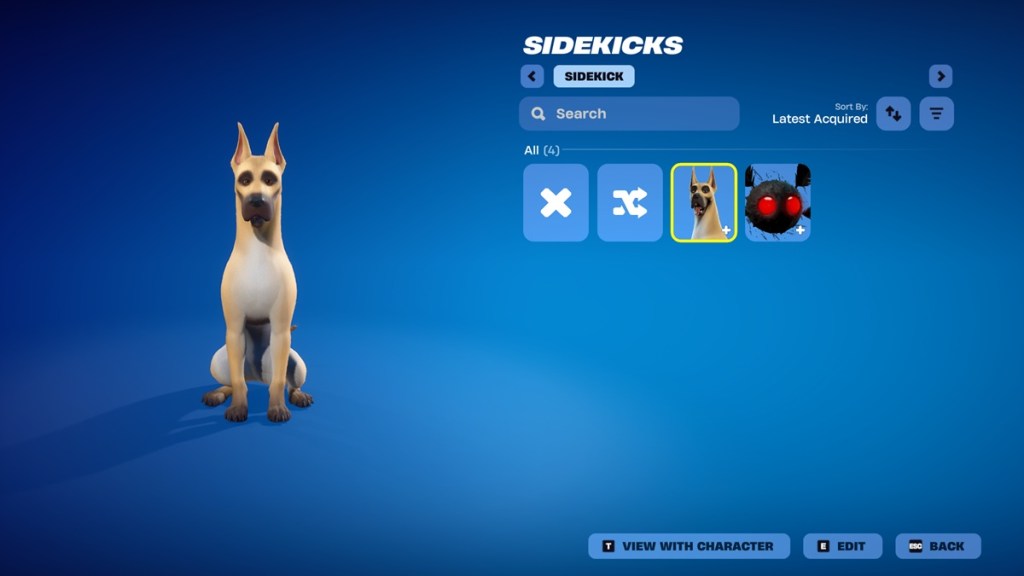
You want to tweak the dog and learn what’s included
The Dane arrives with an alternate style, an emote, and three reactions available to everyone who redeems him. You can rename him inside the sidekick customization screen in your Locker.
Can I rename The Dane in Fortnite?
Yes — open the sidekick customization in your Locker and change the name field. Save the change and the new name will appear across matches.
Can I refund The Dane in Fortnite?
No refunds are available for The Dane because Epic granted him free to players. If you see any charged transaction related to a free grant, contact Epic Support immediately.
You like pets and want alternatives or context
Epic is clearly pushing pets into UEFN and the store rotation this season. If you prefer a themed companion, Ace the Bat Hound is still an option for players who want a crime-fighting look.
Keep an eye on the Hot Bat Summer Event and Fortnite’s official channels — Epic’s Twitter/X and the Fortnite subreddit are your fastest sources for live notes and community reports.
The Dane is more than an accessory; he’s a tiny crowd-pleaser added to the game as a promotional nudge. The Dane becomes a warm hoodie for your avatar.
If you claim him, customize him, or wait for the inevitable next pet drop, what will your signature companion say about your playstyle?