
I remember the first time I saw a Z-tier stat pop up — my heart jumped, then crashed when the rest of the stats were garbage. You’ve held a perfect trait in your hands only to watch the numbers betray it. That sting is why you reroll: to close the gap between potential and performance.
I’ve spent hundreds of hours in Anime Expeditions and traded tips with veteran players on Discord and Reddit so you don’t have to learn everything the hard way. Below I’ll walk you through what rerolls do, how to pull them off efficiently, and the realistic odds you’re fighting when you chase a Z. Read this like a battle plan, not a tutorial — short, sharp, and focused on results.
What Is Anime Expeditions Stat Reroll?
You’ve pulled a unit with great skills but the numbers make it sit on the bench.
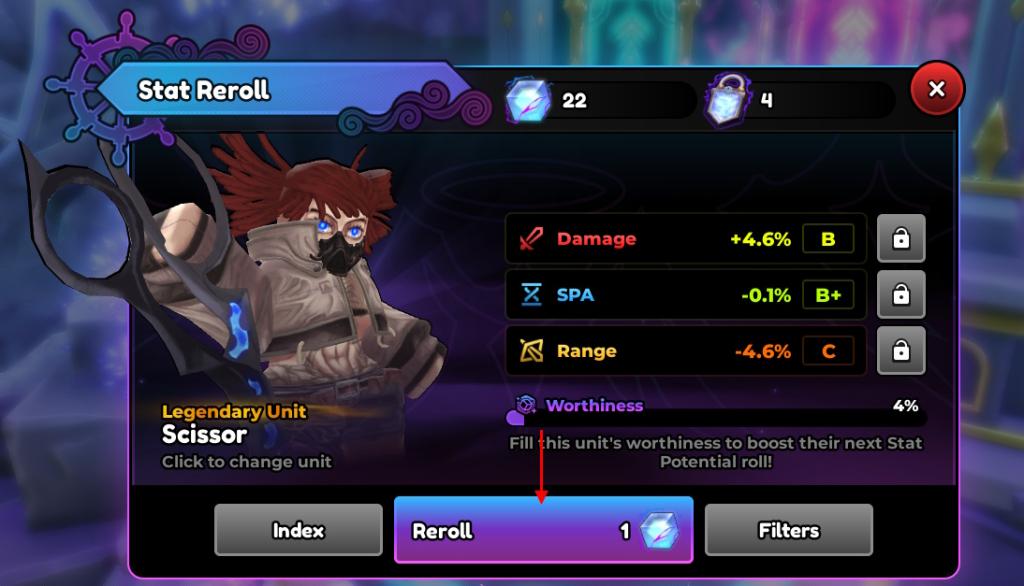
The stat reroll system in Anime Expeditions lets you change those hidden number slots under a unit — damage, range, and SPA (attack speed) — until they read the way you want. Each reroll randomizes those three values, and each value belongs to a visible tier (Z, SSS, SS, S, A+, A, A-, B+, B, B-, C+, C, C-, F). Z is the dream; F is the thing you avoid.
How to Reroll Stats in Anime Expeditions
The stat potential station is a small kiosk near the AFK reward area — you’ll spot it once you start hunting for rerolls.
- Walk to the Stat Potential station or open the area menu on the left and go there.
- Press E to open the Stat Potential menu, then choose Stat Reroll.
- Pick the unit, use Reroll, and watch the three values shuffle. Use the lock icon next to any stat to hold it in place — each lock consumes one Stat Lock item from your inventory.
Think of rerolling like a slot machine: you can hold reels, but each hold costs. Use locks sparingly; they’re your insurance against losing a rare tier while you gamble for a second or third great stat.

Anime Expeditions Stat Reroll Buffs and Chance
Most players share reroll screenshots that read like a resignation letter — lots of B and C tiers, very few Zs.
Each tier carries predictable numeric buffs and a roll chance. The table below is your cheat sheet: damage, SPA, range ranges, and the percent odds for each tier. Use it to decide whether you chase Z or accept a strong SS/S tier and move on.
| Tier | Damage | SPA | Range | Roll Chance |
|---|---|---|---|---|
| Z | +17.5% to +20% | -12.5% to -15% | +12.5% to +15% | 0.15% |
| SSS | +14.9% to +17.4% | -9.9% to -12.4% | +9.9% to +12.4% | 0.8% |
| SS | +11.1% to +14.8% | -6.1% to -9.8% | +6.1% to +9.8% | 1.75% |
| S | +9.1% to +11% | -4.1% to -6% | +4.1% to +6% | 2.2% |
| A+ | +8.1% to +9% | -3.1% to -4% | +3.1% to +4% | 3.25% |
| A | +7.1% to +8% | -2.1% to -3% | +2.1% to +3% | 4% |
| A- | +6.1% to +7% | -1.1% to -2% | +1.1% to +2% | 5.25% |
| B+ | +5.1% to +6% | -0.1% to -1% | +0.1% to +1% | 8.75% |
| B | +4.1% to +5% | 0% to +0.9% | -0.9% to 0% | 10% |
| B- | +3.1% to +4% | +1% to +1.9% | -1.9% to -1% | 13% |
| C+ | +2.1% to +3% | +2% to +2.9% | -2.9% to -2% | 15.5% |
| C | +0.1% to +2% | +3% to +4.9% | -4.9% to -3% | 23.5% |
| C- | -2.6% to 0% | +5% to +7.6% | -7.6% to -5% | 7.55% |
| F | -5% to -2.5% | +7.5% to +10% | -10% to -7.5% | 4.3% |
How many Stat Rerolls do I need to get Z stats in Anime Expeditions?
Short answer: there’s no fixed number. Z-tier sits at 0.15% per roll, so expect to spend hundreds or even thousands on average if you’re chasing RNG alone. Veteran streams on Twitch and community trackers on Discord show extreme variance — some players hit Z early, most do not.
Should I lock stats while rerolling in Anime Expeditions?
Yes, when you already have at least one high-tier stat worth protecting. Locks cost resources and each locked stat consumes one lock item per reroll, so only lock what you’d mourn losing. If you have SS or SSS on a core stat, lock it and reroll the rest.
Can I transfer only one stat instead of all stats in Anime Expeditions?
Yes. The Stat Transfer screen lets you pick which specific stat values to move from the sacrifice unit to the target. Be aware: the unit you sacrifice will have its trait, stat potential, and level reset, and each transfer requires a Gold fee.
How to Get Stat Reroll and Stat Locks in Anime Expeditions
Free items arrive in small, predictable trickles — the calendar and daily logins are where most players start.
The main sources:
- Redeem codes (watch the official Discord and Twitter for timed drops).
- AFK rewards and daily/calendar rewards can grant rerolls or locks — not guaranteed but steady.
- Complete story maps, daily challenges, and limited events for fixed amounts of Stat Rerolls and Stat Locks.
Spend your free stock carefully: saving a handful of locks for a promising unit is often better than burning them on early rolls.
How to Transfer Stats in Anime Expeditions
You’ll notice players treating stat transfer like a surgical operation rather than a sacrifice.
Transferring stats lets you rescue a perfect set of numbers from a unit you no longer need and graft them onto a unit with better traits. Each transfer costs Gold and resets the sacrificed unit completely.
- Open the Stat Potential station and choose Stat Transfer.
- Select the sacrifice unit on the left and the recipient on the right.
- Tick the specific stat boxes you want to move and confirm Transfer Stats.
Think of stat transfer as a sculptor chiseling away the marble — you remove the parts you don’t need and keep what makes the piece sing. Use it to salvage rare tiers when rerolling alone won’t cut it.
I used rerolls, locks, and transfers to turn an otherwise mediocre SSR into one of my strongest towers — and you can too. Will you chase the Z-tier dream until you break the bank of time and resources, or will you settle for a reliably strong build and push the meta forward?