
Update: added new +1 Loot Evo codes on July 30, 2026
I was three runs into a bad streak when a single code flipped the scoreboard. My cursor stopped being a metronome and started feeling like a weapon. You know that small, sudden relief when progress stops being a grind and starts being fun again?
I track Roblox drops so you don’t have to. I’ll tell you exactly which codes are live, where the devs are posting them, and the one mistake that burns players precious boosts.
All New +1 Loot Evo Codes
I checked the Roblox game page after the July 30 update and found two fresh drops sitting in the description.
- New: 2x Wins Boost for 15 Minutes and 2x Power Boost for 15 Minutes NEW
- Loot: 2x Wins Boost for 15 Minutes and 2x Power Boost for 15 Minutes NEW
The codes act like a turbocharger for a run, like a gust of wind behind a sail—short, sharp, and capable of flipping a bad session into a leaderboard push.
How do I redeem codes in +1 Loot Evo?
Launch the game on Roblox, tap the Codes button in the top-right, paste a working code, and hit Redeem. That’s it. Quick wins are wins for a reason: fewer clicks, more progress.
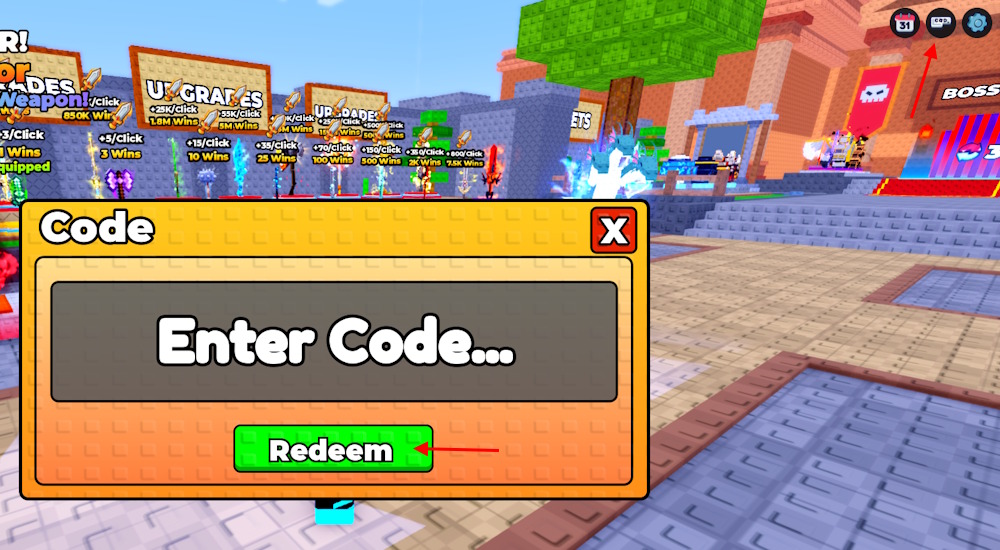
How to Redeem +1 Loot Evo Codes
I grabbed a screenshot of the code window so I could write the exact steps while testing them live on Roblox.
- Open +1 Loot Evo on Roblox.
- Click the Codes button at the top-right of the screen.
- Type or paste the code exactly as shown (Roblox codes are case-sensitive).
- Press Redeem to claim the reward.
If a code fails, check capitalization and whether you already redeemed it on that account—Roblox won’t give the same reward twice.
Where do new +1 Loot Evo codes drop?
The devs haven’t been using Discord for drops much. Instead, new codes are usually posted directly on the Roblox game page after each update. Follow the game page for the fastest notices; I also verify every new code against that page so you won’t waste time testing dead strings.
How to Get More +1 Loot Evo Codes
I refreshed the official Discord and the Roblox page side-by-side for a week to see where updates landed first.
The Discord server exists, but the codes channel is often empty. The reliable source is the Roblox game description and the update notes on the devs’ page. If you want a faster path, follow the game on Roblox and check the description when patches drop.
I keep a running list of verified codes so you can check one page instead of juggling Discord and Roblox announcements like tabs in an overcrowded browser.
Why are my +1 Loot Evo codes not working?
If a code fails, first confirm you typed it exactly—Roblox codes are case-sensitive and tiny mistakes will block redemptions. Second, the code might be expired or already claimed on your account. Third, many older guides and videos keep showing dead codes because the devs don’t centralize drops in Discord.
Why Some Codes Appear Expired (and What I Do About It)
I watch the change log after each update; codes often vanish the moment a patch lands.
Developers add and remove codes on the Roblox page during updates, so a code that worked this morning may be gone by tonight. If you want to protect boosts for a big session, redeem immediately. Each claimed boost feels like finding a secret drawer in an old desk—small, private, and unexpectedly useful.
If you play other progression-heavy auto-clickers, try titles like +1 Keyboard Escape, +1 Speed Evolve, and Slime RNG; the code patterns are similar and the devs often favor short, timed boosts over permanent freebies. I check Roblox, the devs’ update notes, and community threads from creators on YouTube to catch drops early.
Still hunting for the best moment to cash in a boost—what run will you use yours on?