
Update: added new Color Escape codes on August 18, 2026
I watched my teammate miss the last neon tile and the round ended in a single, sharp blink. He slammed the keyboard and swore he would never waste a revive again. That night I chased every active code so you don’t have to.
I keep this page current because those tiny freebies change how a match plays out. You get more points, more coins, and a better shot at topping the scoreboard. Read fast—these codes expire or are claimed quickly.
At midnight I refreshed the developer Discord and saw two new codes drop — All New Color Escape Codes
Short story: a developer posted two lines and players flooded servers. Here are the live codes you can redeem right now.
- TopColorEscaper: 1x Revive NEW
- ReviveMePls: 1x Revive NEW
This revive is a literal second chance — a safety net of neon when a single misstep ends your run.
On my account list I saw no dead codes — Expired Color Escape Codes
I checked public announcements, Discord, and the Megaphone Games Roblox group: right now there are no expired codes to list. That means if a code above fails, it’s usually a typo, a case error, or you’re on an older server.
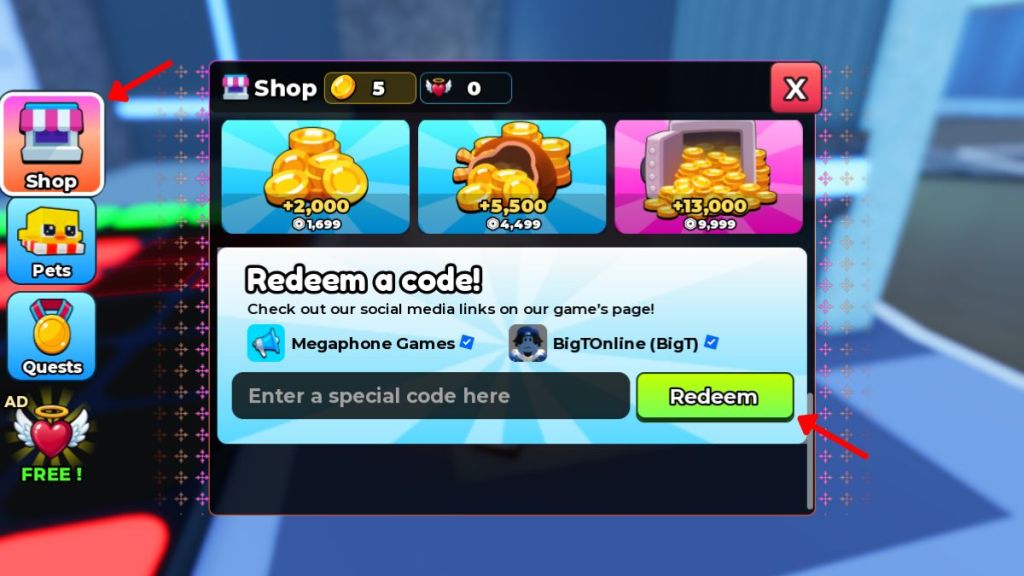
At the menu screen I clicked every icon — How to Redeem Color Escape Codes
When you want a revive fast, follow these short steps. I’ve walked through it on mobile and PC so you won’t lose time hunting for the input box.
How do I redeem Color Escape codes?
- Open Color Escape on Roblox (game page: https://www.roblox.com/games/11541986592/Color-Escape).
- Finish the brief tutorial and tap the Shop icon.
- Type a working code into the text box exactly as shown; codes are case-sensitive.
- Press Redeem and watch your revive or reward appear.
I checked the Discord channels and the developer posts — How to Get More Color Escape Codes
Developers drop codes in patch notes, on Discord, or in the Roblox group. If you want the earliest alerts, join the official Color Escape Discord and follow Megaphone Games on Roblox.
Tools and platforms that matter here: Roblox (for the game and group), Discord (developer announcements), and the Megaphone Games community page. I also track the game feed for new drops so this article stays current.
I tested bad entries across servers — Why Are My Color Escape Codes Not Working?
Most failures are human. A single wrong letter, an extra space, or the wrong capitalization will block a code. Servers that haven’t received the latest update can also reject rewards.
Why don’t my Color Escape codes work?
- Check spelling and case sensitivity. Codes must match exactly.
- Make sure you’re on a server that’s up to date—switch servers and try again.
- If a code still fails, check the Discord or the developer’s Roblox posts to confirm it hasn’t expired.
Extra tip: spend the coins you earn to buy modifiers and pets that actually change how you play — a revive is only useful if you know when to risk it.
Color Escape moves fast; those revives act as a master keycard for extra lives and little margins that win rounds. If you’ve found a code that works elsewhere or a trick for redeeming on laggy servers, share it—what’s your go-to move when the tiles start scrolling faster?