
I froze as the update banner pulsed on my screen — five seconds later I had a new spinner and a sigh of relief. You can feel the game tilt from slow grind to a sprint when a working code drops. I’ve chased dozens of Roblox drops; this one was worth writing down.
I’m going to save you the guesswork. I play, I test codes, and I’ll tell you which ones are live, how to claim them fast, and where to watch for the next batch. You’ll get the exact steps and the freshest list for September 2026.
Roll a Fisherman Codes (September 2026)
Yesterday evening I hit the update and watched new rewards appear on the shop tab.
These are current, tested codes that grant Spins, Gold, and Cash so you can upgrade your dock and recruit better anglers without waiting through the grind. Use them fast — some stick around; some don’t.
All New Roll a Fisherman Codes
I noticed the developer posted a code bundle right after the last patch.
- SEALS: 3 Spins NEW
- FISHING: 2 Spins
- UPGRADES: 500 Gold
- GOLD: 300 Gold
- UPDATE2: 2 Spins
- UPDATE1: 3 Spins
- RELEASE: 5K Cash
Expired Roll a Fisherman Codes
I checked the usual channels and there aren’t any expired codes cluttering the list right now. When a code dies, I move it into this section so you won’t waste time entering it.
If you want more free rewards in Roblox, check communities and lists for Blox Fruits, Volleyball Legends, and Fisch — they all publish codes the same way developers do.
How to Redeem Roll a Fisherman Codes
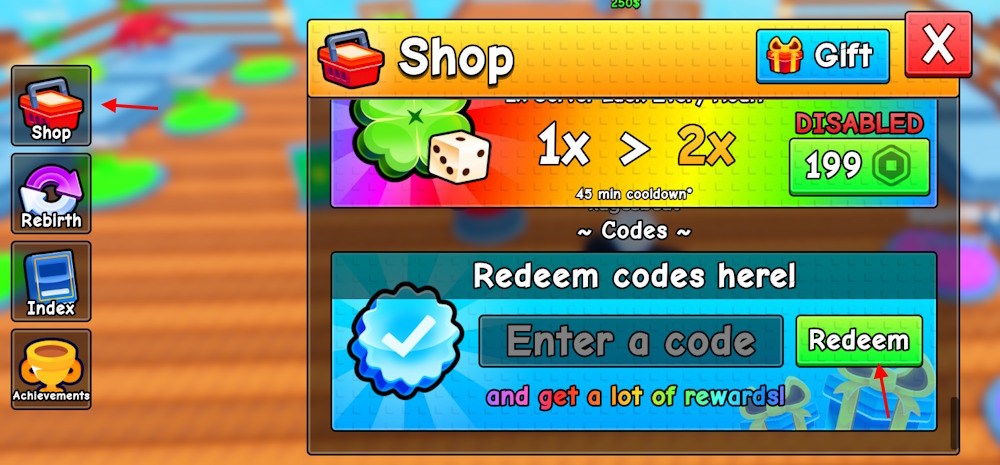
While testing the game, the Shop button was the place every time I claimed rewards.
Complete the tutorial first, then follow these quick steps to redeem codes:
- Open Roll a Fisherman on the Roblox app or website.
- Click the Shop button from the left menu.
- Enter a working code into the text box and press Redeem.
- Collect your Spins, Gold, or Cash immediately.
How do I redeem Roll a Fisherman codes?
I open the Shop, paste the code, press Redeem, and watch the notification pop up. If you’ve done the tutorial and the code is current, rewards appear immediately. If nothing happens, the code was probably removed or mistyped.
How to Get More Roll a Fisherman Codes
I follow the developer channels and refresh after every update to catch new drops.
New codes usually arrive alongside updates, milestones, or streams. The fastest places to find them:
- Official Discord — join the Roll A Fisherman Discord server and check the codes or announcements channels.
- Twitter/X and YouTube — developers often post short clips or tweets with codes after events.
- Game description on Roblox — sometimes a code is pinned there after a patch.
This code list is a map to the next wave of upgrades; treat it that way and mark your calendar when an update drops.
Why Are My Roll a Fisherman Codes Not Working?
I’ve entered the wrong code more times than I’m willing to admit during late-night testing.
Here’s the checklist I run through when a code fails:
- Copy and paste the code to avoid typos.
- Complete the tutorial; some codes require progress beyond the intro.
- Make sure you’re entering it in the Shop box — there are multiple menus in-game.
- If it still rejects, the developer may have expired or replaced the code.
Why aren’t my Roll a Fisherman codes working?
If you’ve checked spelling and progression and the code still fails, it’s usually expired. Follow the developer on Discord or Twitter/X for immediate posts about retirements and replacements. A good spin is a lightning strike on your dock — rare, fast, and game-changing when it hits.
If you want real-time alerts, pin the Roll A Fisherman Discord and follow the game’s Roblox page; I use those two every time a fresh batch arrives. Ready to try the new SEALS code and see how far your dock can go?