
I logged in on a school computer, handed my tablet to a cousin, and later watched a stranger’s avatar walk through my game lobby. You feel that cold twist—someone else playing as you, maybe buying items. I’m going to show you the fastest way to shut every door and reclaim the account.
You left a session open on someone else’s device. How to Sign Out of All Devices on Roblox at Once
If you want to kick every remote login off your account without touching those other devices, Roblox’s Session Management inside Settings > Security does it in a single sweep. You can run this from a web browser, the Roblox Desktop app on Windows/Mac, or the mobile app on iPhone, iPad, and Android.
- Open Roblox and sign into the account you want to protect.
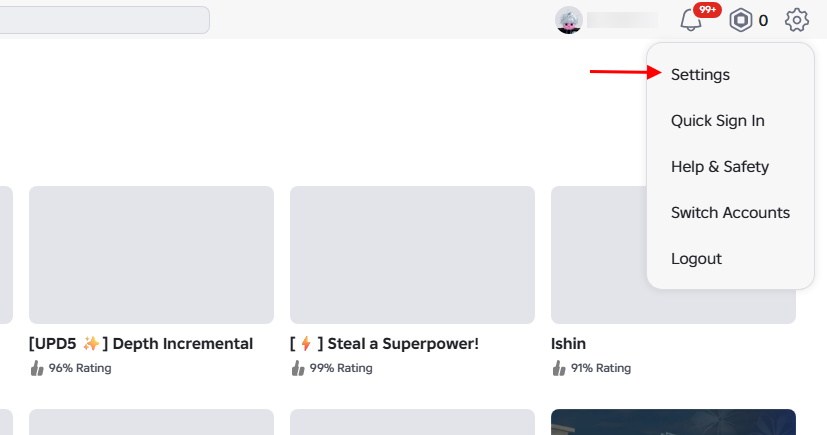
- Go to Settings (Gear icon) → Security.
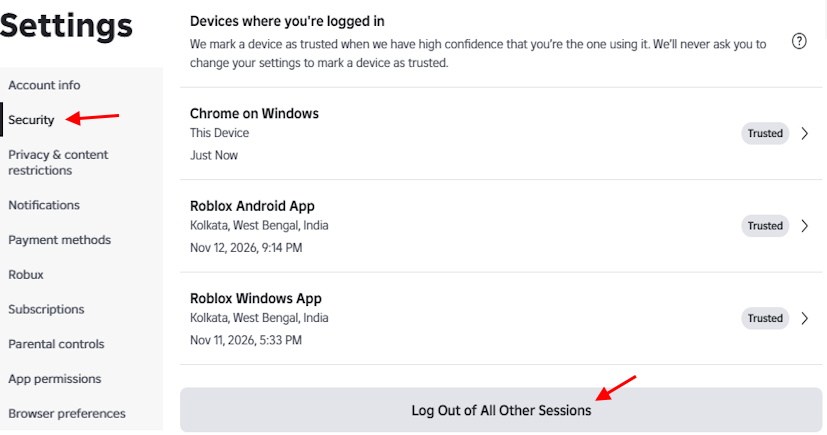
- Find Where you’re logged in and click or tap Log Out of All Other Sessions.
- Confirm the prompt to terminate every other active login instantly.
You’re on a PC and want the full sweep. How to Log Out of Roblox PC (Web Browser and Desktop App)
On Windows or Mac this is a three-click remediation that acts like slamming a door on anyone still inside.
- Visit roblox.com or open the Roblox Desktop app and sign in.
- Click the Gear icon at the top-right and choose Settings.
- Open the Security tab, scroll to Where you’re logged in, then hit Log Out of All Other Sessions.
- Confirm Log Out on the popup. You remain signed in on the device you used to do this; every other session is dropped.
You pulled your phone out and saw an unknown session. How to Sign Out of All Devices on Roblox Mobile (iOS and Android)
On mobile you can sever every remote login from the Roblox app in under a minute — like flipping the circuit breaker on stray connections.
- Open the Roblox app on iPhone, iPad, or Android and sign in.
- Tap More (three dots) → Settings (gear) → Security.
- Scroll to Where you’re logged in and tap Log Out of All Other Sessions.
- Confirm to immediately remove every other device.
How do I log out of my Roblox account on my phone?
Launch Roblox, tap the More (three dots) button, scroll to the bottom of the menu and tap Log Out. Confirm the logout. If you use email or phone number login, make sure those are linked to the account first so you don’t lose access.
You want to know what that button actually does. What Does Log Out of All Other Sessions on Roblox Mean?
When you press that button, Roblox ends every session except the one you’re currently using. You stay logged in on your active device while other devices — phones, tablets, consoles, or browsers — get returned to the login screen.
- You keep the session in front of you; everything else is kicked out immediately.
- Anyone who used your account will need to re-enter the password (and any 2FA you have) to log back in.
You don’t want to nuke everything when only one session looks suspicious. How to Check All Logged-in Devices on Roblox (And Remove One Device)
Roblox lists each active session with a device type, approximate location, and last active time so you can make a targeted decision.
Can you log someone out of your Roblox account?
Yes. Visit Settings → Security → Where you’re logged in, tap the session you don’t recognize, then choose Log out of session. That single device will be disconnected immediately.
For each listed session you usually see:
- Device type and app/browser (Android, iPad, Windows, Chrome, etc.).
- Approximate location — city and region.
- Last active timestamp. Some old sessions may show “Unknown.”
You only need to sign out the device in your hand. How to Log Out of Roblox on Phone, iPad, or Android (Single Device)
Use the simple Log Out option in the app when you just want to leave one device. No need to touch Session Management if that’s all you want.
- Open Roblox, tap More (three dots), scroll to the bottom, and tap Log Out.
- Confirm to sign out of that phone or tablet only.
You switch accounts on PC often. Sign Out Tips for PC Players on Roblox
If you bounce between a main and an alt, use separate browser profiles or a dedicated launcher like BetterLauncher so you avoid constant manual logins. If your browser keeps clearing cookies or you play in Incognito, expect frequent logouts.
Tip: BetterLauncher and similar managers can streamline multiple accounts; browser profiles (Chrome, Firefox, Edge) keep sessions isolated without repeated sign-ins.
Do I lose everything if I log out of Roblox?
No. Your Robux, avatar items, game progress, and friends are tied to your Roblox account in the cloud, not to the device you’re signed into.
Why do I keep getting logged out of Roblox automatically?
Unexpected logouts are often caused by cleared browser cookies, using private/incognito windows, an expired session, or other apps that reset stored data. Check browser settings and whether another app or extension is clearing site data.
That’s the practical path: check Sessions for odd entries, remove single devices when needed, or hit Log Out of All Other Sessions to end everything in one go — and if you haven’t enabled 2-step verification yet, do that next. Will you leave old sessions open as digital speed bumps or take the few clicks that kick intruders out?