
You skid off the road with the monster on your tail and one crate between you and a cosmetic you wanted. I watched a player paste a mistyped code and the crate vanished into the night. That small, avoidable loss is the kind of thing I help you stop from happening.
I play these runs and I track the updates so you don’t have to. Below are the freshest Do Not Stop codes for November 2026, step-by-step redemption instructions, and quick fixes for the common snags that steal your credits.
Someone at a LAN party once bragged they never miss a code — and then fumbled a single character and lost 250 credits.
All New Do Not Stop Codes
- TOURNAMENT: 250 credits NEW
- UPDATE2: 250 credits NEW
- RELEASE: 250 credits NEW
- LASTSTOP: 250 credits NEW
- DONOTSTOP: 200 credits NEW
- ROUTE1610: 150 credits NEW
Those credits cut through the grind like a flashlight in fog — short, bright bursts that get you a crate, a skin, or enough cosmetic variety to stop feeling like everyone else.
Right now, none of these codes are expired. When a code dies, I move it into the expired list and call it out so you can stop wasting keystrokes.
If horror is your jam, try Survive the Backrooms, The Mimic, and Lurking Giants on Roblox. Want more codes across games? Our Roblox game codes collection runs daily updates.
I watched a teammate type a code with an extra space and wonder why nothing happened.
How to Redeem Do Not Stop Codes
How do I redeem Do Not Stop codes?
Follow this exact order and you’ll claim rewards without the usual fumbling.
- Launch Do Not Stop on Roblox.
- Click Garage on the left side of the screen.
- Select the Codes option.
- Paste a working code into the ‘CODE’ box — use the copy button above to avoid typos.
- Click REDEEM to get your credits; open crates from the Garage to spend them.
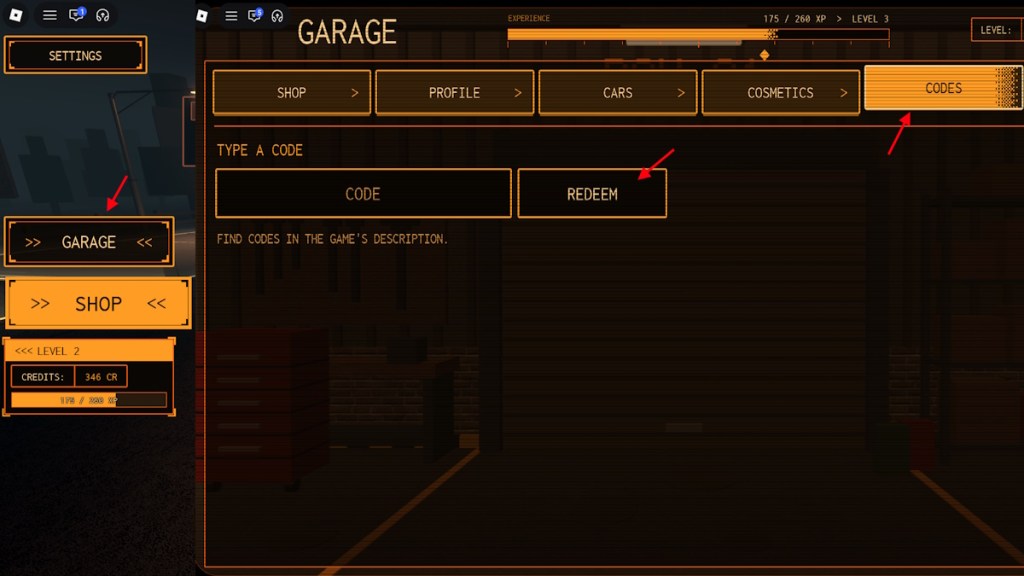
I get messages asking where people miss codes most: mistyped characters, extra spaces, and expired phrases.
How to Get More Do Not Stop Codes
Where can I find more Do Not Stop codes?
Codes arrive with updates, events, and community pushes. Watch these channels and you’ll catch them first:
- Follow the game’s Discord server (official announcements drop new codes fast).
- Join the Roblox group for developer posts and event notices.
- Keep this guide bookmarked — I refresh code lists the moment devs publish them.
- Monitor creators on Twitter/X and popular Roblox YouTubers who report giveaways.
If you prefer push notifications, set alerts on Discord and Twitter/X so you don’t miss time-limited releases.
Once, a streamer shared a code on social and their chat emptied out credits the second it appeared.
Why Are My Do Not Stop Codes Not Working?
Why are my Do Not Stop codes not working?
When a code won’t redeem, don’t panic. Try these quick fixes I use myself:
- Close and reopen Roblox — the client sometimes lags and rejects valid entries.
- Use copy-and-paste; avoid adding spaces or swapping O and 0 or I and 1.
- Confirm the code is still active; expired codes will no longer grant credits.
- Check server status on the game’s Discord if many players report issues simultaneously.
- If nothing works, file a support message with the devs on Discord and include a screenshot.
Treat code hunting like finding a spare key under a cracked flowerpot: a small habit saves you from big losses.
Play smarter, paste precisely, and follow the right channels — then bragging rights become earned, not lucky. How many crates have you opened this week and which skin was worth the chase?