
I was half-asleep scrolling through my phone when an old Xbox logo flashed past and stopped me cold. For a second I felt like I’d tripped over a childhood memory—then realized you can now play those memories on a modern PC. That little jolt matters more than you think.
I’m going to walk you through what dropped today, why it matters if you own any of these games, and what you’ll need to actually play them. You’ll get strict facts, a few opinions, and a clear path to firing up classics without guesswork.
On the street you still see shirts advertising retro games — the market for old favorites is alive
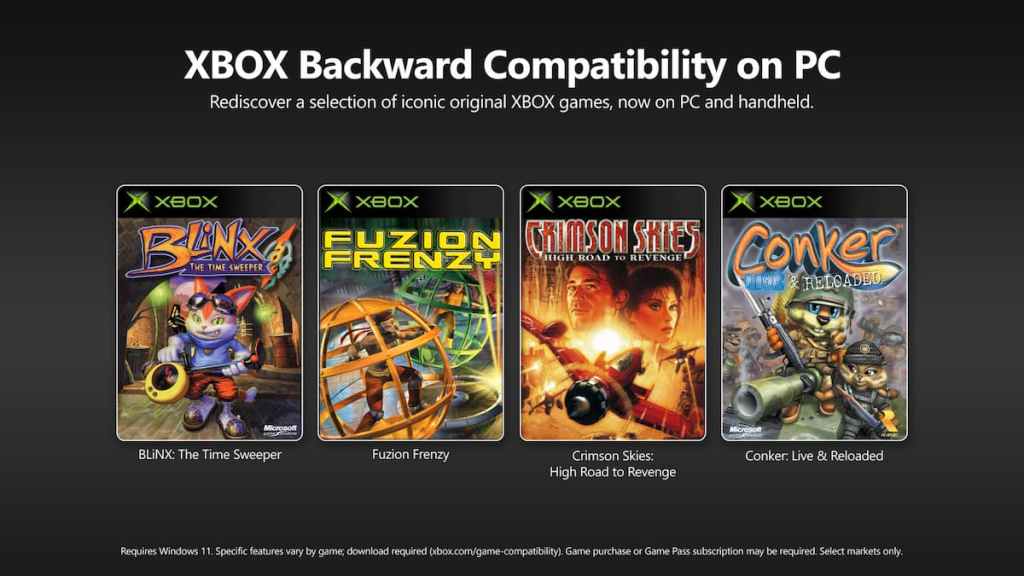
Today Microsoft launched an official Xbox Backward Compatibility program for PC and handhelds, bringing original Xbox console games to a new platform for the first time. Four titles are available right away: BLiNX: The Time Sweeper, Conker: Live and Reloaded, Crimson Skies: High Road to Revenge, and Fuzion Frenzy. Each is available to buy for $9.99 (€10) or playable via Xbox PC app if you already own the digital copy on your Xbox account.
These releases are on the Xbox on PC app and compatible with Xbox Play Anywhere and Xbox Cloud Gaming. They’re also appearing on Game Pass, which means many players will be able to access them without an extra purchase.
Can I play OG Xbox games on PC?
Yes. Microsoft has reworked these original Xbox titles so they run through the Xbox on PC app. If you own one of the games digitally on your Xbox account it will show up in the Xbox PC app; otherwise you can buy the ports directly. The company confirms PC ownership sync and cloud play for these releases.
I watched a friend try to run a decade-old disc on a new system and fail — compatibility matters
Microsoft says this is only the start. Jason Ronald, Xbox VP of next generation, told players that achievements will be added to select original Xbox games on both console and PC later this year, and that the first four titles will receive Achievement support in the coming months. That’s a clear signal these aren’t static ports — they’ll evolve.
The team also added new customizable graphics settings for the first four titles, so you can tweak resolution, frames, and GPU behaviors instead of running a washed-out, stretched image. That matters if you want modern visual options without losing classic gameplay.
How much do they cost?
Each game is priced at $9.99 (€10). If you already own the digital copy on your Xbox account, the title will be available in the Xbox PC app with no additional purchase required. Game Pass subscribers may see the games listed there, which removes the immediate cost for members.
I’ve installed many emulator packages and I can tell you the difference is in support
These ports carry some clear advantages over community emulation: official patches, integration with Xbox services, and platform-level features such as cloud saves and Play Anywhere. That translates to less tinkering and more time actually playing.
Think of it like finding a vinyl record in a curated store rather than unearthing a dusty mixtape in a garage—both feel good, but one comes with care and context.
My desktop sits next to a modern laptop — specs are always the first question
Microsoft published minimum and recommended PC requirements. I’ll paste them here so you can compare against your rig and decide whether to buy, stream, or wait.
Minimum system requirements:
- GPU: Nvidia GTX 950 or AMD Radeon RX 550 or Intel UHD 770 or Intel Arc A310
- CPU: Min 4 cores — Intel Core i3-8100 or AMD Ryzen 3 1200 or AMD Ryzen Z2 A Processor
- RAM: 8GB
- OS: Windows 11
- Drivers & Versions: Latest version as of January 2026
Recommended specifications:
- GPU: Radeon RX 6800 or Nvidia GTX 1070 Ti or Intel Arc A770
- CPU: 6 cores / 12 threads — Intel Core i5-10400 or AMD Ryzen 5 3600 or AMD Ryzen AI Z2 Extreme
- DirectX: DirectX12 API, Hardware Feature Level 11
- GPU VRAM: 8GB
- OS: Windows 11
- Drivers & Versions: Latest version as of January 2026
What do I need to run these games smoothly?
Match or exceed the recommended specs for the best experience. If your PC is older, Xbox Cloud Gaming is a viable option: stream the game to less powerful hardware and avoid local compatibility headaches. Xbox Play Anywhere support also helps if you own the title on console and want to pick up progress on PC.
I don’t own all of these titles myself — I grew up a PS2 player — but I can tell you Microsoft is backing this initiative with feature updates that matter to players: achievement tracking, graphics toggles, cloud saves, and official support. That combination makes these ports feel like a careful restoration, not a hastily slapped-on wrapper.
Two metaphors: this move is like opening a restored storefront on a familiar block, and like finding a time capsule with Wi‑Fi inside—old content meeting modern services.
If Microsoft follows through on rolling achievements and expanding the catalog, we may be looking at a steady trickle of classic games returned to life rather than a one-off nostalgia stunt. Are you ready to revisit or finally try an original Xbox game on your PC?