
The scene: I’m idling at the outpost and the frame counter tumbles mid-conversation. One moment you’re reading tooltips, the next the game judders and everything feels brittle. You feel that small, sharp panic when a play session slips away.
I’ve spent hours testing NTE: Neverness to Everness across machines so you don’t have to. I’ll tell you exactly which toggles to flip and why, where to save GPU headroom, and which compromises give you smooth play without losing the art style.
- NVIDIA RTX 3060 12 GB (street price ~ $329 (€305))
- 16 GB DDR5 RAM
- AMD Ryzen 5600G
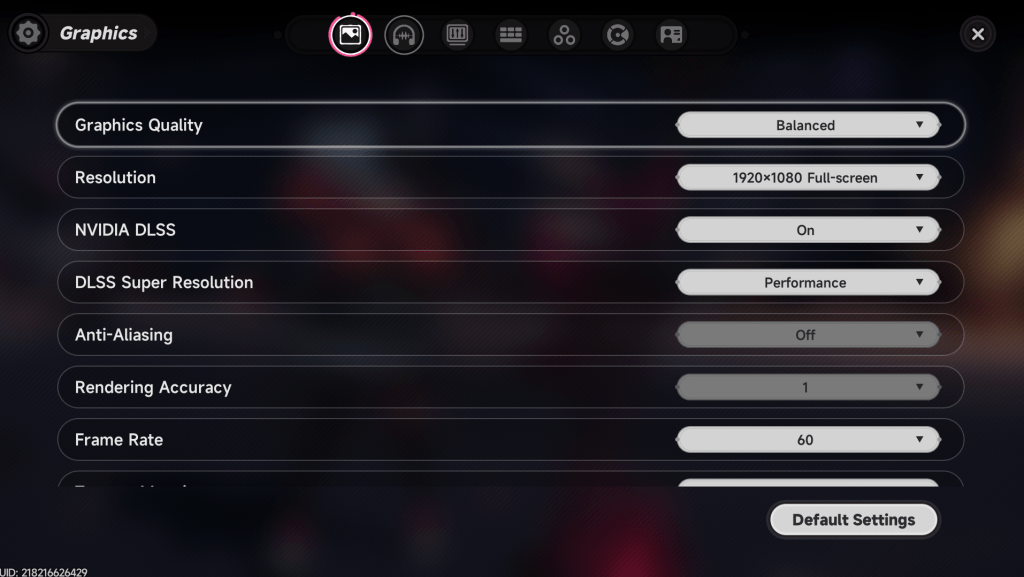
When the bushes spawn and the counter drops — Best NTE: Neverness to Everness graphics settings
If you want steadier FPS on PC, this is the short list I use for mid-range hardware. These settings aim to keep visuals faithful while cutting the elements that tax VRAM and shader time most.
- Graphics Quality: Smooth / Performance
- Resolution: 1920×1080 (lower to 1600×900 if you need more headroom)
- NVIDIA DLSS: On
- DLSS Super Resolution: Performance
- Anti-Aliasing: Off
- Frame Rate: 60 FPS
- Texture Mapping: Low
- Texture: Low
- Foliage: Very Low
- View Distance: Low
- Post-Processing: Low
- VSync: Off (turn on only if you have a high-end, consistent GPU)
- Sharpening: 0.3
- Saturation: 100
- Motion Blur: Off
When the counter steadies at 60 — Why I choose these settings
You’ll trade a little surface detail for steady frames and fewer micro-stutters. Lower textures and foliage reduce VRAM pressure; turning off anti-aliasing and aggressive post-processing trims shader cost.
- DLSS: This is the biggest single win on NVIDIA cards. Set Super Resolution to Performance to regain pixels while saving GPU time.
- 60 FPS choice: I saw fewer stutters at 60 than at higher targets. NTE isn’t a twitch shooter; smoothness and consistency matter more than chasing 120.
- VSync: Leaving it off lowers input latency and avoids forcing the GPU into odd timing—only enable it if screen tearing beats inconsistent frame pacing for you.
Turning DLSS on is like swapping a sandbag for a jetpack.
How do I boost FPS in NTE?
Start with driver and OS hygiene: GeForce drivers, Windows updates, and Steam file verification. Use GeForce Experience to auto-optimize for NVIDIA cards, or open the in-game options if you prefer manual control.
- Run Windows Game Mode and set your power plan to High Performance.
- Close background recording (Discord, OBS) and overlays if you don’t need them.
- Use MSI Afterburner or RivaTuner to watch GPU and CPU usage; that tells you whether textures or CPU-bound view distance are the bottleneck.
- On AMD CPUs, check Ryzen Master if you suspect single-thread limits; on NVIDIA GPUs, adjust settings via the Control Panel or GeForce Experience.
Should I use DLSS with NTE?
Yes, if your GPU supports it. DLSS in Performance mode gives the biggest frame boost with the smallest visual penalty. On an RTX 3060 or similar, it changes the game from “playable” to “smooth” in many scenes.
What frame rate should I target?
Target 60 FPS for the most consistent experience on mid-range hardware; push higher only if you have an RTX 40-series class GPU or a high-refresh monitor and want that extra fluidity.
The patch notes and forums tell a story — Quick fixes and what to expect next
Community threads show many players seeing rough spots; that usually means hotfixes and driver tweaks will follow an early patch cycle. Until then, these steps minimize pain.
- Update GPU drivers (NVIDIA/AMD) and install the latest Windows cumulative update.
- Verify game files on Steam or your platform of choice.
- Lower foliage and view distance if you hit micro-stutters in open areas.
- Expect more stability patches; keep an eye on the developer’s Twitter and Steam announcements.
Simplify the settings, use DLSS Performance, cap at 60, and you’ll rescue most sessions—so what’s your next tweak going to be?