
I stared at my inventory as the sun set in Dreamlight Valley, one ingredient away from finishing a recipe. You probably know that sharp tug of “almost there” — it sinks into your shoulders like a cold coin. I trained my villagers to fetch that final piece, and they came back like a postman with a secret.
I play and test these updates so you don’t waste time guessing. Below I’ll show you the exact steps, limits, and tricks that make the Pixel Perfect feature actually useful — fast, practical, and ready for whatever platform you run the game on (Gameloft’s updates land on Steam, PlayStation, Xbox, and Nintendo Switch).
I missed a quest reward because I hadn’t asked anyone for help yet. Here’s how to send villagers to collect items in Disney Dreamlight Valley.
Use this when you want someone else to chase an item while you handle crafting, events, or awkward quests. You need friendship level seven with the villager and a clear role assignment for best results.
- Find the villager you want to send. Track down the character and confirm they’re at friendship level seven or above. Their assigned role changes what they can find — mining characters look for gems, gardeners for crops, etc.
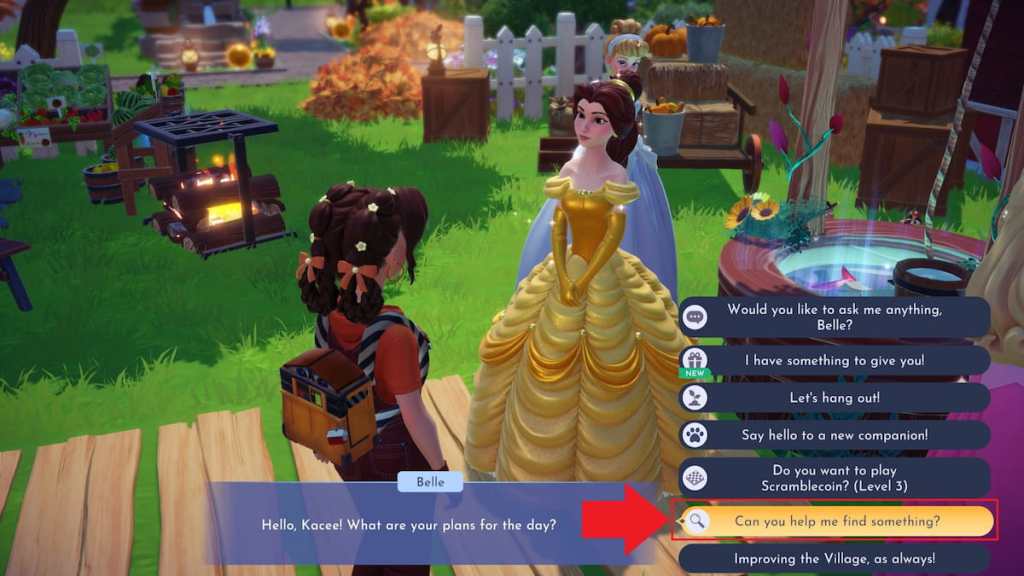
- Talk to them. Interact and open the full dialogue menu to surface the collect option.
- Select “Can you help me find something?” It’s near the bottom of dialogue choices. Choose it to open the item list.
- Pick the item you want. Scroll the menu and choose. You’ll see a range showing how many the villager might bring back.
- Check back the next day. Villagers take one in-game day to gather the requested items — come back tomorrow and collect.
How do I send villagers to collect items?
Choose the villager, open dialogue, pick “Can you help me find something?”, select the item, and return the next day. It’s that simple — provided you’ve reached friendship level seven and assigned the proper role.
I once assumed only certain favorites could help, and that cost me time. Which villagers can collect items for you?
Any villager at friendship level seven or higher is eligible. That’s the baseline you have to hit before their “help me find” option appears.
Roles matter. The option doesn’t grant universal access to all items — it ties back to what you set them to do. That’s why managing roles is more useful than hoarding friendship gifts.
Which villagers can collect items for you?
Everyone, once they reach friendship level seven. The caveat: they only gather items linked to their assigned role (mining, gardening, fishing, etc.).
My valley once felt like a mini-army — I wondered how many I could deploy. How many villagers can you send?
There’s no cap on the number of villagers you can task simultaneously; send a dozen or send the whole roster if they qualify. The real limiter is the quantity each villager can bring back.
When choosing an item, the menu shows a possible return range. Rarer items tend to have smaller ranges — sometimes as low as a single unit. Think of each villager as a fishing net: some pull up a haul, others snag one glittering prize.
How many villagers can you send to collect items in Disney Dreamlight Valley?
Unlimited in count; limited in quantity per task. If you need more units of a common item, send multiple villagers with the same role and item selected.
I sent Olaf once on a forage run and learned the hard way that roles matter. What items can villagers collect?
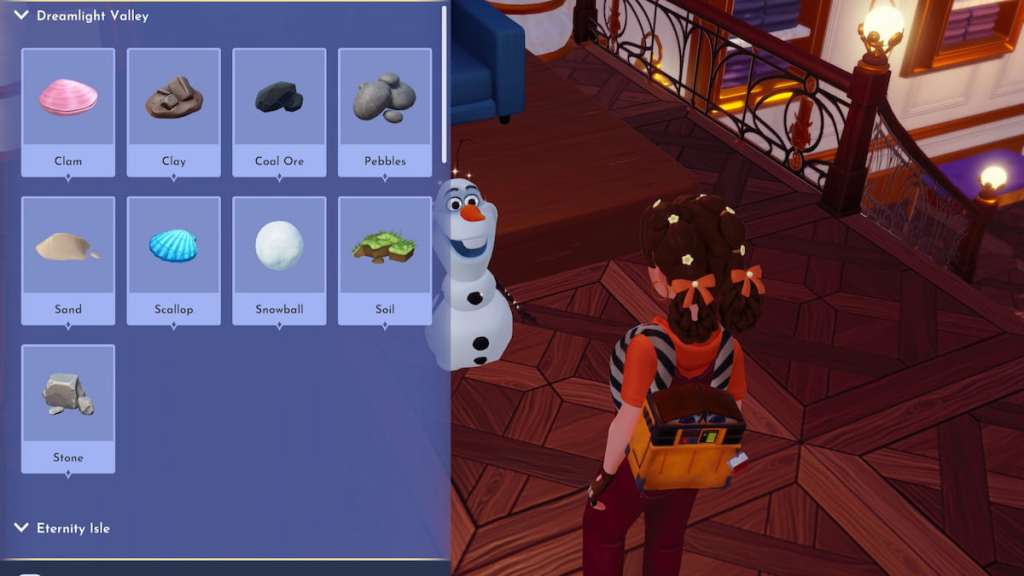
Villagers will gather items tied to their role. The in-game list you open after selecting “Can you help me find something?” shows exactly what that character can fetch.
- Mining specialists: gems and minerals.
- Gardening specialists: crops and growable plants.
- Fishing specialists: fish and seafood.
- Foraging specialists: materials from trees and bushes, wood, flowers, and wild ingredients.
- Digging specialists: stone, pebbles, clay, and other diggable finds.
- Snippet Catching specialists: Snippets.
- Timebending specialists: items like Ancient Gears and Glimmer.
What items can villagers collect in Disney Dreamlight Valley?
They collect items tied to their role. If you need multiple of the same resource, send several villagers with matching roles or queue them up across days.
Quick extras: manage roles via the villager menu, check community threads on Reddit and Discord for role-specific bonus tips, and remember Gameloft sometimes tweaks rates in patches. Want to test a mass-send strategy on Steam or Switch and report back your yields — or are you keeping that secret playstyle to yourself?