
I froze at the doorway when I found my inventory scattered across three islands and a dozen chests. You know that small, sinking panic—when essential items are everywhere except where you need them most. I fixed that problem with a single machine and a short detour to Bubbly Basin.
I’m going to walk you through how the Portal Pod works, where to grab the ones you need, and the fastest tricks to make them act like a single, connected vault. I’ve tested this in-game and cross-referenced the map screenshots from Moyens I/O, so you won’t waste time wandering aimlessly.
I’ve seen players spend minutes hunting for items — What does the Portal Pod do in Pokopia?
The Portal Pod is a linked storage machine. Place two or more and they share the same pool of stored items, so a sword you stash by the shoreline appears in a pod you placed on the mountain.
With one Portal Pod it behaves like a large chest. With two, it becomes a system: you store an item at Pod A and retrieve it at Pod B anywhere in the overworld. Think of it like a postal network for your inventory, not just another place to pile loot.
Walking past cluttered chests at every save point — How to get Portal Pod in Pokopia
There are three practical paths to the Portal Pod, and I’ll rank them by speed and reliability.
How do I get a Portal Pod?
- Explore Bubbly Basin. The quickest method is to find them in the wild: two Portal Pods sit near the upper northeast corner of Bubbly Basin. If you can reach that small underwater house, you’re halfway there.
- Copy at a Pokémon Center. If you or a friend already owns a Pod, place it, take a photo, then head into any Pokémon Center. Use the machine on the left side of the room, pick the “Make copy” option, and spend five rare Pokémetal Ingots to generate a copy. Repeat as needed.
- Buy the recipe in Palette Town. Raise the environment level and the shop will offer the Portal Pod recipe for 3,000 Coins (≈ €20). That’s the purchase route if you prefer crafting over scavenging.
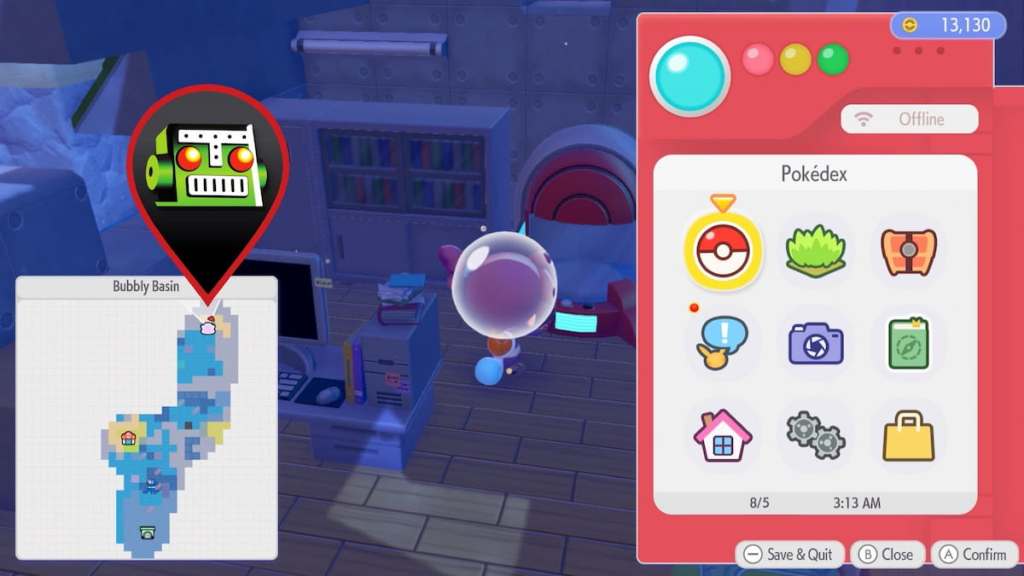
The map shows a tiny house on the coast — Pokopia Portal Pod map location
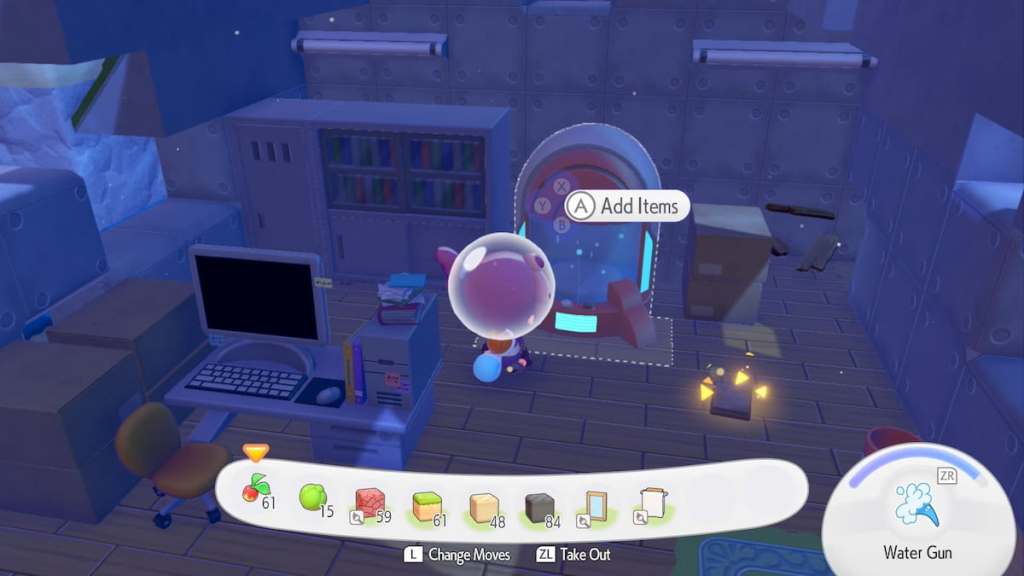
Head to Bubbly Basin and go upper northeast. You’re after a small underwater building: a white-and-brown house with a green roof and door.
Enter and you’ll see the first Portal Pod against the back wall. Walk behind it, find the secret staircase, go downstairs, and interact with the red Poké Ball in the corner to collect the second Portal Pod. That pair is enough to start a linked network immediately.
I’ve watched players test pods alone — How to use Portal Pod in Pokopia
Place at least two Portal Pods for the linked-storage feature to kick in. Interact with Pod A to store an item; visit Pod B and it will be waiting.
Do Portal Pods share storage across regions?
Yes. Place several across different regions and they all tap the same inventory pool. That makes them a Swiss Army knife for storage: compact, versatile, and suddenly indispensable when you’re collecting region-specific items or migrating Pokémon between habitats.
Use them to ferry crafting materials, rare catches, or story items without backtracking. If you play with friends, trading a photo and copying at a Pokémon Center turns shared logistics into cooperative speedruns—handy for community content creators on platforms like YouTube and Twitch who want tidy inventories during streams.
Set up a Pod at your base, another at your resource hub, and one near expedition entrances. You can keep as many as you like active; the system simply treats them as access points to the same storage.
If you want the fastest route: travel to the underwater house in Bubbly Basin, grab the two pods, and then use a Pokémon Center copy to expand your network. For map help, I used screenshots and a short clip from Moyens I/O; for troubleshooting, check community threads on Reddit and guides by Game Freak’s community managers or Nintendo support for interface questions.
Ready to stop hunting chests and start moving like a team with a shared stash—are you going to place your first Pod near your base or on the front line of exploration?