
I hit quit mid-cast and froze—my save screen showed the wrong island. You can force a hidden Developer Island to appear by editing one line in your save. I did it, and the island turned up like a sealed workshop behind the game’s curtain.
I’ve spent hours poking through indie builds and save data; you can trust the steps below because I walked them twice. You and I will move fast, make a backup, and keep the game closed while we edit.
Open File Explorer and follow the breadcrumbs
The folder names are ordinary: Users, AppData, LocalLow. Those plain directories hold the Saves folder for How to Fish (Dazed Games) on PC—this is where your current world lives.
Quick checklist:
- Quit How to Fish completely (close Steam or the standalone window).
- Open File Explorer and type
%appdata%in the address bar, then click up one level to reach AppData and open LocalLow. - Go to LocalLow > Dazed Games > HowToFish > Saves (some installs put it under your named Windows user folder).
- Make a copy of the save file you plan to edit—right-click > Copy > Paste. Treat that copy as your safety net.

One-line edit that moves the island
I opened the save with Notepad; the file looks like plain text, not an encrypted vault. The SpawnedIsland entry is the lever you pull.
How to change it:
- Right-click the save file > Open with > Notepad (or Notepad++ if you use it).
- Find the line that reads
SpawnedIsland. - Change its value to
5so the line becomesSpawnedIsland: 5. - Save the file, then launch How to Fish and load the edited save.
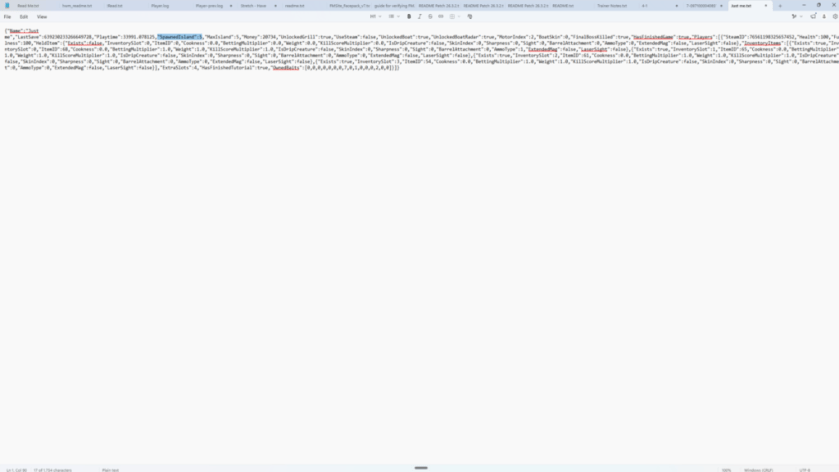
How do I get to Developer Island in How to Fish?
Change SpawnedIsland to 5 in your save and load it—provided you’re running the Developer build. If you bought the game on Steam (price can vary; example: $4.99 (€5)), make sure you’re in the build that exposes developer content; otherwise the island won’t exist.
The island itself and what you’ll find
The first thing I noticed was the shop sign—familiar but off, like the set of a closed fair. Developer Island spawns the shop, the casino, and a grill; you can walk around, spend money, and see odd props, but fishing won’t work there right now.
Practical notes:
- The ocean around the island currently has no fish spawns—so don’t expect new catches yet.
- There is a snowman and other placeholder objects, which suggests more content may come in later updates from Dazed Games.
- This location behaves like a test level: menus and NPCs may be present but incomplete.
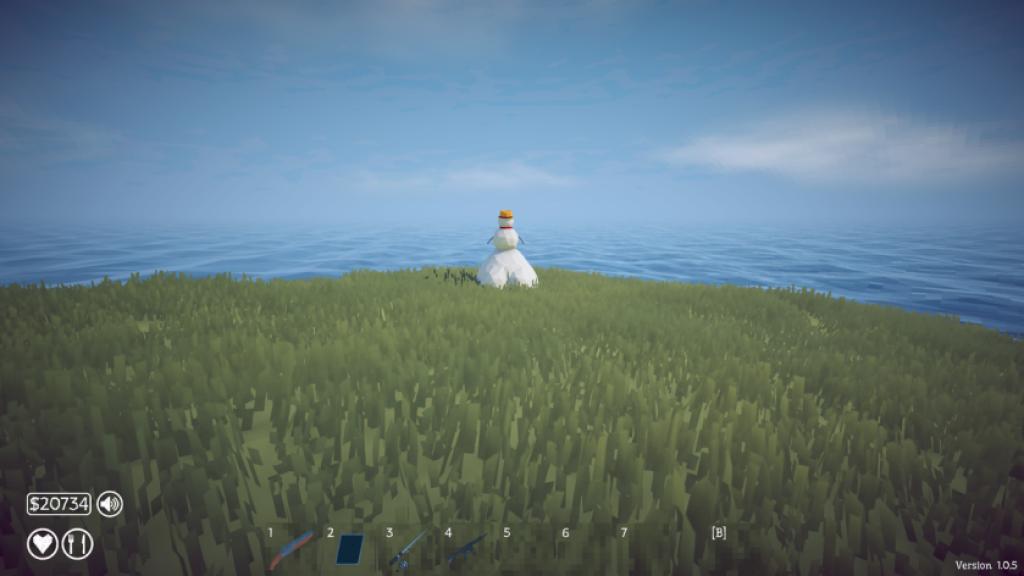
Where are the save files for How to Fish?
Saves live under %appdata% > LocalLow > Dazed Games > HowToFish > Saves. If you use a cloud service through Steam, your local files still control the exact SpawnedIsland value—Steam won’t overwrite what you edit until it syncs, so keep an eye on Steam Cloud if you want the change to persist across machines.
Small risks and a few practical tips
I made a backup before every edit; you should too. The file is plain text, but changing the wrong line can break a save.
- Backup twice—copy the file to another folder or to cloud storage.
- Use Notepad++ or Visual Studio Code if you want search and line numbers; plain Notepad is fine for a single-line edit.
- Don’t edit while the game is running; that can corrupt the save.
Final note: this is Developer content, not a finished area. The spawn acts like a hidden test map, and it may change as Dazed Games patches the build. The save file is a treasure map, and the SpawnedIsland line is the X—will you edit yours and see what the developers left behind?