
I’d just lost a close game when I noticed an Emerald card blinking in the corner of MyTeam. You hover over the Evolution tag and suddenly every game feels like reputation on the line. The clock on the match screen felt like a metronome counting down opportunities.
I’ve spent seasons measuring which small decisions move a lineup faster than hours of random grinding. I’ll walk you through how Evolutions work in NBA 2K27 MyTeam, what the requirements actually ask for, and how to claim the five free Evolution picks that set most early-season lineups apart.
At the practice court you can see who studies minute stats and who plays by feel — here’s how to evolve a card in NBA 2K27
Evolution is a short, specific upgrade path for a subset of MyTeam items. You don’t get to upgrade every card; only those stamped with the Evolution graphic and an Evolution tab can be improved.
- Open the card and tap the Evolution tab to read its requirement.
- Put that card in your active lineup — the stat tracking only counts when it’s in play.
- Meet the requirement (it might be game-count, points, assists, rebounds, etc.).
- Return to the Evolution tab and finalize the upgrade.
The difficulty of each step scales with a card’s base rarity. A Walker Emerald’s first evolution might ask you to simply play one game; its second step could demand 20 assists spread across several matches. If you want to speed things up, run modes where that stat pops frequently: Triple Threat and Domination or quick online matches on PlayStation, Xbox, or Steam can compress the grind.
Can any card evolve in NBA 2K27 MyTeam?
No. Evolutions only apply to items explicitly printed as Evolution-compatible. If the card lacks the Evolution tab you can’t upgrade it the same way — think of those cards as fixed editions while Evolutions are the limited print runs that grow.
At the rewards board you see beginners picking up freebies — here’s how to get your free Evolution cards
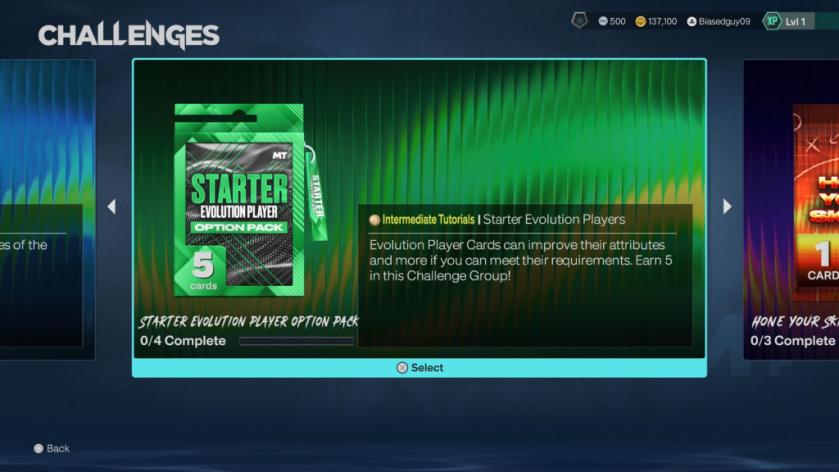
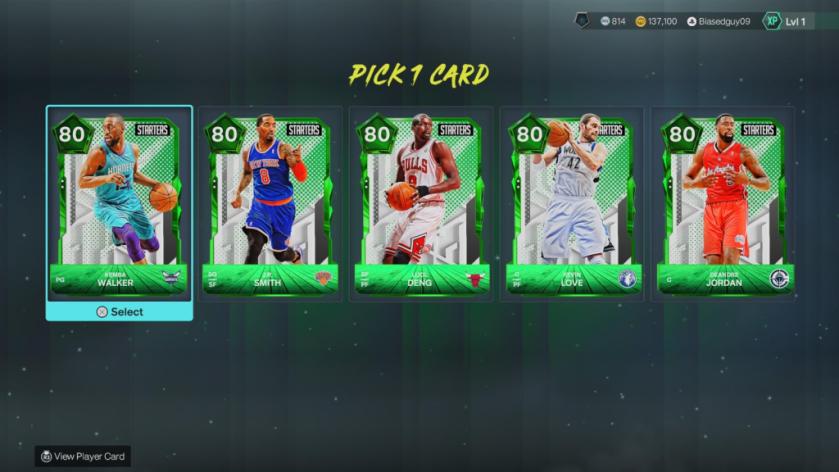
MyTeam hands out five Emerald Evolution picks through the in-game challenges designed to teach you the system. It’s a small set of choices that compounds fast if you evolve all of them.
- Open MyTeam.
- Go to the Hone Your Skills challenge area.
- Scroll through until you reach the Evolution challenge pane.
- Complete the four required challenges to claim your five Emerald picks.
How do I claim the free evolution cards?
Complete the Hone Your Skills challenge set tied to Evolutions. Each completed task awards progress; finish all four and you choose from five Emeralds. If you grind the full set you can end up with all five picks — then evolve them and form a competent starting five without spending VC or auction house credits.
Think of evolution like a ladder you climb one rung at a time: small, repeatable actions that change a season’s trajectory. Use the freebies as your scaffold — play the modes that feed the stat requirements and rotate those Emeraleds into minutes until they clear their tasks.
What are evolution requirements and how are they tracked?
Each Evolution step lists a measurable objective: games played, points, assists, rebounds, steals, or combined tasks. Progress is tracked while the card is active; requirements that span multiple games aggregate automatically. You can check progress in the Evolution tab at any time.
I’ve seen players rush the wrong stat and waste hours; instead, pick the card that matches your playstyle. Need assists? Run point guard in Triple Threat or online play. Need rebounds? slide the player to the five-minute rotation and box out. Small choices save a ton of time.
If you want a short list of practical moves: use Triple Threat to stack quick games, swap the card into the lineup before tip-off, and track progress in the Evolution tab between sessions. For cross-platform players, MyTeam behavior is consistent on PlayStation, Xbox, and PC (Steam).
So which free Emerald are you evolving first, and what mismatch are you planning to exploit to finish the requirements faster?