
I was chasing a rare Aniimo through a sudden downpour and realized the game was playing by different rules than my backyard. I remember pressing every button and still watching gray clouds stubbornly hang over the plains. You can feel the frustration—especially when a weather window means the difference between capture or miss.
I’ve spent time testing every method and talking to players in Discord and on Reddit so you don’t have to. I’ll walk you through exactly how the weather system behaves, the reliable ways to change it, and the tricks players use to find the conditions they need. Read fast: some Aniimo only show up in narrow windows.
There are afternoons when the sky flips in real life — can you force that same flip in Aniimo?
Short answer: Yes. The ability to change weather in Aniimo becomes available early in the story, but it isn’t handed to you immediately.
I learned this the hard way: the main quest teaches time control but not weather control, so you’ll need to complete a few steps before you can swap storms for sunshine. Once you have the needed progress and resources, you can pick conditions across biomes and pay to apply them for a session.
Can you change the weather in Aniimo?
Yes—you can. But it’s gated. You must reach specific collection and story milestones in a region before you can modify that region’s weather yourself.

A friend in town once threw a coin to decide whether to water the garden — here’s how the game lets you flip its coin
There are four practical methods you can use to change or find weather in Aniimo. I’ll break each down so you can pick the fastest route to the conditions you need.
-
Change Weather at a Branch (most reliable)
You can change weather by interacting with the Breezy Plains Branch. To enable this menu you must first spend a total of 60 Lumin Ambers at the Branch. After that, the bottom-left Change Weather option appears.
Procedure: select the region, pick the biome, choose the weather type, and spend a Prismana Crystal to apply it. Note: you also need the Silver Collection Badge for the region—meaning about 70% collection progress and the local Alpha defeated—before that Branch weather option will actually let you switch conditions.
-
Visit another player’s world (fast, unreliable)
Travel to someone else’s world and you might find different weather already active. This is hit-or-miss, but it’s free and instant if you’re connected to friends or joining public lobbies via Discord servers and Steam communities. Players often coordinate weather requests in Aniimo Discord channels and Reddit threads.
-
Photo Mode (visual-only)
If your goal is screenshots, Photo Mode can fake weather effects temporarily. It won’t change the game’s state or spawn weather-specific Aniimo, but it’s the fastest way to compose rain, fog, or sun for images. Open Photo Mode, go to the sixth tab (cloud icon), and toggle the weather effect.
-
Wait for it to change naturally (patience-based)
Weather cycles randomly across regions. If you don’t have the Branch or Prismana Crystals, your only option is to watch the schedule and wait. It’s slow, but sometimes the only way to catch rare conditions without spending resources.

How do you change the weather in Aniimo?
Use a Branch when you can. Spend 60 Lumin Ambers to enable the menu, have the Silver Collection Badge for the region (roughly 70% completion plus defeating the Alpha), then pay a Prismana Crystal to switch the sky. If you don’t meet those requirements, try joining other players through Discord or Reddit to find the weather you need.
I zoomed out on the map and watched tiles flip — here’s how the game tells you what’s coming
Checking scheduled weather is straightforward and often faster than random waiting.
Zoom all the way out on the world map, hover over the region you care about, click the biome, and select the tab with a sun icon. That tab shows upcoming weather blocks for that area; repeat for each region you want to scan. The weather tab only appears at full map zoom, so if you’re not seeing it, zoom out further.
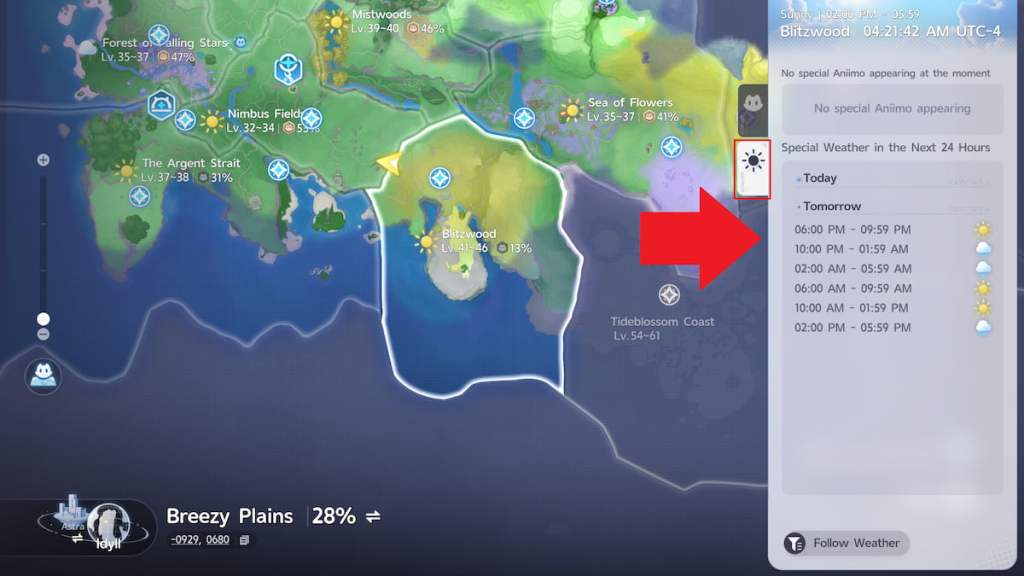
If you want to speed things up, players use community tools and spreadsheets shared on Reddit and Discord to track regional weather windows—this is where following Aniimo content creators on X (Twitter) and checking guides on Moyens I/O, IGN, or GameSpot helps.
Think of changing weather like tuning a radio: the station you want is there, but you may need to finesse the dial. If you prefer chance over effort, visiting other players’ worlds is like rolling a pair of dice—sometimes it lands on what you need, sometimes not.
If you’re still hunting a rare Aniimo, consider these quick checks: do you have the Silver Collection Badge for the area, enough Prismana Crystals, and a list of active Discord communities where players share weather lobbies? The faster you act when a window opens, the higher your odds.
Want me to map the best Discord servers and Reddit threads that organize weather swaps and trade Prismana Crystals?