
I sat through a Twitch stream chat that moved faster than the Drops meter and felt the small thrill of being thisclose to free loot. You can sense the moment when a code is pending and also completely invisible. The Drops timer was a stone—silent and stubborn.
Streams flooded the Minecraft category on launch day — how to get the Aurora Cape
I tested both paths so you don’t have to guess. You can claim the Aurora Cape by watching creators on either Twitch or TikTok, then redeeming a unique code through Minecraft’s official redemption page. Read these short, precise steps and you’ll have the cape in your Dressing Room before the window closes.
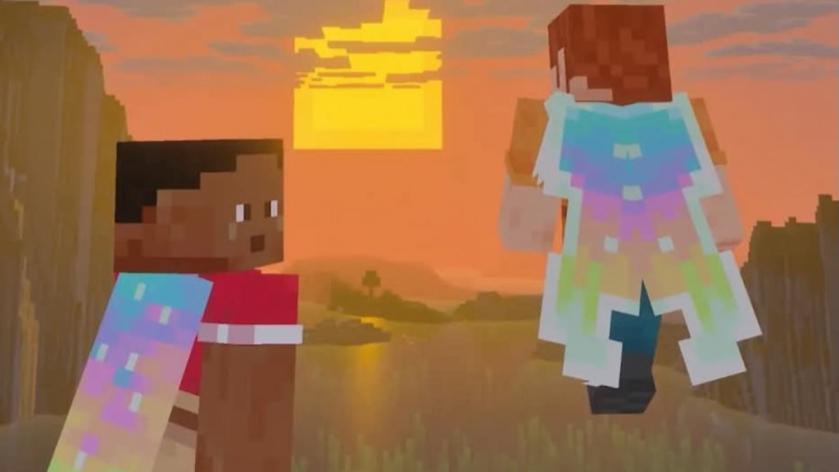
How do I get the Aurora Cape in Minecraft?
Short answer: watch and claim. Choose Twitch or TikTok, sit for the required watch time on a qualifying stream, then claim the code and redeem it at Minecraft.net. Below are the exact steps and the quirks I ran into so you won’t waste time.
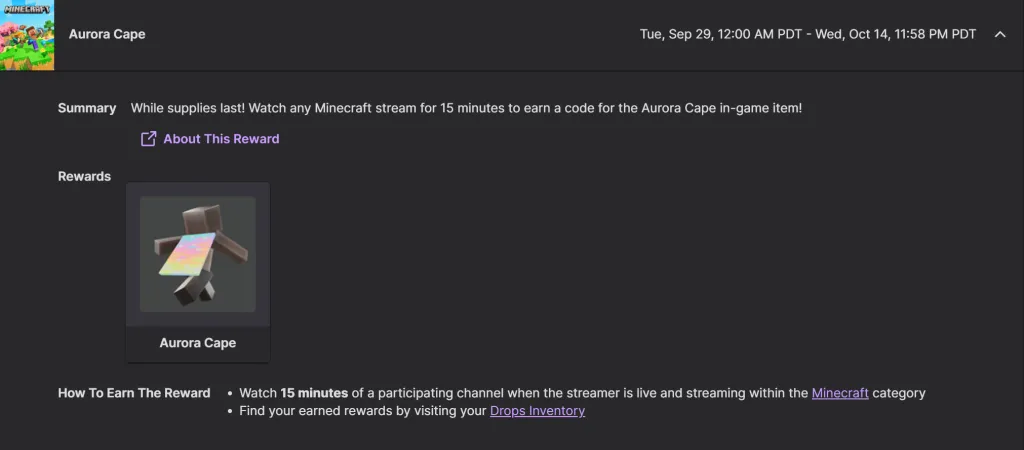
On Twitch I noticed the Drops tag, then waited 15 minutes — the exact Twitch process
Observation: every Drops-enabled stream displays a badge that’s easy to miss if you’re skimming categories. Here’s the concrete path.
- Open Twitch and find a Partner or Affiliate streaming under the Minecraft or Minecraft Dungeons 2 category with the “Drops Enabled” badge.
- Watch that stream for at least 15 minutes. I watched a stream where the progress tracker sat at zero the whole time, but a code still arrived — so trust the timer, not the on-screen meter.
- When you get a Twitch notification that a code is available, click it to visit the redemption page and copy your unique code.
- Log in with the Microsoft account tied to your Minecraft profile, paste the code, and confirm the claim.
I scrolled TikTok’s LIVE page and found a stream with Game Rewards — the TikTok method
Observation: Game Reward tags on TikTok show up on the LIVE page and are easier to spot than Drops badges in a crowded Twitch category. The steps are faster here.
- Open TikTok and go to the LIVE tab. Find a creator streaming under Minecraft or Minecraft Dungeons 2 with Game Rewards enabled.
- Watch for at least three minutes.
- Claim the code from the Game Rewards UI, then paste it on the Minecraft redemption page and confirm with your Microsoft account.
How do I redeem an Aurora Cape code?
Redeem codes at the official page: minecraft.net/en-us/redeem. Sign in with the Microsoft account linked to your Minecraft profile, paste the unique code, and accept the prompt to add the item to your account. The code becomes valid immediately and will be claimable on your console or launcher once redeemed.
I clicked redeem and then opened Bedrock — where to find and equip the cape
Observation: the cape shows in Bedrock first, which is the only in-game area that confirms a successful redemption instantly. Here’s where to go.
- Bedrock: Load the game, open the Dressing Room, then open the Capes tab (bottom left). Find the Aurora Cape and press Equip.
- Java: Open the Minecraft Launcher, go to the Skins tab, hover the skin you want, click the three dots, choose Edit, select the Aurora Cape from the cape options, then click Save & Use.
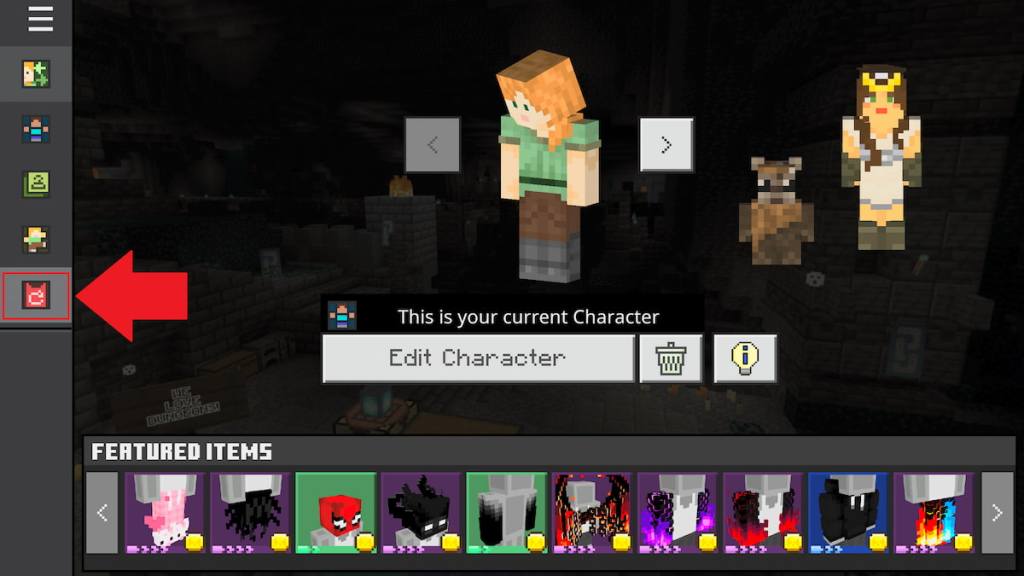
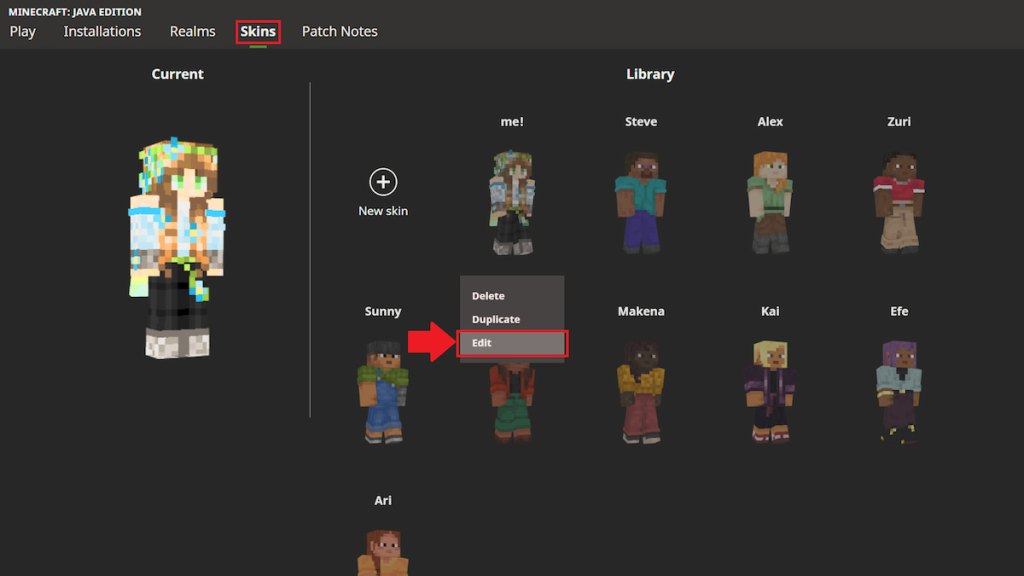
Where do I find and equip the Aurora Cape in Minecraft?
Find it in Bedrock’s Dressing Room under Capes. Want it on Java? Use the Launcher’s Skins tab and edit the skin to add the cape. If you redeemed but don’t see it, sign out and back in, or launch Bedrock once to register the item with your account.
I watched the timeline and checked dates — how long you have to claim it
Observation: these events always have a hard stop, and they vanish after the end date. The Aurora Cape is claimable from Sept. 29 at 2am CT through Oct. 14 at 2am CT, and any earned codes must be redeemed by Oct. 31. After that window the cape disappears from official distribution.
Bits of practical advice from my testing: use a browser logged into the same Microsoft account you use for Minecraft, prefer streams with a clear Drops or Game Rewards label, and keep an eye on Twitch notifications — the tracker can freeze, but the code often still arrives. If you care about provenance, watch creators you enjoy rather than chasing the fastest route; it beats scraping chat logs for a code.
If you want more quick gear guides and the kind of snark I trust, subscribe to the Moyens I/O Checkpoint newsletter for short takes and links to reliable streamers and partners.
The Aurora Cape is not just a cosmetic—it’s a northern-light tattoo on your avatar that says you were paying attention during a brief promotional window. Will you snag it from a Twitch drops stream or pick it up on TikTok — and which creator will you credit when someone asks where you got it?