
I’m kneeling over six fallen bandits while my controller buzzes from expired stamina — and the only thing more annoying than the combat is checking every corpse for the same scrap of loot. You know the feeling: repetitive taps, tiny rewards, time slipping away. That moment is exactly why the Loot Merge system matters.
I’ve spent hours with The Witcher 3: Remastered, testing patches and toggles so you don’t have to. I’ll show you what Loot Merge actually does, why you might prefer it, and the exact steps to flip it on or off across PC and consoles.
You’ve probably clicked through multiple corpses and felt the game stall for no good reason. How does the Loot Merge system work in The Witcher 3: Remastered
Think of Loot Merge as a single hotspot that collects nearby drops so you don’t visit every body. When enabled, the loot from multiple enemies in the same area will be grouped into one searchable pile. Pick an item once and the game can grant that same item from all merged sources at the same time — no extra clicking, no repetitive inventory screens.
This isn’t just a time-saver. It changes how you move through the world: fights are tighter, scavenging is quicker, and quest pacing improves. It’s like sweeping scattered tools into one toolbox — everything you need is where you expect it.
How does Loot Merge work in The Witcher 3 Remastered?
When enabled, the engine consolidates loot from multiple nearby containers or corpses into a single loot container. The merged container shows combined contents; taking an item from it can replicate that take across all merged sources if that item appears in each source’s drop table. The feature runs on both CD Projekt Red’s Remastered builds for PC (Steam and GOG) and on console ports (PlayStation, Xbox).
Can I turn off Loot Merge in Witcher 3 Remastered?
Yes. If you prefer the old-school method — checking each corpse individually for roleplay or thorough looting — you can disable the feature in the Gameplay settings and go back to manual looting.
Is Loot Merge available on consoles and PC?
Yes. CD Projekt Red shipped the Loot Merge option across platforms. Whether you play on Steam, GOG, PlayStation, or Xbox, the toggle appears in the same Settings section; controller and keyboard prompts differ, but the result is identical.
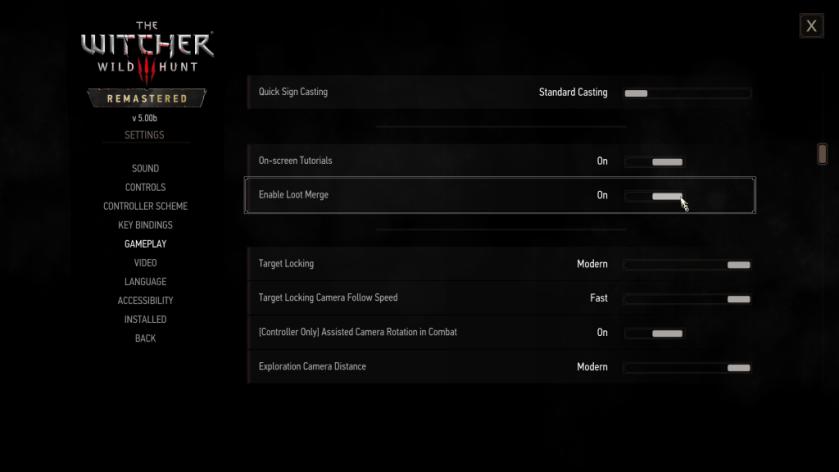
You might have started a fresh campaign and missed the tiny toggle buried in menus. How to enable Loot Merge in The Witcher 3: Remastered
- Open Settings from the main menu or pause menu while playing.
- Choose the Gameplay tab — that’s where CD Projekt Red keeps most player-facing options.
- Scroll down until you see Enable Loot Merge.
- Switch it on, then save your changes and return to the game.
If you prefer the old method, flip the same switch off. The toggle is immediate and doesn’t require restarting the session, though a quick save is never a bad idea when fiddling with settings.
One practical note: merged loot behaves the same whether you use keyboard and mouse on PC (Steam/GOG) or a DualSense/ Xbox controller on consoles; icons and button prompts change, not the mechanic.
I won’t tell you what to choose, but if you hate repetitive clicks and like a faster rhythm to combat-to-loot loops, Loot Merge is worth trying. Will you keep the old scavenger’s habit or let the game tidy your pockets for you?