
I remember the first time I blew a missile lock by accident: my HUD went red, my heart sped up, and for a breath I had no idea what to do. You can feel the aircraft tighten around a single decision. The jet becomes a coiled spring.
I’ve spent hours on the test range and in ranked lobbies so you don’t have to reinvent the wheel. You’ll get this—if you practice the timing and respect the aircraft’s limits. I’ll walk you through exactly how I set up controls, when I pull power, and which planes are worth grinding for.
On the range I watch the speed needle fall before I explain the move: How to perform PSM in Ace Combat 8: Wings of Theve
Short version: PSM isn’t a button combo you find in the options menu. It’s a rhythm between throttle, attitude, and patience. Think of it as a secret handshake between pilot and plane.
- Confirm your jet has PSM. Not every airframe in Ace Combat 8 supports it—use the list below or test in free flight on PlayStation or Steam.
- Bleed speed down to roughly 500 km/h but stop before an actual stall. The gauge should feel sluggish, not dead.
- Let the throttle rest so the aircraft settles toward neutral trim.
- Press throttle (Spacebar on default KB) and decelerate (Ctrl) at the same time to engage the High-G envelope.
- Wait about half a second in High-G. Don’t yank the stick up immediately—timing is the catch.
- Then press S to pitch up; the jet should rotate toward vertical. Hold until you’re approximately 90 degrees.
- Hit full throttle immediately to snap out of post-stall recovery and regain forward airspeed.
Two practical tips I repeat to students and in ranked play:
- Delay your pitch after High-G by about half a second—rushing the input is how I see players over-commit and spin.
- Keep speed under 500 km/h when initiating; higher speeds won’t let the aircraft enter the post-stall regime cleanly.
How do you do a PSM in Ace Combat 8?
You just read the sequence, but don’t expect a one-session mastery. Drill the maneuver in free flight for 20–30 minutes while using a controller or a HOTAS—Thrustmaster and Logitech setups map these inputs cleanly. If you’re on Steam or PlayStation, record the practice runs and review where the timing slips.
If you’re playing with a flight stick and want repeatable inputs, try mapping throttle and decel to separate hat switches or buttons. That small change removes finger-traffic on the keyboard and makes the half-second delay reliable.
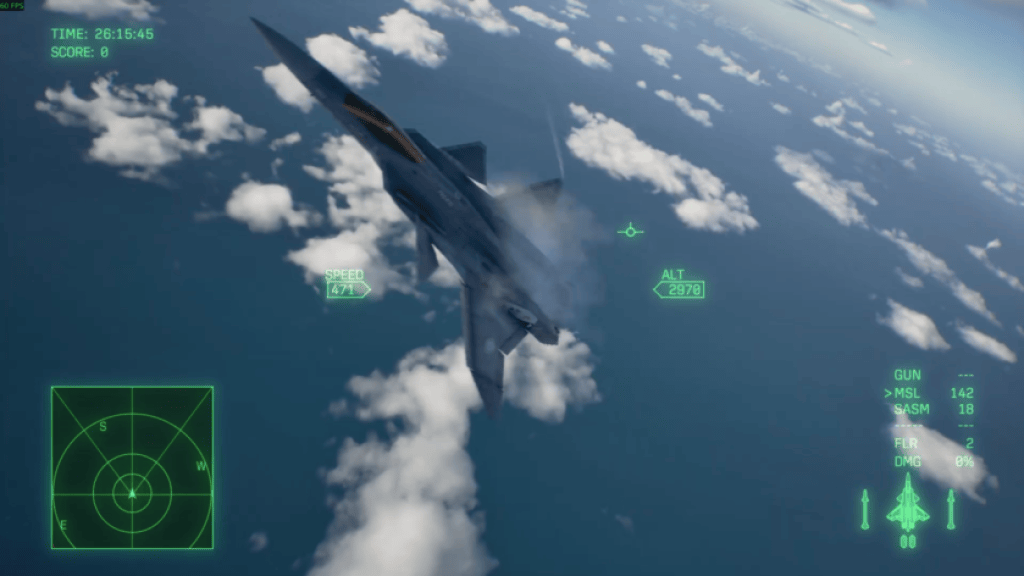
During playtests I logged which airframes pulled the trick: All PSM aircraft in Ace Combat 8: Wings of Theve
Below are the models I’ve verified have PSM. I’ve flown most of these on PS5 and Steam; your mileage may vary on modded builds or controller presets.
- ADFX-02 Morgan -Pixy-
- F/A-18F Super Hornet
- F-35C Lightning II
- FA-36 Game
- F-22A Raptor
- Su-57 Felon
- Su-35S Flanker-E
- Su-47 Berkut
- Su-33 Flanker-D
- MiG-29A Fulcrum
- X-40 Nightmare
Which aircraft can perform PSM in Ace Combat 8?
If you’re choosing a grind target, start with the F-22A or F-35C—both handle predictably in post-stall and are easy to fly on PlayStation controllers. Bandai Namco priced Deluxe and standard editions differently; the base game sits around $59.99 (€56) on launch windows, so pick your platform (PS5 or Steam) and controller setup before practice sessions.
Pro tip: watch Ace Combat creators and community leaders on YouTube and Twitch—players using Thrustmaster HOTAS often show the cleanest PSM executions. Study a few clips, then copy one pilot’s throttle timing until the motion becomes second nature.
PSM gives you two real advantages: a missile lock breaker and a violent reposition that can turn a tail-chase into a head-on. It’s hard to bait if you time it right, and the payoff in ranked matches is obvious—your opponents will blink first.
If you want, I can export my controller bindings for Thrustmaster and Logitech, or walk you through a 30-minute practice routine that guarantees cleaner attempts—what would you prefer?