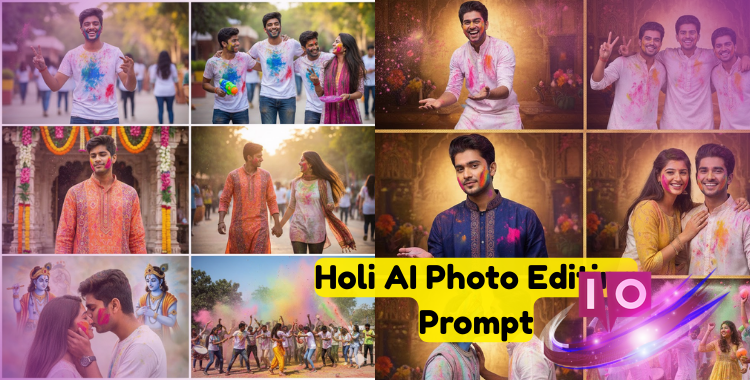
The packet of color landed on my brother’s shoulder just as the temple bell tolled—he froze, face streaked with magenta, and for a second I thought the photo was ruined. Then I realized the mess was the story; with the right AI prompt you can make that exact mess look cinematic instead of accidental. The smear across his jaw was a sunrise gone rogue.
Holi AI Photo Editing Prompt — 45+ Creative Prompts & Easy Guide
by Emma Collins 2026-02-26 14:58:14
Part 1. 45+ Holi AI Photo Editing Prompt
I watch feeds fill with the same safe shots every Holi—mid-air powder, smiling faces, predictable framing.
Below are 45+ concise prompt templates you can copy, tweak, and paste into Gemini, Midjourney, DALL·E, Leonardo, or your favorite generator. Use short modifiers at the end: “golden hour,” “high detail,” “cinematic DSLR,” or “ultra-realistic.” Replace subjects, colors, and settings to make variants.
- “Portrait of a young woman mid-laugh, pink and yellow powder in motion, shallow depth of field, golden hour, realistic skin tones”
- “Children racing through a narrow lane, rainbow dust cloud behind them, candid energy, warm tones, high shutter freeze”
- “Couple sharing a playful color smear, temple steps in background, soft bokeh, natural sunlight”
- “Elderly man with powdered face, close-up, fine wrinkles visible, muted background, documentary style”
- “Aerial festival scene, thousands of tiny color bursts, wide-angle, cinematic contrast”
- “Slow-motion splash of blue powder, studio black backdrop, dramatic side lighting, ultra-detailed particles”
- “Group jump shot, synchronized motion, vivid neon powders, festival energy, high saturation”
- “Silhouette against a cloud of magenta, backlit sun halo, high contrast, moody atmosphere”
- “Street vendor throwing green powder, candid portrait, motion blur, vibrant local market”
- “Close-up of hands clapping colored powder, textured skin, natural light, macro detail”
- “Monochrome portrait with a single colored powder splash (red), cinematic grading”
- “Teenagers on a rooftop throwing colors at sunset, warm palette, editorial feel”
- “Traditional tilak moment, priest applying color, respectful documentary framing”
- “Couple running through cloud of color, filmic grain, pastel palette, joyous expression”
- “Temple group celebration, wide-angle, golden hour backlight, candid smiles”
- “Neon powder portrait, blue and magenta contrast, studio lighting, fashion editorial”
- “Ethereal fog of teal and saffron, long exposure light trails, dreamlike composition”
- “Close-up face with powdered eyelashes, high detail, natural skin tones”
- “Street view with scattered flower petals and powder, documentary, natural light”
- “Child tossing powder directly toward camera, extreme freeze, hyper-realistic detail”
- “Couple silhouette on temple steps, color halo, cinematic dust walk mood”
- “Friends on motorcycle, color in the air, motion blur, cinematic grade”
- “Traditional costume change — before and after color, split-screen editorial”
- “Minimalist portrait with a single color streak across the cheek, high fashion vibe”
- “Color explosion over a riverbank, reflections, wide panoramic frame”
- “Close-up of powdered hands offering sweets, shallow depth, warm palette”
- “Tilt-shift festival scene, tiny people, huge color clouds, playful perspective”
- “Cinematic crowd shot from behind, powders rising like a tide, dramatic grading”
- “Portrait with colored smoke bombs, vibrant but soft, shallow focus”
- “Funny candid: pet covered in gentle color dust, natural expression, family photo feel”
- “Black-and-white background with colored Holi powders only, selective color technique”
- “High-fashion editorial with Holi powders as styling element, studio backdrop”
- “Close-up of a child’s smile with colorful specks on teeth and cheeks, natural light”
- “Group circle throwing colors upward, bird’s-eye view, radial composition”
- “Cinematic portrait with rim lighting and powdered halo, low-key aesthetic”
- “Temple detail shot, hands applying color to a statue, rich textures”
- “Night Holi scene with fairy lights and powder motion, long exposure streaks”
- “Color handshake: two people exchanging colored palms, shallow DOF, candid tone”
- “Portrait with powdered hair highlights, fashionable salon look, high detail”
- “Playful color smear across a bike rider’s face, urban backdrop, energetic mood”
- “Traditional festival attire contrasted with modern sneakers, colorful street realism”
- “Close-up of powdered footprints on a terracotta path, quiet aftermath scene”
- “Couple playful color smear, cinematic lens flare, documentary warmth”
- “Temple bells and colored dust settling at golden hour, meditative wide shot”


Part 2. How to Generate holi ai photo editing prompt photos
In my tests, the same prompt can produce five different results depending on the generator and settings.
I use a simple three-step flow: pick a tool, write a prompt with concrete details, then iterate. Below I name the tools I recommend and how each one behaves so you can match tool to outcome.
How do I create Holi photos with AI?
Write a full sentence that includes the subject, action, color palette, lighting, and style. Paste it into a model (I often start in Google Gemini to refine) and add modifiers like “high detail” or “cinematic.” Tweak until faces and powder behave as you want.
Which AI tool is best for Holi photos?
It depends on the look: Midjourney for artistic drama, DALL·E for natural faces, Leonardo AI for tight control, and Gemini to craft the prompt itself quickly.
What prompt makes Holi colors look realistic?
Include exact powder colors (pink, yellow, teal), lighting (“golden hour” or “soft daylight”), the camera type (“50mm DSLR” or “cinematic 35mm”), and an emotion word (“joyful,” “playful”). Add “realistic skin tones” to avoid oversaturated faces.
Step 1: Choose an AI Tool
I lean on each platform for specific reasons:
Gemini helps you craft prompts that include lighting, mood, and camera language. I use it to make prompts tool-agnostic, then paste the refined text into other generators.

2. Midjourney
Midjourney produces dramatic color splashes and stylized frames—my choice for editorial, dreamy, or exaggerated festival scenes.

3. DALL·E
DALL·E excels at realistic faces and balanced color. Use it when you need portraits that feel like a real camera captured them.

4. Leonardo AI
Leonardo gives control over styles and model choice—handy for high-resolution outputs destined for prints or posters.

Step 2: Write a Clear and Detailed Prompt
Short prompts waste iterations. I start with a base sentence and add five anchors: subject, action, colors, lighting, camera/style.
Example prompt I use as a starting template: “A young boy celebrating Holi with friends, throwing colorful powder in the air, vibrant street background, natural sunlight, realistic look, high detail, festive mood.”

Step 3: Generate the Image
Paste your refined prompt into the generator and run. Expect several iterations; each pass teaches you what words move the model toward your idea.
Step 4: Improve the Result
If skin tones or powder look off, add corrective tags: “realistic skin tones,” “soft powder edges,” “avoid oversaturation.”

Step 5: Download and Share
When the image reads like a story in a single frame, export at the highest resolution available and save your final prompt for later reuse.
Part 3. Tips & Best Practices to Generate Perfect Holi AI Photo Prompts
I’ve watched a dozen good shots fail because the prompt missed one small detail—usually lighting or subject definition.
- Be Specific About Who and What
Name the subject and their action: “boy throwing powder,” “elderly woman clapping hands,” “group jumping.” - Mention Exact Colors and Mood
Say “bright magenta,” “saffron yellow,” or “teal blue” and tag the mood as “playful,” “reverent,” or “energetic.” - Include Lighting and Style
“Golden hour,” “soft overcast,” or “studio rim light” changes results as much as swapping models. - Use Action Words
“Throwing,” “jumping,” “running” tells the generator to favor motion and particle detail. - Add Environment Details
Streets, gardens, temple steps—small context elements make a scene believable. - Try Multiple Angles
Prompt for “close-up,” “mid-shot,” and “wide-angle” to build a variety pack for social sharing. - Combine Elements
Stack ideas like “boy with friends + temple steps + slow-motion powder + golden hour” for unique results. - Use Clear Keywords
Words such as “Holi festival,” “powder,” “color cloud,” and “traditional” reduce ambiguity.
Let color drape the frame like a velvet cloak when you want drama without over-saturating faces. Small modifiers—”avoid halo artifacts,” “preserve realistic eyes”—stop common AI mistakes before they start.
Part 4. Make Your Holi Photos Stand Out with PixPretty Free AI Clothes Changer
At shoots I see people re-do outfits on every edit; swapping colors in post saves time and attention.
PixPretty’s free AI clothes changer (mentioned in many creator threads) is an easy way to try festival outfits or matching looks without a wardrobe change. Upload a photo, pick looks, and the tool remaps clothes to fit the Holi palette—handy for social profiles and coordinated group posts.

No design skills required: try multiple outfits, export the ones that read best, and keep the rest as backups.
Final Words:
My last hard drive still contains Holi shots I thought were trash until I rewrote the prompt and found a keeper.
If you take one step away from endless scrolling, make it this: write the shot you want in a single, specific sentence, then iterate. I’ll always favor a bold prompt over a timid one—what story will your Holi photo tell next?