
Update: added new Project Universe codes on April 3, 2026
The city lights blur as the kaiju charges through the downtown district; sirens are background noise and you feel a grin you didn’t know you had. I watched a server flood with players and realized how a handful of codes can tilt a match from routine to legendary. You’re about to learn which codes matter and how to claim them before someone else does.
I’ve tracked dozens of Roblox drops, chased Discord announcements, and poked at developer posts until they made sense. Think of this as a field guide: short, practical, and written so you can act fast. I’ll point to the reliable sources—Vex Games Studio, the official Discord, Roblox group pages—and show the exact steps that actually work.
All New Project Universe Codes
Observation: After every update, servers light up and players swarm for freebies.
These are the fresh codes added on April 3, 2026. Redeem them quickly—some don’t last long.
- BIGTHINGSSOON: 1000 G-Cells NEW
- BETAUPDATEYAY: 1500 G-Cells NEW
- ONEMILLIONVISITS: 1000 G-Cells NEW
- BUGFIXES: 500 G-Cells NEW
How do I redeem Project Universe codes?
Observation: The simplest mistakes are the ones that make you close the game in frustration.
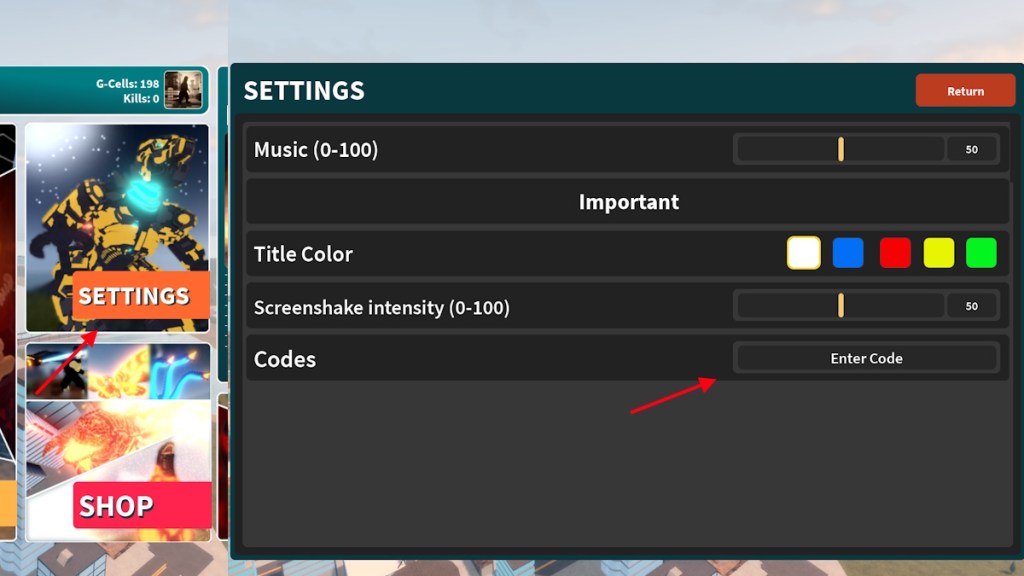
You need to be in the Vex Games Studio Roblox group before codes will accept. Once you’re a member, do this:
- Launch Project Universe on Roblox.
- Open Settings in-game.
- Type or paste a working code into the Enter Code box.
- Press Enter. A Code Redeemed message confirms success.
Expired Project Universe Codes
Observation: Items that once glinted today sit in the expired list like receipts in a junk drawer.
Right now there are no expired codes to report. When a code dies, I’ll move it here so you can stop wasting tries on it. Bookmark this page and check back after major updates or server events.
How to Get More Project Universe Codes
Observation: The community chat becomes a rumor mill the moment a teaser drops.
If you want new codes as soon as they appear, follow the primary sources: the Vex Games Studio group on Roblox, the Project Universe Discord, and the game’s Roblox page. I also recommend following developers on social platforms they use—many announce codes during livestreams and beta tests. The community is a wolf at the gates: protective, loud, and often the first to sniff out freebies.
Official links you should bookmark:
Why Are My Project Universe Codes Not Working?
Observation: You paste a code, hit Enter, and the only response is silence.
There are three common causes I see again and again:
- The Roblox group requirement isn’t met. Join the Vex Games Studio group first.
- You’ve already claimed the code on that account. Codes are usually one-use per account.
- The code has expired or was entered with a typo. Copy-paste directly from this page to avoid mistakes.
Why are my Project Universe codes not working?
Observation: The error message often tells the truth if you read it.
When a code fails, read the in-game response: it will usually say whether the code is invalid, already redeemed, or expired. If the message is missing, try relaunching Roblox and rejoining the group, then attempt redemption again.
If you’d rather try something else while waiting for new codes, check games like Be Dino, Become the Biggest Brainrot, or Get Fat to Splash on Roblox for similar rewards and community activity. I track these spaces regularly and update when something worth chasing appears.
So you’ve claimed the codes, fought a few matches, and maybe melted a skyline—what strategy did you use and would you admit to a chaotic rampage in the comments?