
I opened a crate in a quiet room and my pulse jumped — a flash of green text told me I hadn’t lost the roll. You know that rush: one code, one rare part, and suddenly the car on your screen breathes. I’ve chased codes across Discord channels and Trello boards so you don’t have to sit through the misses.
Updated May 25, 2026 — We added the latest codes!
I write this as someone who spends more time in Roblox than is strictly healthy. In Create a Car you don’t buy finished vehicles; you build them from scraps and luck. Each code is a coin in a treasure chest, and the parts boxes are miniature jackpots — use them and you speed up the build.
All Create a Car codes list
At my desk I keep a short list pinned to the screen so I can redeem fast.
Below are the codes that work right now. Redeem them in the Shop and watch your Gold and boxes stack. I update this page as AssemblerX Studios drops new codes on Discord and social channels.
- UPDATE2 — Redeem for a Lava Race Prep Box
- UPDATE1 — Redeem for 50k Gold
Active Create a Car codes
When I joined a live session on Discord, one code was posted and it emptied in minutes.
Active codes move fast. Paste these into the Shop’s Enter Code box and hit Verify — rewards appear instantly. Keep your mouse over your friend list; players often share codes in-game.
Are there any active Create a Car codes?
Yes. The current working codes are listed above and I refresh them whenever AssemblerX Studios announces new drops on their Discord or Trello board.
Expired Create a Car codes
At conventions I hear people grumble about wasted codes they found too late.
Right now there are no expired codes to show — every code we’ve tracked is either active or replaced with an update note. Keep this page bookmarked and check it after major updates.
How to redeem codes in Create a Car
At the game’s main menu the Shop button sits on the right, waiting for a click.
I’ll walk you through the fastest way to redeem so you don’t lose a single second to lag or typo.
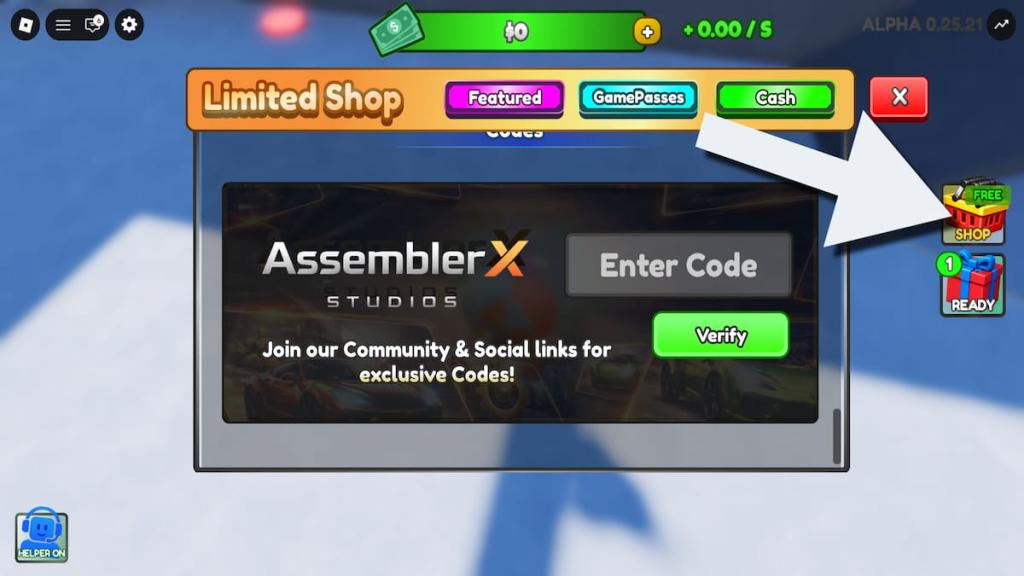
- Run Create a Car in Roblox.
- Click the Shop button on the right.
- Type a code into the Enter Code textbox.
- Hit Verify to receive your reward.
How do I redeem codes in Create a Car?
Follow the four-step list above. If a code fails, check Discord for typos or an expired date; new codes sometimes require a game update.
Official Wiki, Trello Board, and Discord Server information
At the AssemblerX Discord server the pinned messages often carry the newest drops and developer notes.
If you want the primary source, join AssemblerX Studios Discord. The devs post code windows, patch notes, and Trello links there. I also monitor Trello and the official Roblox game page for code leaks. For community finds, check Roblox groups and YouTube creators who run code hunts.
Where can I find Create a Car codes?
AssemblerX’s Discord, the Roblox game page, and Trello board are the best places to watch. I recommend following creators on YouTube and Twitter who specialize in Roblox codes for quick alerts.
Extra resource: We maintain a broader collection of Roblox codes and a separate Car Dealership Tycoon Codes list if you play other tycoon titles.
I’ve kept this guide short so you can redeem faster — are you ready to stop hoping for luck and start stacking parts in your garage?