
The PlayStation Store timer appeared on my feed like a flashing warning light. Within hours, forums filled with screenshots, angry support chats, and people threatening boycotts. You felt the panic: would your library go dark if your internet cut out?
I write about gaming systems and the ugly ways they change. You should know what this new PlayStation rule actually does, why Sony rolled it out, and what you need to do in plain terms — no panic, no myths.
You saw a 30-day countdown on a newly purchased game — what just happened?
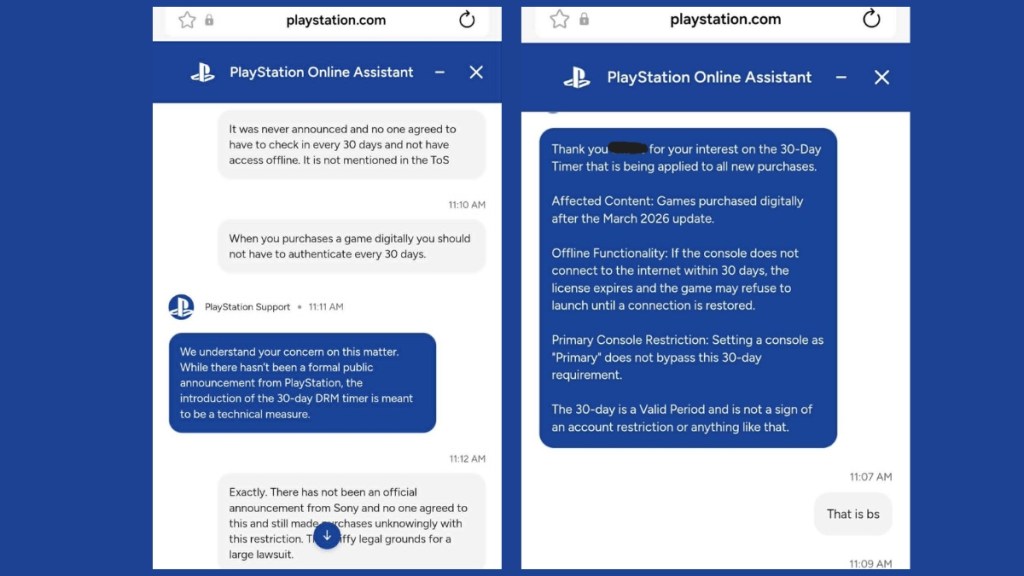
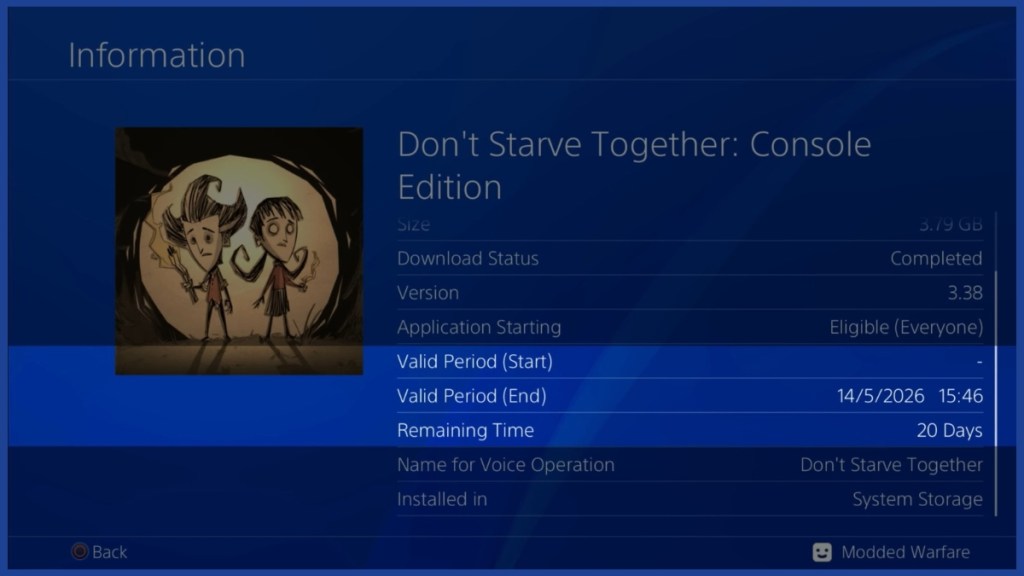
The red timer that showed up on PS4 and PS5 purchases in April 2026 started the fire. Gamers posted screenshots of a “30-day license timer” and some support agents seemed to confirm a monthly online check-in was mandatory.
What is the PlayStation 30-day DRM policy?
Short version: digital games bought after March 2026 are initially issued a temporary online license. That license carries a 30-day validation window. Connect your console to Sony’s servers at least once during that window and, if everything checks out, the temporary license becomes permanent. After that one successful check, the game behaves like any other digital title you own — playable offline without repeated verifications.
You read claims that games would stop working offline — did they?
People on social platforms reported games crashing after the timer expired; error messages about license verification spread fast. That fed the anxiety.
Will my games stop working offline?
Not if you complete the one-time check. The timer only matters during the initial 30-day validation period. If your console connects to PSN during that window and the license is confirmed, the title becomes permanent and playable offline. For most players who keep consoles online — via Wi‑Fi or a wired connection — this happens automatically without you noticing.
Physical discs and digital purchases made before March 2026 are unaffected. If you prefer a guaranteed offline copy, retail discs remain the clean workaround.
You noticed inconsistent answers from PlayStation support and social posts — here’s why communications failed
Multiple support agents gave different responses, and Sony didn’t announce the change clearly. The silence created a vacuum that rumor filled.
That confusion was worsened by reports that some users on jailbroken consoles were able to rip license files and keep them after refunds. The timing of PS5 ROM key leaks and custom Linux builds made Sony sensitive about license exploitation.
You want to know the reason behind the change — what was Sony trying to stop?
Retail staff pushed disc sales, gamers called out refunds, and security researchers raised alarms — the same pattern repeated across threads.
Sony’s likely target was refund-and-rip scams and exploits on modified consoles. Bad actors bought games through the PSN web store, extracted license data on hacked systems, refunded the purchase, and retained a working license. A 30-day temporary license prevents that loop: if the console doesn’t validate the purchase with Sony’s servers within the window, the ripped license can’t be converted into a permanent one. Think of it like a theater ticket stamped at the door — one validation makes the ticket real.
You need clear steps so your library stays playable — what should you do next?
If you buy a digital title, connect your console to the internet, launch the game, and let the store confirm the license during that first 30 days. For most players this is automatic.
If you travel or plan long offline stretches, open the new game while online before you go. Physical discs still avoid this process entirely and remain the straightforward offline option — which is why retailers like GameStop highlighted discs during the wave of concern.

You likely wondered if there’s a hack or workaround — can this be bypassed?
Reports of people slipping around the system on jailbroken consoles prompted this change. Sony closed the loopholes that allowed license retention after refunds.
Can you still bypass PlayStation DRM?
No reliable bypass exists for legitimately purchased digital games after this update. Setting a console as primary won’t skip the one-time check. The practical workaround remains buying physical discs if you need guaranteed offline access. The system is designed to stop the exact exploits that leaked PS5 ROM keys and amateur license hacking made possible — a security guard checking IDs at the gate rather than a perpetual patrol.
I’ve watched similar security patches roll out at Microsoft Store and Steam over the years; companies react when a loophole becomes a tool for fraud. For now, your best play is simple: connect once, confirm the license, and you’re safe.
What will change next season when PS6 arrives, and will digital ownership keep shrinking or recover — what do you think?