
I watched my teammate frantically search menus after a raid, realizing a rare Sprite had slipped through his fingers. You felt that little rush—the cost, the regret—because Fortnite’s in-game tracker is vague. I stopped letting chance decide what stayed in my vault.
The solution I use is surgical, fast, and sharable: the Fortnite Sprite Checklist on SpriteLocker. It turns messy collects into a clear ledger and makes trading with friends painless.
What is the Fortnite Sprite Checklist?
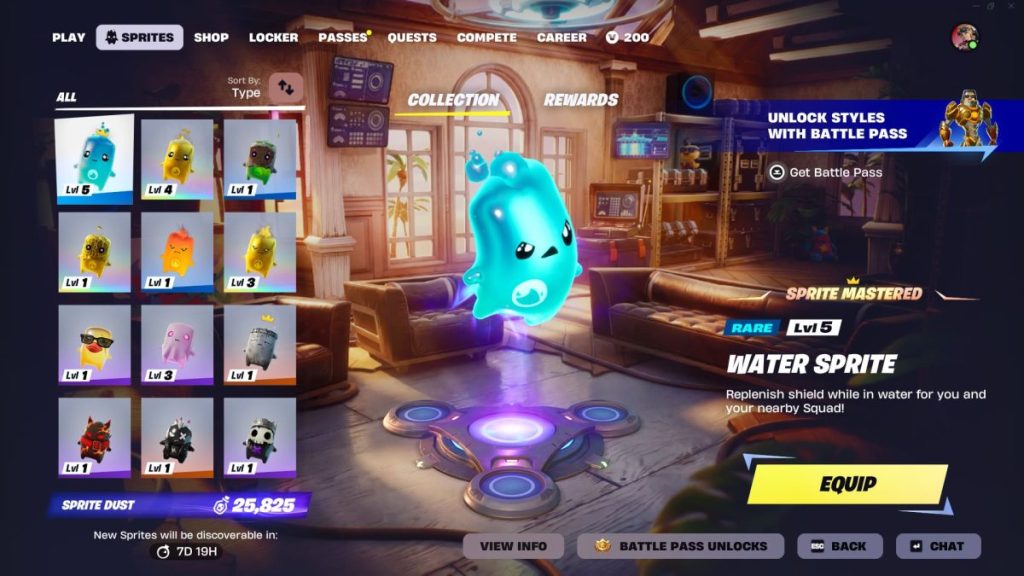
I saw a Twitter thread last week where a streamer mapped his entire Sprite haul with screenshots and timestamps. The Fortnite Sprite Checklist is that discipline packaged for you: a web-based tracker that lists every Sprite, shows rarity and type, and saves your ticks so you never forget what you own. It plugs the gap Epic Games left open and gives you certainty when trading or extracting Sprites.
Why it matters: the in-game UI shows what you have poorly. SpriteLocker lets you mark collection progress, see the rarest missing pieces, and calculate Sprite Dust needed to re-summon—so you can weigh risk before you try an Extraction Gizmo.
How to Use the Fortnite Sprite Checklist
You probably open Fortnite, pause, and realize the internal system won’t tell you where your rare Sprites hide. Start at spritelocker.com, take in the layout, then follow these quick moves that turn guesswork into control.
- Collection Progress: Click a Sprite and the page updates your totals automatically. It separates by rarity and type so you can spot gaps at a glance.
- Rarest Still Missing: This panel highlights what to hunt for—where to search Sprite Chests and what to ask for when trading on Discord or X (Twitter).
- Dust Calculator: As you tick Sprites off, the site shows how much Sprite Dust you’d need to re-summon them. That number tells you what you’re gambling when you hit an Extraction Gizmo.
- Export Image: Use this to make a sharable snapshot of your collection. Paste it into a Discord channel, DM it on X, or drop it into a Fortnite party chat to compare with friends.
Think of the checklist like bringing a compass into fog—sudden clarity in a messy map. Use it before trades, before extractions, and anytime you want to keep a clear record of value in your inventory.
Can you access the Fortnite Sprite Checklist in-game?
No. The checklist lives outside Fortnite as a third-party site. That separation is a feature: you can export images, screenshot lists for Discord, and keep a permanent record that persists beyond the game’s UI. For direct game actions, you’ll still use Epic Games’ menus, but the checklist informs every decision.
Can you obtain Sprites from the Fortnite Sprite Checklist?
No. The site doesn’t grant Sprites or change drop rates. It gives you situational awareness: where to look for specific Sprites and when a trade is worth making. Use it as your trade binder when arranging swaps on platforms like Discord, X, or community forums.
How to Share Sprites With Your Friends
I watched a squad use a single exported image to settle who had duplicates and who needed a specific rare Sprite. The easiest route is Export Image from SpriteLocker—paste that into your group’s Discord channel or a party chat and let trading begin.
- Prep your offer: Mark duplicates and compute Dust costs so your partner knows what’s at stake.
- Use screenshots: If someone asks for verification, a timestamped image from SpriteLocker beats a clipped in-game screen.
- Negotiate in public channels: A transparent Discord server or X thread reduces scams and builds reputation; many communities keep simple trade logs or pinned offers.
Treat the checklist like a ledger that refuses to lie—clear, sharable, and hard to argue with when you’re brokering swaps.
I’ve shown you how to stop guessing and start trading with confidence; now tell me, will you keep losing rare Sprites to chaos or will you start sharing a proper record with your squad?