
You sprint through a Locust nest, heart hammering, the exit barely in sight. I’ve chased tiny code drops that feel like a flashlight in a burned-out theater. Grab the right code and a desperate run turns into a payday; miss it and you’re back to scavenging.
I play these drops so you don’t have to waste time. Below I list what’s live right now, how to claim it in seconds, where the next crumbs usually fall, and the quick checks that solve almost every broken code.
An easy scan of the patch notes will often show a fresh code after a milestone
- Community!: 100 Keys (NEW)
These Keys are the fastest way to buy useful rewards and shave off risky, time-consuming runs in MM2 of The Locust on Roblox. Treat each confirmed code like extra ammunition for your next escape.
Most players check the UI first—codes live in the corner of the screen
How do I redeem MM2 of The Locust codes?
Open MM2 of The Locust on Roblox and follow these steps:
- Launch the game on PC or mobile.
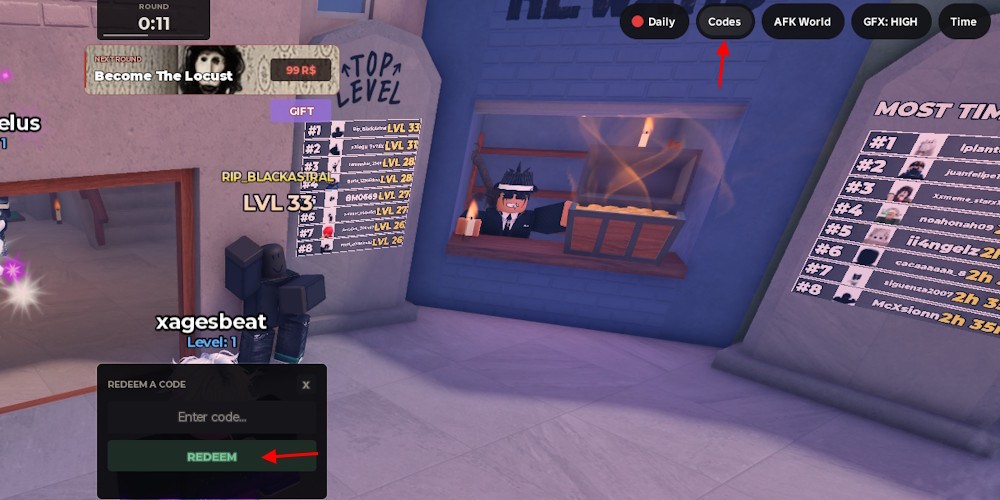
- Tap the Codes button in the top-right corner of the HUD.
- Type the code exactly as shown and press Redeem.
- If it succeeds, Keys will appear in your account immediately.
A quick scroll through official channels usually reveals where the devs drop freebies
The most reliable sources for new MM2 of The Locust codes are the game’s official Discord server and the Roblox community page. The Discord often posts immediate drops in a codes channel after updates or when a milestone is hit.
The Discord server acts like an old radio that crackles with announcements—join it, enable notifications, and you’ll hear new codes first. Also follow the developer on Twitter/X and check the game’s Roblox group for pinned posts.
If you want broader coverage, watch these places:
- MM2 of The Locust Discord server — primary source and codes channel.
- Roblox Community and the game’s social feed — for patch notes and official posts.
- Murder Mystery 2 communities and general Roblox Game Codes aggregators — similar games often cross-promote (try searching “Murder Mystery 2 codes” and “Roblox game codes”).
A quick glance usually reveals whether the problem is a typo or an expired drop
Why isn’t my MM2 of The Locust code working?
Most failures are simple: a missing character, wrong capitalization, or an expired code. For example, the code Community! requires the exclamation mark—omit it and it won’t redeem.
If you’ve typed everything correctly and it still fails, the developer may have disabled the code after a brief window. Check the game’s Discord and Roblox group to confirm whether the drop is still active.
If you prefer a shortcut, follow the official channels and copy/paste codes instead of typing them manually; that fixes more than half of the problems I see.
Want to risk chasing every random drop, or are you going to start treating codes like a planned resource for your next run?