
The firefight lasts two seconds and then you run out of ammo. I sat back, cursed, and opened a console window—because I refuse to grind for bullets when the story is peaking. You can patch the interruption; I’ll show you how.
All Cyberpunk 2077 Console Commands and Cheat Codes
On my desk a half-drunk coffee cools while Night City burns on the monitor — players spamming grenades but missing one tool that fixes everything. I’ve tested these commands across patches and I’ll tell you which ones are safe, which ones bend the game, and which ones are better left alone.
You’ll find the full command list below: HP tweaks, carry capacity, speed, infinite stamina, levels, money, ammo, Cyberware expansion, perk and attribute consumables, and a catch-all to add any item by its ID. I use CyberEngineTweaks and GitHub as my go-to tools; if you play on Steam or GOG, the install path differs slightly and I’ll walk you through it.
| Console Command | Description |
| Game.ModStatPlayer(“Health”, “x”) | Set custom HP. |
| Game.ModStatPlayer(“CarryCapacity”, “x”) | Set custom carry capacity. |
| Game.ModStatPlayer(“MaxSpeed”, x) | Change the default speed of the player. |
| Game.InfiniteStamina(true) | Infinite Stamina. |
| Game.SetLevel(“StreetCred”,x,1) | Set custom street cred level. |
| Game.SetLevel(“Level”, x) | Set custom level of the player. |
| Game.AddToInventory(“Items.money”, x) | Add money. |
| Game.AddToInventory(“Ammo.x”,x) | Add Ammo. |
| Game.AddToInventory(“Items.CWCapacityPermaReward_Legendary”) | Provides players with the ability to increase their maximum Cyberware. |
| Game.AddToInventory(“Items.PerkPointSkillbook”) | Perk Points can be added as consumables. |
| Game.AddToInventory(“Items.AttributePointSkillbook”) | Maximizes Attribute points. |
| Game.AddToInventory(“Items.x”,1) | Add any item in Cyberpunk 2077. |
| Game.TeleportPlayerToPosition(x, y, z) | Teleport the player to a specified coordinate. |
For some commands you’ll need item IDs, ammo identifiers, or coordinates. I’ve grouped those below so you can copy-paste and get back to play without hunting through JSON files. Think of these entries as a precision toolset — like a surgeon’s kit — that stops unnecessary busywork.
What cheat codes add ammo or items?
I remember a raid where every magazine went empty and the tension turned from fun to frustration; that’s the exact moment you want these commands. Use the ammo IDs to refill specific types instantly.
| Ammo Type | Command |
|---|---|
| Handgun ammo | Game.AddToInventory(“Ammo.HandgunAmmo”, 500) |
| Rifle ammo | Game.AddToInventory(“Ammo.RifleAmmo”, 700) |
| Shotgun ammo | Game.AddToInventory(“Ammo.ShotgunAmmo”, 100) |
| Sniper rifle ammo | Game.AddToInventory(“Ammo.SniperRifleAmmo”, 100) |
| Common components | Game.AddToInventory(“Items.CommonMaterial1”, 1000) |
| Uncommon components | Game.AddToInventory(“Items.UncommonMaterial1”, 1000) |
| Rare components | Game.AddToInventory(“Items.RareMaterial1”, 1000) |
| Epic components | Game.AddToInventory(“Items.EpicMaterial1”, 1000) |
| Legendary components | Game.AddToInventory(“Items.LegendaryMaterial1”, 1000) |
Can I teleport to locations using console commands?
Once, while testing a quest, I jumped straight to a mission room to verify NPC scripting — teleporting saved hours. Below are coordinates I use frequently; paste them into Game.TeleportPlayerToPosition(x, y, z).
| Location | Coordinates |
|---|---|
| Megabuilding H8 Apartment | -690.816, 823.984, 324.856 |
| Japantown Apartment | -786.091, 975.949, 29.828 |
| Glen Apartment | -1517.805, -969.188, 91.200 |
| Northside Apartment | -1504.078, 2228.468, 23.798 |
| Corpo Plaza Apartment | -1607.948, 350.182, 50.997 |
| V’s Penthouse (Path of Glory) | -1340.495, 1189.842, 116.618 |
| Afterlife | -1455.068, 1010.975, 17.824 |
| Clouds | -625.404, 794.564, 132.252 |
| Arasaka Tower | CEO Level | -1437.788, 157.247, 565.346 |
| Arasaka Tower | Jungle Floor | -1449.256, 118.300, 321.639 |
| Arasaka Tower | Johnny’s Interrogation Room | -1389.446, 141.266, -139.361 |
| Arasaka Tower | Orbital Station | 4743.650, -1091.755, 1310.439 |
| Time Machine Guitar Room | -1843.676, -575.336, 7.754 |
| Voodoo Boys’ Subway | -1662.758545, -1867.002563, 54.982040 |
| Hanako’s Estate Bedroom | 290.197662, 1022.468079, 229.920425 |
How to Use the Console in Cyberpunk 2077
At a modding meetup I watched a veteran drop a one-line fix and every player cheered — it was that easy. You don’t get an in-game console by default; you add one with a small, trusted mod and a few file moves.
The community standard is CyberEngineTweaks. I use the release builds on GitHub. Install steps I follow:
- Download Cyber Engine Tweaks from the GitHub releases page linked above.
- Find your Cyberpunk 2077 install folder:
- GOG users: GOG Games/Cyberpunk 2077
- Steam users: Steam Library/steamapps/common/Cyberpunk 2077
- Extract the CyberEngineTweaks files into the game folder — overwrite when prompted.
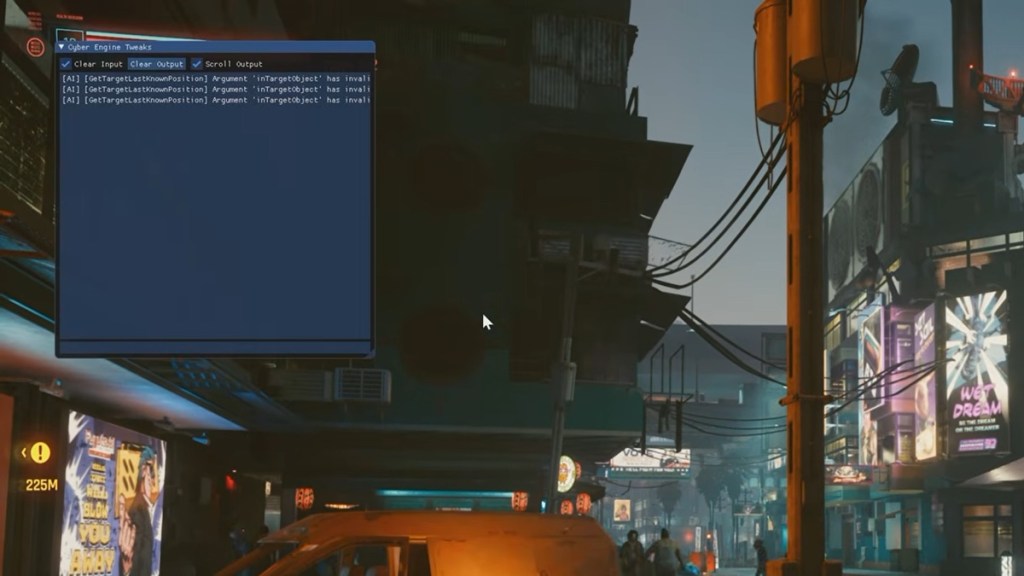
- Start Cyberpunk 2077 and press the tilde key (~) to open the console. If nothing appears, check that your antivirus didn’t quarantine the DLLs.
How do I use console commands safely?
I break rules only when testing; in your playthrough, I recommend saving before major commands. Some entries change progression flags — use them to skip grinding, not to skip story beats you care about. If you want a no-risk solution, copy your save folder before experimenting.
For reference, tools in the scene include CD Projekt Red’s patches, CyberEngineTweaks on GitHub, and community hubs like Nexus Mods and the Steam Workshop where modders publish updated utilities. Treat mods like plugins on a server: one bad file can destabilize the whole game.
I’ve shown you the commands, the ammo list, the teleport coordinates, and how to install the console. Use them to tailor play, fix a broken mission, or test builds. Do you think hitting the console turns playing into cheating, or is it just smart time management?