
Call of Duty: Modern Warfare 4 booted, I clicked Multiplayer, and the game hit me with Attestation Failure. The match screen refused to load and the DMZ was locked out. You feel the clock ticking while the error message sits there like a judge.
I fixed this on three different rigs and stripped the process down to what actually matters. I’ll walk you through the BIOS flips, Windows checks, and PowerShell commands so you can stop staring at “New Key Failed to Generate.” No jargon, just the exact steps I used.
My first PC refused to join a game after a patch. Here’s how I solved the New Key Failure and Attestation problems.
If Multiplayer or DMZ are greyed out, that message means Windows or your firmware can’t prove your device is trusted. Activision’s online modes require attestation; without it you can’t play online.
Why does “New Key Failed to Generate” happen?
Most of the time it’s because Secure Boot is off or TPM 2.0 isn’t provisioned. Think of attestation like a security stamp: if the hardware or OS can’t make the stamp, the server refuses entry.
On one laptop I found Secure Boot disabled by default. Turn it on in the BIOS.
Restart, press Delete (or the key your motherboard vendor uses) and open BIOS/UEFI. On MSI it’s under Security/Boot; other brands place it in a similar section.
- Set Secure Boot to Enabled.
- Save and exit the BIOS.
- Windows check: press Win+R, type msinfo32, and confirm Secure Boot State says On.
Enabling Secure Boot usually flips TPM 2.0 on as well; if it doesn’t, keep reading.
Do I need TPM 2.0 for Modern Warfare 4?
Yes—Modern Warfare 4 requires TPM attestation. TPM is the tiny chip that proves your PC is genuine; without a provisioned TPM, the game won’t accept your device. It’s like a car with a flat tire—you can still drive, but you won’t get far.
I once bricked a board by skipping a BIOS update. Update carefully, but do it.
Motherboard firmware can fix TPM and Secure Boot quirks. Go to the official site for your board (ASUS, MSI, Gigabyte, etc.) and download the latest BIOS for your exact model.
- Put the BIOS file on a FAT32 USB stick.
- Enter BIOS, find the Flash/Update utility, and run the update.
- Do not power off or remove the USB until it finishes.
If you prefer vendor tools, many makers provide Windows utilities (e.g., MSI Live Update, ASUS EZ Flash) that simplify the process.

I ran Activision’s attestation tool and it flagged the same failures. Here’s what to run next.
Download and run Activision’s official Attestation Check (https://support.activision.com/articles/trusted-platform-module-and-secure-boot). It will tell you if the system can create the required keys.
- Open Command Prompt as admin and run: tpmtool getdeviceinformation. Look for Ready for Attestation and Is Capable for Attestation. Both must read True.
- If they read False, run: sfc /scannow to repair system files.
- Also run: DISM /Online /Cleanup-Image /ScanHealth if sfc finds issues.
Restart and re-check. If the tool still offers to generate a key and fails with “Removing new key failed to generate,” move on to PowerShell provisioning.
- Open PowerShell as admin.
- Run: Get-Tpm and Get-TpmEndorsementKeyInfo to inspect current status.
- Then run: Enable-TpmAutoProvisioning.
- Finally run: Initialize-Tpm -AllowClear -AllowPhysicalPresence.
After those commands you may see TpmReady as False and RestartRequired as False. Reboot, open PowerShell again, and run Get-Tpm and tpmtool getdeviceinformation. The flags should flip to True.
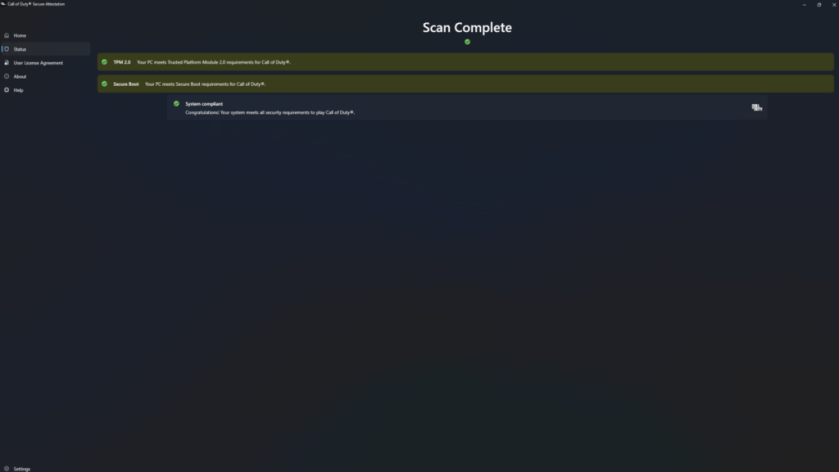
Once those flags are True, open the Activision Attestation Check again and run a scan. The app should show green across the board.
I hit one stubborn machine that still failed key generation. Final checks and notes.
If the problem persists, check these items in order:
- Confirm Windows build and updates—some TPM fixes are distributed via Windows Update.
- Double-check BIOS settings for an item called “TPM,” “PTT” (Intel), or “fTPM” (AMD) and set it to Enabled.
- Use the motherboard vendor’s support forums or contact Activision support if the Attestation tool gives unclear results.
If you prefer a visual guide, many creators on YouTube and OEM support pages walk through BIOS menus for MSI, ASUS, and Gigabyte boards. Activision’s support article is the authoritative reference for attestation behavior.
I kept the steps lean because every extra minute staring at an error screen costs a night of matches—would you sacrifice another session to a fix you can do in 15–30 minutes?