I watched a new trader fling a common crate at the counter and walk away, stomach sinking when a Prismatic slipped through his fingers. You know that hollow kick—hours of grinding, one tiny roll deciding whether you break even or bank a fortune. I want to save you that bruise.
Consider this guide a map through the early grind. I’ve tracked every working code, tested the redeems, and written what actually moves the needle. You’ll get the active codes, the fast redeem path, and the places people post the real updates.
All Trade Up codes list
I’ve seen players stand in the trading hall and reload the same crate window until they miss lunch. Here’s the clean list of codes that will add luck, spins, or cash to your kit right now—redeem them before they expire.
- update2 — Redeem for Free rewards (New)
- generosity — Redeem for Lucky Box
- SORRY — Redeem for Lucky Box
- UPDATE1 — Redeem for 2x Money (10 min), 1.5 Crate Speed (10 min), and 1 Spin
- FEELINGLUCKY — Redeem for Lucky Box
- RELEASE — Redeem for $2,500 (€2,300), 1 Spin, and 2x Money (1 min)
- LUCKY7 — Redeem for +7 Luck (7 mins)
Are there any active Trade Up codes right now?
Yes. The codes above are live as of the update timestamp. I recommend copying the newest ones first—game developers retire codes without notice. If you’ve installed Codes Hunter (Chrome Web Store) or follow Problox and Moyens I/O coverage, those tools push live alerts faster than a forum thread.
How to redeem codes in Trade Up
I clicked Redeem for a friend while we were both on voice chat and watched the spin meter jump—small wins add up fast. Follow these five steps and you’ll have freebies in under a minute.
- Join the Kitten Paw Studios Roblox group.
- Start Trade Up in Roblox.
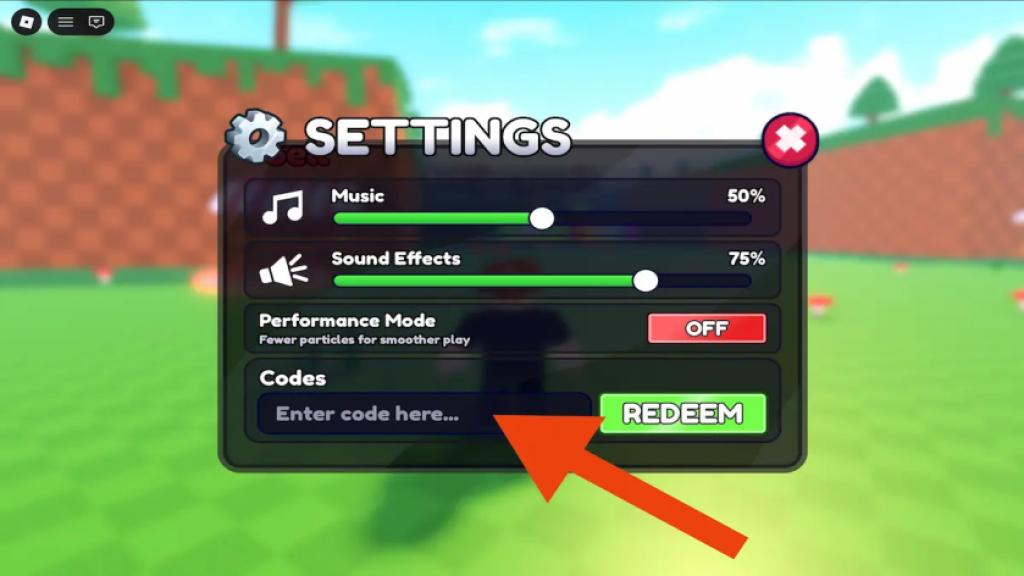
- Open Settings on the left side of the screen.
- Enter your code in the Enter Code Here field.
- Hit Redeem and claim your freebies.
How do I know a code is still valid?
Watch the in-game confirmation after you hit Redeem—no popup, no reward. Outside the game, trust three sources: the official Kitten Paw group, Problox newsletter, and real-time browser tools like Codes Hunter from the Chrome Web Store. I keep an eye on Moyens I/O and Bloxinformer posts for major drops and community-confirmed redeems.
Official Wiki, Trello board, and Discord server information for Trade Up
I checked all the usual developer channels and found a thin trail of public announcements. The real updates live in the Roblox group and the occasional Dev post—the studio hasn’t posted a public Discord invite or a Trello board for this experience.
If you want passive alerts, subscribe to Problox (their newsletter often bundles codes and patch notes). For live hunting, the Codes Hunter browser extension copies and flags codes immediately—use it if you crave speed. Remember: the fastest players don’t always win, but they control momentum.
Where should I follow Trade Up for the fastest code alerts?
Join the Kitten Paw Studios Roblox group. Combine that with a Problox subscription and Codes Hunter installed on Chrome for a solid alert stack. Moyens I/O and Bloxinformer are reliable for curated coverage and context.
Quick tips from someone who tests codes daily
I once watched a player waste two spins on a near-miss and then redeem a code that paid for both spins back. These small behaviors matter.
- Redeem new codes immediately—their lifetime is unpredictable.
- Stack short buffs before a big roll: even a minute of 2x Money or extra Luck can change outcomes.
- Keep spare spins for prime crate releases; a $2,500 (€2,300) reward in a drop can flip your inventory overnight.
These codes are a stacked deck when you need the house to lean your way. If you want a constant feed of new codes, install Codes Hunter, follow Problox, and watch the Kitten Paw group for developer posts.
Will you press Redeem now or keep grinding and hope for better luck?