
I froze as my Aniimo went down to a level-up enemy and the battle screen flashed red. You can feel the game tiptoe forward the moment you realize a little icon holds the answer. I hunted that icon and learned a faster way to turn underpowered teammates into game-changing partners.
You and I both want results without wasting runs. Evolving Aniimo is the single fastest shortcut to stronger stats, new skills, and fewer frustrating wipe screens. Below I’ll show you where that tiny button hides, what each evolution asks for, and the platform quirks that trip players up.
How do you evolve Aniimo?
Most players squint at the Aniimo Management screen and miss the tiny cat-shaped icon.
Here’s the quick road map I use when I need an immediate power jump. Open the menu (button location changes by platform—Switch, PlayStation, Xbox, Steam and Steam Deck all label it slightly differently). Head to Aniimo Management, where your roster is displayed across inventory and active team slots. Pick the Aniimo you want to improve.
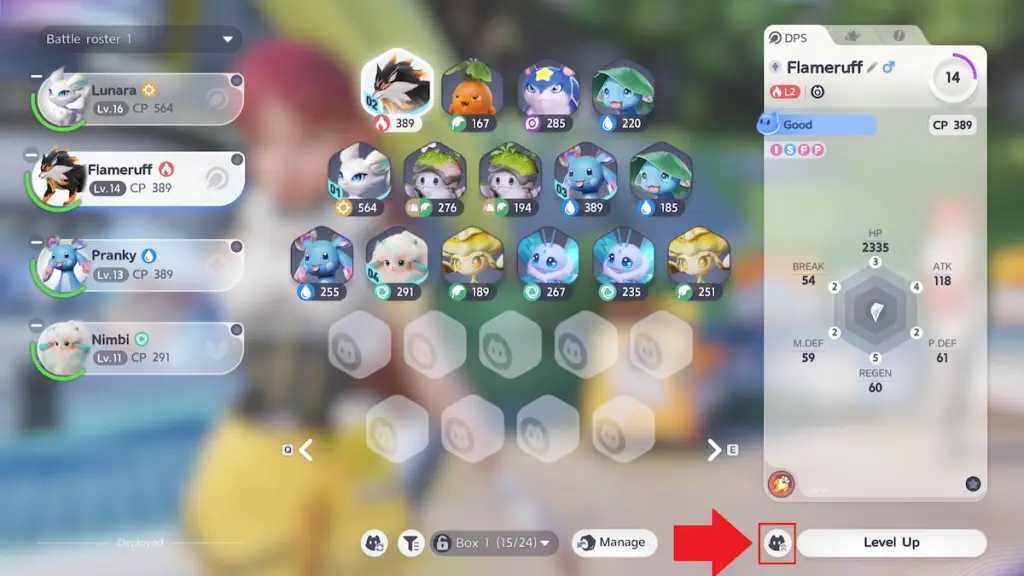
Look for the small circular cat-shaped icon with three arrows. It sits near the bottom-right of the Aniimo detail card, slightly left of the Level Up option. Click that icon and the evolution screen appears. From there you can press the large Evolve button in the bottom-right once requirements are met.
- Open the menu. The menu button sits in the top-right on every platform; its label and controller button will vary (check the Steam, Switch or PlayStation overlays if you’re unsure).
- Find Aniimo Management. It’s on the top row of the menu, between Inventory and the minimap icon.
- Select your Aniimo. The management screen shows all Aniimo in your inventory and active team—tap the one you want.
- Tap the evolve icon. If you don’t see it, that Aniimo can’t evolve yet. Helion and Lunara are notable exceptions: story progression gates their evolutions until you reach a specific plot beat.
- Confirm on the evolution page. The final Evolve button in the bottom-right completes the process when all requirements are satisfied.
Evolving an Aniimo is a vintage radio: find the right frequency and the signal snaps into focus.
How do you evolve Aniimo on Switch, Steam, or console?
Controls differ by platform, but the flow stays the same—menu, Aniimo Management, select Aniimo, tap the cat-arrow icon. On Switch the + or – opens the menu; on PlayStation and Xbox it’s the Menu/Options button; on PC/Steam use the on-screen UI or the Esc key. If the icon is greyed out, check the evolution requirements before pressing the final Evolve confirmation.
Where to find evolution requirements in Aniimo
Players often assume evolution is purely level-based until a missing item stops them mid-press.
Every Aniimo has its own checklist you must clear before evolution. To see that list, tap the cat-arrow icon to open the evolution page; the requirements appear in the upper-right corner. You cannot progress past this screen until every listed requirement is satisfied.
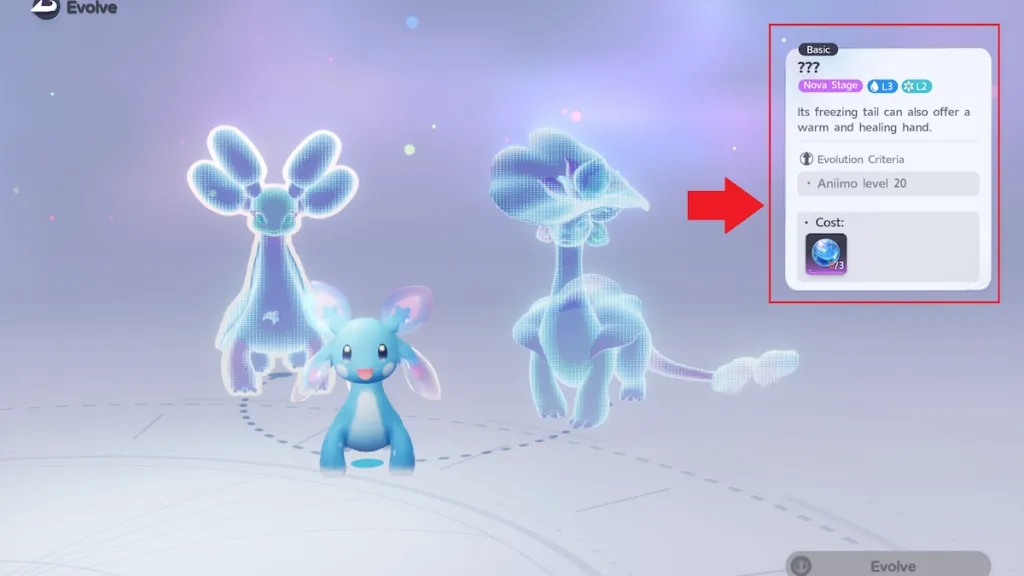
Requirements typically mix three elements: minimum level, specific items, and sometimes a story gate. Items show by icon and name; if an item is rare, you’ll find it listed where such drops happen—check dungeon loot, vendor stock, or event rewards.
Where can I farm evolution items for Aniimo?
Check the item description for drop locations, then target those zones. Community hubs like the Aniimo Discord, the Moyens I/O guide thread, and Reddit flair pages list spawn tables and vendor rotations. If a vendor sells a needed item, compare prices across settlements before buying—market caps can vary between towns.
Can every Aniimo be evolved?
Almost, but not immediately. Some Aniimo require a plot point, like Helion and Lunara, before their evolve option becomes available. Others need rare items or a high level. If the evolve icon is missing entirely, that Aniimo is either permanently non-evolving or locked behind story progress.
Think of evolution as a ladder of worn stone; each rung steadier than the last.
If you want to keep your team competitive fast, track requirements as soon as you recruit a new Aniimo and bookmark community guides on Steam, Moyens I/O, and Reddit—will you let an overlooked item be the reason your team stalls?