
Update: added new Mojave Valley codes on February 23, 2026
I was three minutes from a job payout in Mojave Valley when my balance blinked red — I felt that small, familiar panic. You know the one: you want to drive, buy, or hang out, but the game keeps asking for cash. Then a code drops into chat like finding a folded twenty under the couch, and the math suddenly tips in your favor.
Mojave Valley Codes (February 2026)
I watched the player count spike after the latest patch and saw people rushing to claim rewards.
Here’s the short version you can act on right now: the developers added a fresh code on February 23, 2026. I list the working code first, then the expired ones so you don’t waste time typing what’s dead.
All New Mojave Valley Codes
On my server the new code showed up in the news channel minutes after deployment.
- LUNARYEAR: 15,000 Cash NEW
What are the latest Mojave Valley codes for free rewards?
The only live code confirmed the day this was updated is LUNARYEAR (added February 23, 2026). Use it for a one-time 15,000 in-game cash boost — a simple way to skip grind cycles and buy the car or outfit you’ve had your eye on.
Expired Mojave Valley Codes
I still see players pasting old keys in chat; they expect miracles.
Those codes no longer work. Save your clicks and copy this expired list for reference:
- MOJAVERETURNS
- LIKES150
- STREAMPF2
- LASTWORD
- HALLOWEEN
- MIYLOTANKED
- TANKLATER
- BURNTKITCHEN
- TWOMILLIONVISITS
- LIKES3500
- WINTER
- CATALINAISLAND_TANKED
- HYDROLOCKED
- NEWYEARS
- DELAYED
- PRESSPRESS
- BUGFIX
- BURNTKITCHEN
How to Redeem Mojave Valley Codes
On my last play session I watched a friend redeem a code in under ten seconds.
Follow these steps and you’ll get your reward fast:
- Launch Mojave Valley on Roblox.
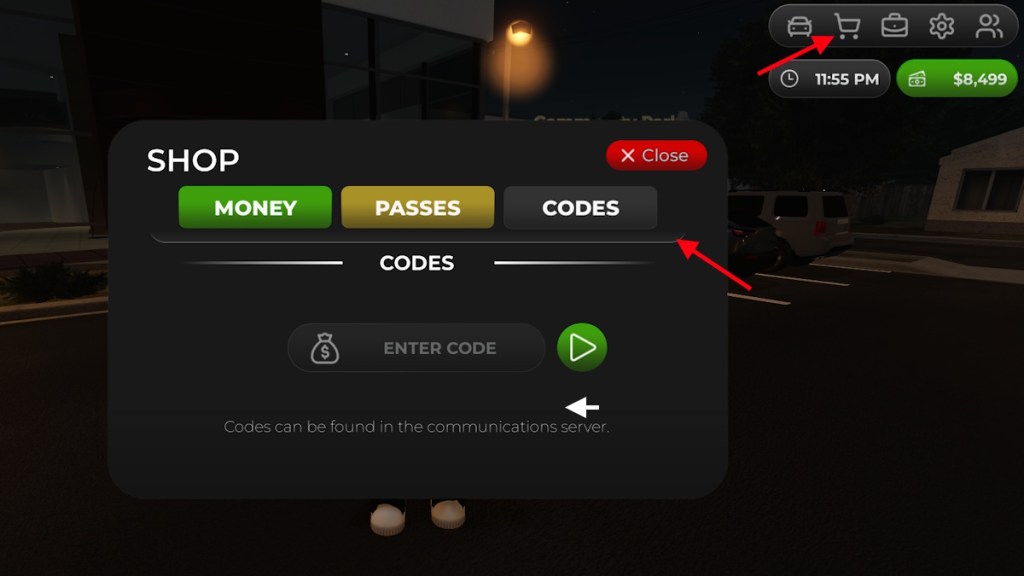
- Click the Shop icon at the top right.
- Choose Codes.
- Paste a working code into the Enter Code box (case-sensitive).
- Hit the Arrow button or press Enter to claim your prize.
How to Get More Mojave Valley Codes
I check three places when new codes drop: the game’s Discord, the Roblox description, and the developer’s social posts.
If you want a steady stream of codes, do this:
- Bookmark this page and refresh after major updates.
- Join the Mojave Valley Discord and watch the news channel for instant alerts.
- Follow the devs on Twitter/X or YouTube for teasers and event announcements.
- Join the Roblox group for in-game announcements and occasional group-only promos.
Tools and platforms that matter here: Roblox, Discord, Twitter/X, YouTube — these are where codes and sneak peeks surface first.
How do I redeem Mojave Valley codes?
Use the Shop > Codes flow in-game; copying the code from a trusted source avoids typos. If the button doesn’t respond, try rejoining the server or restarting Roblox.
Why Are My Mojave Valley Codes Not Working?
Yesterday I saw five players in a row paste a brand-new code and get an error message.
Common failure modes and quick fixes:
- Typos or extra spaces — always copy/paste from a verified source.
- Expired key — codes are often time-limited or one-use.
- Server propagation — new codes can behave inconsistently for the first hour; wait and retry.
- Case sensitivity — most codes require exact capitalization.
- Client issues — close Roblox and reopen, or switch servers.
If you’ve tried everything, post in the Mojave Valley Discord’s support channel; devs or community mods usually respond faster than Roblox support.
Why can’t I redeem codes in Mojave Valley?
If redemption keeps failing, the most likely culprit is expiry or a fresh-code delay on some servers. Give it 30–60 minutes and try again.
What should I do if a code is expired?
Expired codes stay expired — but active events and social pushes often mean a new batch is coming. Stay in the Discord and follow the devs on social; that’s where they announce drops and reward events.
If you want to trade strategies: I’ll tell you my favorite place to farm cash and which cars feel worth the grind — or would you rather argue that the economy is unbalanced and needs a nerf?