
Update: added new Dig and Clean codes on August 10, 2026
I remember the moment I found a flaming token buried under sand and watched my luck spike after redeeming a code. You feel the pulse — a short, exact boost that can flip a slow run into a payday. The code list is a tiny treasure chest.
I write this as someone who spends too much time in Roblox servers so you don’t have to. You’re getting a fast, usable list of working codes, exact steps to redeem them, and the quirks that break redemption so you don’t waste a minute.
All New Dig and Clean Codes
You can tell when a developer update landed because players spam the shop chat. Below are the current, working Dig and Clean codes added on August 10, 2026 — plug them in and you get short, concentrated boosts that matter.
- UPDATE1: 2x Luck for 30 Minutes (NEW)
- SECRET10: 10x Luck for 10 Minutes (NEW)
How do I redeem Dig and Clean codes?
Finish the tutorial first; it opens the in-game shop where codes are entered. Then:
- Launch Dig and Clean on Roblox.
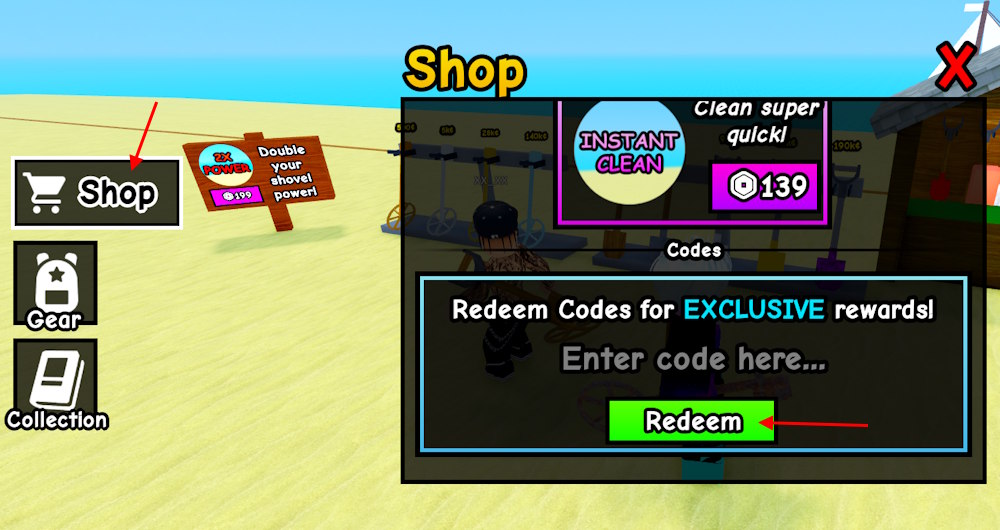
- Open the Shop from the left menu (it appears after the tutorial).
- Type or paste a code and press Redeem. If it accepts, the buff applies immediately.
Expired Dig and Clean Codes
Players refresh feeds and expired-code threads the second a patch drops. As of August 10, 2026 there are no expired codes to list — the devs released codes with Update 1 and they remain active.
If a code stops working after a few hours, check the game’s Discord and the Roblox updates page; developers will often rotate temporary boosts during events.
How to Redeem Dig and Clean Codes — step-by-step
You can see people asking for help in chat five seconds after a server starts. Follow this if the tutorial is already complete.
- Open Roblox and join Dig and Clean.
- Complete the tutorial to enable the Shop button.
- Click Shop → Code box → Paste a code → Redeem.
Pro tip from my runs: copy the code from a trusted list or the official Discord to avoid typos and wasted attempts.
Why are my Dig and Clean codes not working?
Servers and small mistakes are the usual culprits. Common causes:
- You haven’t completed the tutorial — redemption is locked until then.
- You typed the code incorrectly — copy/paste is safest.
- The game’s servers are unstable — try again or switch to a private server.
- The code was time-limited and expired between announcement and use.
If nothing helps, check Discord and the Roblox update notes for notices from the developers.
How to Get More Dig and Clean Codes
People who chase codes treat Discord like a newswire. Discord is a rumor mill.
Where to watch:
- Official Dig and Clean Discord server — codes are posted in the codes channel and sometimes in announcements.
- Roblox game page — patch notes sometimes include temporary boosts.
- Creators’ social accounts (Twitter/X, Roblox group) — quick drops and surprise rewards happen here.
I monitor these feeds constantly; bookmark or follow the server so you see codes in the first minute they drop.
Why codes break during events
Server load spikes and rushed updates are obvious when everyone is online at once. During big events, codes can fail because the game is restarting or the devs are rotating rewards.
Wait five to ten minutes, try a private server, then paste the code again. If the code still fails, expect a developer announcement on Discord.
Want a quick reality check: rare items in Dig and Clean can fetch real in-game value — some players sell or trade equivalents worth around $5 (€5) per rare find in player economies, so a well-timed code can be the difference between a slow session and a profitable run.
If you want me to keep this page current, I’ll be watching the official channels and updating when devs push new boosts. Which code are you testing first — will you gamble on a short burst of luck or save the boost for a guaranteed haul?