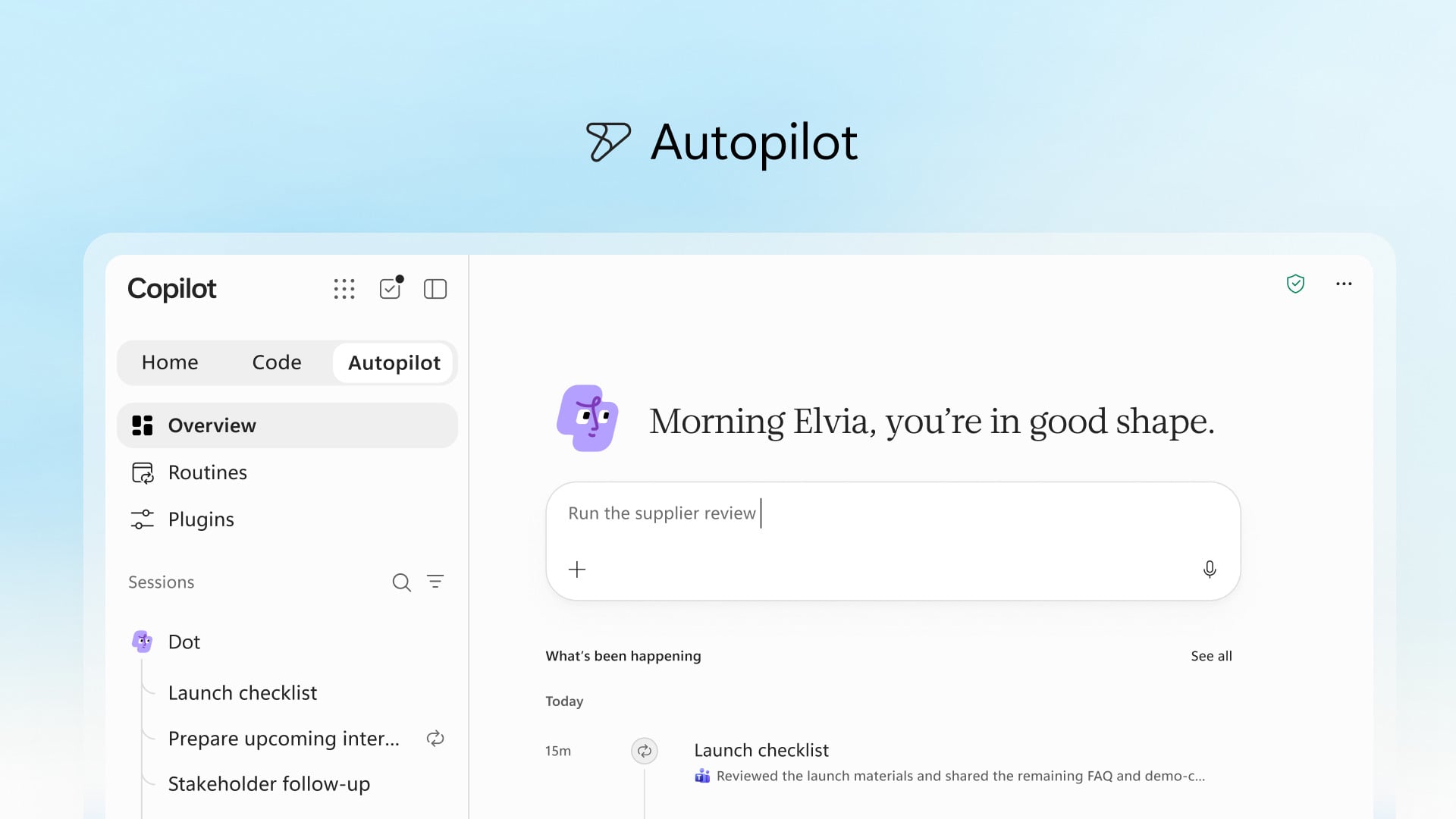
I opened my Teams feed and found a message that wasn’t from any human: a tiny avatar had scheduled a demo, attached a summary, and closed an old ticket. You feel a flicker of relief, then a jolt — something you’d have handled yourself is now quietly finished. I remember thinking: that little victory might cost us more than it saved.
I’ve tracked Microsoft’s Copilot experiment from Bing Chat to Copilot for Microsoft 365, from Scout to Autopilot and back again. I’ll walk you through what changed today, what hasn’t, and where the real risk and reward live — with a clear eye on the product’s history, the competitive copycats, and the fine print that matters when an AI starts doing your work.
My team renamed services three times last year — Microsoft’s branding sprint still obscures the product
Microsoft has been rewriting the Copilot label like someone keeps moving the furniture to find a better fit. Bing Chat became Copilot for Microsoft 365, then a standalone Copilot; Bing Chat Enterprise folded in; Scout launched inside 365 in June and now shows up again as Autopilot. Even the Copilot+ PC badge was quietly pulled back after security noise tarnished the devices’ reputation.
This churn matters because names carry expectations. When you hear Copilot you think of chat, coding help and now always-on agents. That stretching of a single name across multiple promises is a marketing shortcut — and it creates a credibility tax when a single failure isolates and robs trust from every service that shares the brand.
What is Microsoft Copilot?
Copilot today is a bundled workspace: a Home screen that flags your work updates, a chat interface that toggles between conversational and cowork-style modes, an Autopilot agent for running long tasks, and a Code tab tied to GitHub Copilot technology and Microsoft IQ. The company pitches it as a single app where prompts, delegated tasks, and downstream automations live in one place across Outlook, Teams, and other Microsoft apps.
I watched Autopilot finish a week-long report while I slept — Always-on agents change the playing field
Autopilot is the rebranded Scout — the “always-on personal agent” Microsoft first showed in June. Jared Spataro calls it a digital teammate; in practice it runs in the cloud, has a customizable avatar, and you can tag it in project chats like a human colleague. It keeps working while you aren’t staring at the screen — Microsoft’s own phrasing — and that convenience carries a hidden handoff.
Autopilot is a night watchman that never blinks. When you give an AI ongoing authority, you trade a lot of stopping points: oversight, small-check approvals, and the friction that once forced human reconsideration. That matters for productivity, yes, but also for bias, data exposure, and silent errors that compound over days.
How does Autopilot work?
Autopilot runs in the cloud and is billed by usage: tasks that run longer or touch more sources cost more. It relies on the same large-model foundations Microsoft uses elsewhere and pulls from company-wide data only when permissions allow — Microsoft IQ is supposed to limit training to corporate-shared resources. You can name your agent, drop it into a thread, and let it carry out long-running workflows without constant monitoring.
I asked Copilot to build a small dashboard — The Code tab actually tried to ship an app
Open a new Code tab and tell Copilot what you want: a tracker, a dashboard, an automation. Microsoft says the tab uses GitHub Copilot tech and Microsoft IQ to generate widgets, tests, or cloud-hosted internal apps you can share. The pitch is practical: describe an outcome and Copilot picks an approach and builds it.
Code is a mechanic’s toolbox with the right wrench always at hand. That convenience speeds prototypes and shrinks the time from idea to working demo. But when generated apps touch internal data or need maintenance, you inherit technical debt. The billing model — usage-based — means you’ll pay more as complexity grows, and choices of frontier models (Fable, Astra…) introduce another layer of variability in cost and output.
My inbox filled with vendor notes after competitors merged features — The race is about consolidation, not just better chat
OpenAI merged Codex into the ChatGPT app; Anthropic folded Cowork into Claude. Microsoft’s play is the same: consolidate tools so you rarely leave the company’s UI, and funnel more signals back into the models. That vertical consolidation makes these platforms feel like the new default work surfaces for knowledge and tasks.
That’s the tension you should care about: centralizing work in one company’s dashboard reduces friction and increases lock-in. It also concentrates telemetry, which improves models but expands the attack surface. Microsoft wants the data flow; security researchers and admins — and the employees whose messages and documents are swept along — have to weigh convenience against surveillance risk and potential leaks.
My last question is practical — What do you change tomorrow?
You can start by treating Copilot features as delegated power, not passive help: limit what Autopilot can do without human sign-off, set narrow scopes for Code-generated apps, and audit where model outputs touch sensitive systems. Watch third-party integrations and model-selection defaults — those choices shape cost, accuracy, and exposure over time.
Microsoft has stitched a lot of pieces together, borrowed win states from GitHub Copilot, leaned on Microsoft IQ for data boundaries, and stacked a billing model that charges for compute and complexity. The product feels steadier today than it did at the start of the rebrand treadmill, but steadier isn’t the same as safe or final — especially when competitors like OpenAI, Anthropic, and Slack-style agents are copying the same playbook.
I’ll leave you with this: when software can act for you while you sleep, are you buying time — or outsourcing responsibility?