
I joined the Slayers 2 Discord at 3 a.m. and watched a code drop explode across channels. My fingers hovered over Roblox as hundreds raced to test a tweak I hadn’t even read about yet. That little scramble told me where the game’s pulse really lives.
I write this as someone who follows dev channels, reads patch notes, and tests builds so you don’t waste time chasing dead links. You want the official paths—where codes spawn, where devs post sneak-peeks, and where community events actually happen. I’ll point you straight to the server and explain the Trello situation without the guesswork.
Official Slayers 2 Discord Server Link
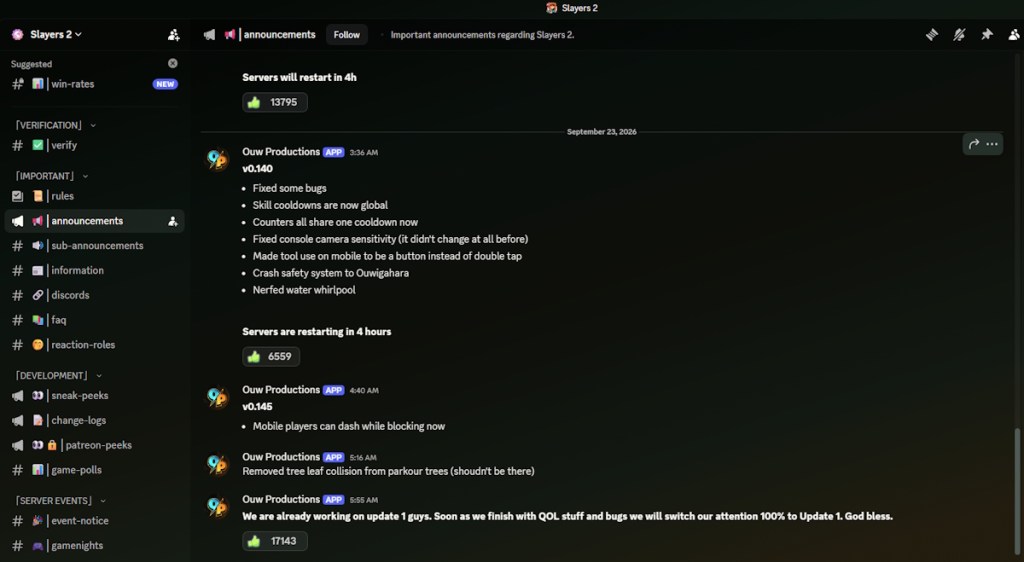
Observation: At peak hours the announcements feed fills with codes, hotfixes, and developer posts.
You can join the official Slayers 2 Discord server—this is where news breaks first. Discord is a living war room; developers drop patch notes, community managers pin codes, and players test changes in real time.
What you’ll find immediately: an announcements channel (the primary place for codes), sub-announcements for smaller updates, and a pinned FAQ that answers verification and rules. If you want steady code updates without refreshing the server, follow the announcements channel closely or consult our Slayers 2 codes guide.
The server isn’t just noise. There are dedicated channels for sneak-peeks, change-logs, and Patreon-only peeks (useful if you follow the devs on Patreon). You’ll also see polls, win-rate threads, and a server events section listing game nights and tournaments. Reaction-roles let you pick your faction or interests so notifications stop being spam and start being useful.
How do I join the Slayers 2 Discord?
Click the invite link above, accept the server rules, and complete verification. If you’re protecting account security, enable two-factor auth on Discord and keep your Roblox credentials separate—developers will never DM you direct codes asking for login details. Follow Project Slayers on Twitter or Patreon for cross-posted teasers and sponsored peeks.
Official Slayers 2 Trello Board Link
Observation: Right now there is no confirmed Trello board for Slayers 2—only the original Project Slayers Trello floating around.
I’ve checked public channels, the devs’ socials, and community mirrors: there’s no official Trello to link. Trello is a blank map in the middle of a treasure hunt for the sequel, and unofficial boards often mix rumor with old Project Slayers data. Treat any Trello you find as community-curated unless the dev team posts a direct link in the Discord announcements.
If you’re hunting for clan tier lists, best Demon Arts, or Breathing Styles, rely on the Discord’s pinned guides and curated community threads or read our dedicated guides for those topics. Follow the Slayers 2 game page on Roblox and the dev team’s Patreon for deeper development notes; those channels will surface confirmed systems before a Trello ever appears.
Is there an official Slayers 2 Trello board?
Not at the moment. Use the Discord announcements as the primary source and check Patreon peeks for development context. If a Trello appears later, expect the devs to announce it in the server and on Project Slayers’ official socials.
I’ve walked through enough server logs and patch notes to tell you: trust the Discord for immediacy, treat Trello links with skepticism until verified, and follow Patreon or the developers’ Roblox pages for early access content. Which route are you taking—sticking with Discord fast-twitch news, or trusting community-made Trello trackers that may lead you astray?