
Update: added new Choose An Ability codes on August 10, 2026
You drop into the arena with zero cash and three players on your tail. I’ve felt that split-second panic—the shop button glowing like a dare—and then hunted for any edge. That’s why I pulled together every working code for August 2026.
I’m going to keep this tight: which codes work, how to redeem them, where the developers drop extras, and the quick fixes when a code refuses to cooperate. Read fast, copy the codes, and spend the cash before someone else does.
All New Choose An Ability Codes
Last night I refreshed the game’s Discord and two new codes appeared in the pinned channel; people spammed them within minutes.
- FREE: 250 Cash (NEW)
- 20KLIKES: 200 Cash (NEW)
- AverageNozza: 90 Cash
- waifu67: 150 Cash
How do I redeem Choose An Ability codes?
Short answer: join the game’s Roblox group, open the shop, paste the code, submit. Here’s the step-by-step you’ll actually follow.
- Join the Goofy Games Roblox group — this is mandatory.
- Launch Choose An Ability on Roblox.
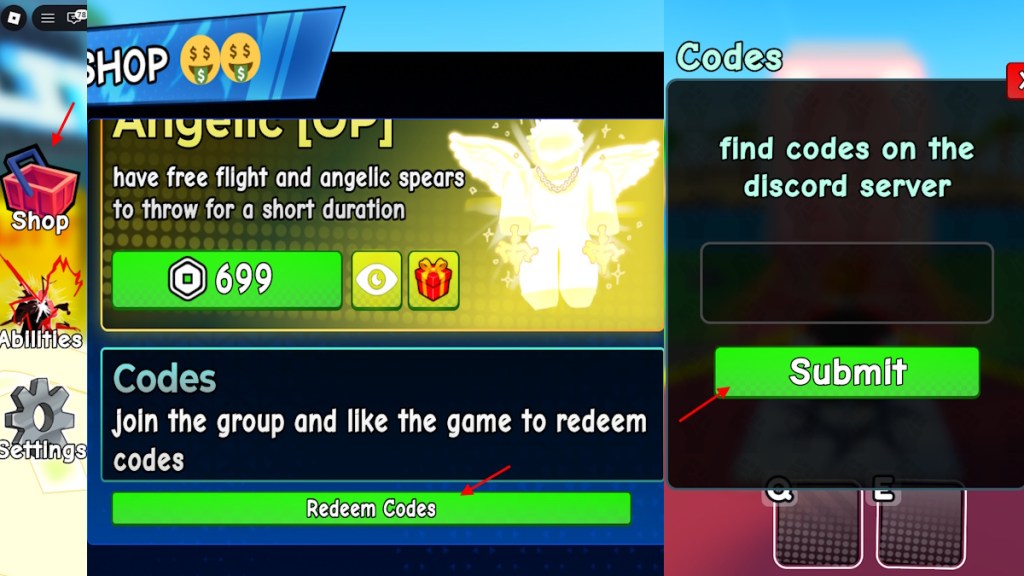
- Open Shops from the left menu, then scroll to Redeem Codes.
- Type or paste the code exactly (case-sensitive) and hit Submit.
Expired Choose An Ability Codes
I checked the store history and these codes stopped working after the last patch; people still paste them hoping for a miracle.
- 15KLIKES
- V0ID
- CHILLI
- 7500LIKES
- 1KLIKES
How to Get More Choose An Ability Codes
I watch the developer channels and the rhythm is predictable: code drops around updates and social milestones.
Bookmarking this list is practical, but if you want to chase the originals yourself, follow these channels: the game’s Discord, the Goofy Games Roblox group, and the developer’s Twitter/X or YouTube for dev logs. Codes often appear in pinned messages or a dedicated ‘codes’ channel, but those channels rarely push notifications — you’ll need to check them now and then.
Pro tip: codes drop like finding a golden ticket in a cereal box—rarely, and wildly satisfying when it happens. Treat this page as your Swiss Army knife of shortcuts: copies of working codes, redemption steps, and quick fixes all in one place.
Where can I find more codes for Choose An Ability?
Follow Goofy Games on Roblox and Discord. Watch developer streams and set alerts on Twitter/X for announcements. Community creators on YouTube and Roblox often repost codes after events or reach milestones.
Why Are My Choose An Ability Codes Not Working?
I joined the Roblox group mid-match and had to wait a few minutes before the server recognized my membership — that lag is common.
- Not in the Goofy Games Roblox group: join the group, then wait a couple of minutes for the servers to register you.
- Expired or already redeemed code: check the expired list above.
- Typing errors: codes are case-sensitive; copy and paste when possible.
- Server hiccups: close and reopen the game, or rejoin the round after a short wait.
Why won’t my Choose An Ability code redeem?
Most failures come down to one of the bullets above. If you’ve joined the group and the code still fails, restart Roblox, double-check spelling, and try again in five minutes.
Some premium abilities in the shop can feel pricey — a handful of choices are roughly $4.99 (€5) worth of in-game value — so codes are the fastest way to try what you want without spending real cash.
So tell me: which ability are you hoarding to tilt the meta—care to argue for it?